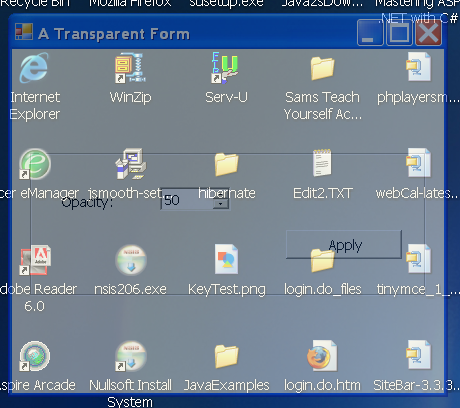
Transparent window: set Opacity
using System;
using System.Collections.Generic;
using System.ComponentModel;
using System.Data;
using System.Drawing;
using System.Text;
using System.Windows.Forms;

public class Form1 : Form
{
  private System.Windows.Forms.GroupBox GroupBox1;
  private System.Windows.Forms.Button cmdApply;
  private System.Windows.Forms.NumericUpDown udOpacity;
  private System.Windows.Forms.Label Label1;

  public Form1() {
        InitializeComponent();
  }


  private void cmdApply_Click(object sender, EventArgs e)
  {
    this.Opacity = (double)udOpacity.Value / 100;
  }
  private void InitializeComponent()
  {
    this.GroupBox1 = new System.Windows.Forms.GroupBox();
    this.cmdApply = new System.Windows.Forms.Button();
    this.udOpacity = new System.Windows.Forms.NumericUpDown();
    this.Label1 = new System.Windows.Forms.Label();
    this.GroupBox1.SuspendLayout();
    ((System.ComponentModel.ISupportInitialize)(this.udOpacity)).BeginInit();
    this.SuspendLayout();
    //
    // GroupBox1
    //
    this.GroupBox1.Controls.Add(this.cmdApply);
    this.GroupBox1.Controls.Add(this.udOpacity);
    this.GroupBox1.Controls.Add(this.Label1);
    this.GroupBox1.Location = new System.Drawing.Point(12, 89);
    this.GroupBox1.Name = "GroupBox1";
    this.GroupBox1.Size = new System.Drawing.Size(268, 116);
    this.GroupBox1.TabIndex = 5;
    this.GroupBox1.TabStop = false;
    //
    // cmdApply
    //
    this.cmdApply.Location = new System.Drawing.Point(172, 64);
    this.cmdApply.Name = "cmdApply";
    this.cmdApply.Size = new System.Drawing.Size(80, 24);
    this.cmdApply.TabIndex = 5;
    this.cmdApply.Text = "Apply";
    this.cmdApply.Click += new System.EventHandler(this.cmdApply_Click);
    //
    // udOpacity
    //
    this.udOpacity.Increment = new decimal(new int[] {
        5,
        0,
        0,
        0});
    this.udOpacity.Location = new System.Drawing.Point(88, 32);
    this.udOpacity.Name = "udOpacity";
    this.udOpacity.Size = new System.Drawing.Size(48, 21);
    this.udOpacity.TabIndex = 4;
    this.udOpacity.Value = new decimal(new int[] {
        50,
        0,
        0,
        0});
    //
    // Label1
    //
    this.Label1.Location = new System.Drawing.Point(20, 36);
    this.Label1.Name = "Label1";
    this.Label1.Size = new System.Drawing.Size(56, 16);
    this.Label1.TabIndex = 3;
    this.Label1.Text = "Opacity:";
    //
    // Transparent
    //
    this.AutoScaleDimensions = new System.Drawing.SizeF(6F, 13F);
    this.AutoScaleMode = System.Windows.Forms.AutoScaleMode.Font;
    this.ClientSize = new System.Drawing.Size(309, 289);
    this.Controls.Add(this.GroupBox1);
    this.Font = new System.Drawing.Font("Tahoma", 8.25F, System.Drawing.FontStyle.Regular, System.Drawing.GraphicsUnit.Point, ((byte)(0)));
    this.Name = "Transparent";
    this.Text = "Transparent";
    this.GroupBox1.ResumeLayout(false);
    ((System.ComponentModel.ISupportInitialize)(this.udOpacity)).EndInit();
    this.ResumeLayout(false);

  }


  [STAThread]
  static void Main()
  {
    Application.EnableVisualStyles();
    Application.Run(new Form1());
  }

}
Related examples in the same category