Plot
/*
 * Copyright (c) Ian F. Darwin, http://www.darwinsys.com/, 1996-2002.
 * All rights reserved. Software written by Ian F. Darwin and others.
 * $Id: LICENSE,v 1.8 2004/02/09 03:33:38 ian Exp $
 *
 * Redistribution and use in source and binary forms, with or without
 * modification, are permitted provided that the following conditions
 * are met:
 * 1. Redistributions of source code must retain the above copyright
 *    notice, this list of conditions and the following disclaimer.
 * 2. Redistributions in binary form must reproduce the above copyright
 *    notice, this list of conditions and the following disclaimer in the
 *    documentation and/or other materials provided with the distribution.
 *
 * THIS SOFTWARE IS PROVIDED BY THE AUTHOR AND CONTRIBUTORS ``AS IS''
 * AND ANY EXPRESS OR IMPLIED WARRANTIES, INCLUDING, BUT NOT LIMITED
 * TO, THE IMPLIED WARRANTIES OF MERCHANTABILITY AND FITNESS FOR A PARTICULAR
 * PURPOSE ARE DISCLAIMED.  IN NO EVENT SHALL THE AUTHOR OR CONTRIBUTORS
 * BE LIABLE FOR ANY DIRECT, INDIRECT, INCIDENTAL, SPECIAL, EXEMPLARY, OR
 * CONSEQUENTIAL DAMAGES (INCLUDING, BUT NOT LIMITED TO, PROCUREMENT OF
 * SUBSTITUTE GOODS OR SERVICES; LOSS OF USE, DATA, OR PROFITS; OR BUSINESS
 * INTERRUPTION) HOWEVER CAUSED AND ON ANY THEORY OF LIABILITY, WHETHER IN
 * CONTRACT, STRICT LIABILITY, OR TORT (INCLUDING NEGLIGENCE OR OTHERWISE)
 * ARISING IN ANY WAY OUT OF THE USE OF THIS SOFTWARE, EVEN IF ADVISED OF THE
 * POSSIBILITY OF SUCH DAMAGE.
 *
 * Java, the Duke mascot, and all variants of Sun's Java "steaming coffee
 * cup" logo are trademarks of Sun Microsystems. Sun's, and James Gosling's,
 * pioneering role in inventing and promulgating (and standardizing) the Java
 * language and environment is gratefully acknowledged.
 *
 * The pioneering role of Dennis Ritchie and Bjarne Stroustrup, of AT&T, for
 * inventing predecessor languages C and C++ is also gratefully acknowledged.
 */
import javax.comm.*;
import java.util.*;
import java.io.*;
import java.lang.*;
import java.awt.*;
import java.awt.event.*;


/** Main program, driver for Plotter class.
 * This is to simulate a larger graphics application such as GnuPlot.
 */
public class PlotDriver {

  /** Construct a Plotter driver, and try it out. */
  public static void main(String[] argv)
  {
    Plotter r ;
//    if (argv.length != 1) {
  //    System.err.println("Usage: PlotDriver driverclass");
    //  return;
//    }
    try {
      Class c = Class.forName("PlotterAWT");
      Object o = c.newInstance();
      if (!(o instanceof Plotter))
        throw new ClassNotFoundException("Not instanceof Plotter");
      r = (Plotter)o;
    } catch (ClassNotFoundException e) {
      System.err.println("Sorry, "+argv[0]+" not a plotter class");
      return;
    } catch (Exception e) {
      e.printStackTrace();
      return;
    }
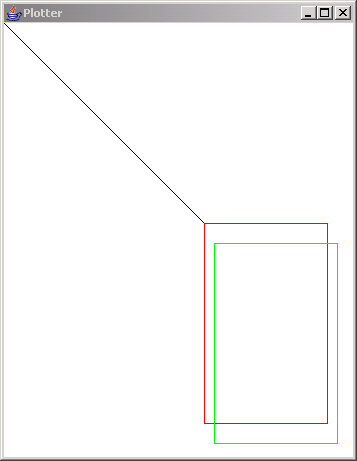
    r.penDown();
    r.penColor(1);
    r.moveTo(200, 200);
    r.penColor(2);
    r.drawBox(123, 200);
    r.rmoveTo(10, 20);
    r.penColor(3);
    r.drawBox(123, 200);
    r.penUp();
    r.moveTo(300, 100);
    r.penDown();
    r.setFont("Helvetica", 14);
    r.drawString("Hello World");
    r.penColor(4);
    r.drawBox(10, 10);
  }
}
/**
 * Plotter abstract class. Must be subclassed
 * for X, DOS, Penman, HP plotter, etc.
 *
 * Coordinate space: X = 0 at left, increases to right.
 *    Y = 0 at top, increases downward (same as AWT).
 *
 * @author  Ian F. Darwin
 */
abstract class Plotter {
  public final int MAXX = 800;
  public final int MAXY = 600;
  /** Current X co-ordinate (same reference frame as AWT!) */
  protected int curx;
  /** Current Y co-ordinate (same reference frame as AWT!) */
  protected int cury;
  /** The current state: up or down */
  protected boolean penIsUp;
  /** The current color */
  protected int penColor;

  Plotter() {
    penIsUp = true;
    curx = 0; cury = 0;
  }
  abstract void rmoveTo(int incrx, int incry);
  abstract void moveTo(int absx, int absy);
  abstract void penUp();
  abstract void penDown();
  abstract void penColor(int c);

  abstract void setFont(String fName, int fSize);
  abstract void drawString(String s);

  /* Concrete methods */

  /** Draw a box of width w and height h */
  public void drawBox(int w, int h) {
    penDown();
    rmoveTo(w, 0);
    rmoveTo(0, h);
    rmoveTo(-w, 0);
    rmoveTo(0, -h);
    penUp();
  }

  /** Draw a box given an AWT Dimension for its size */
  public void drawBox(java.awt.Dimension d) {
    drawBox(d.width, d.height);
  }

  /** Draw a box given an AWT Rectangle for its location and size */
  public void drawBox(java.awt.Rectangle r) {
    moveTo(r.x, r.y);
    drawBox(r.width, r.height);
  }
}

/**
 * A Plotter subclass for drawing into an AWT Window. Reflecting back
 * to AWT gives us a "known working" plotter to test on.
 * You can also steal this as a basis for your own plotter driver.
 * @author  Ian Darwin
 */
class PlotterAWT extends Plotter {
  Frame f;
  PCanvas p;
  Graphics g;
  Font font;
  FontMetrics fontMetrics;
  PlotterAWT() {
    super();
    f = new Frame("Plotter");
    p = new PCanvas(MAXX, MAXY);
    f.add(p);
    f.pack();
    f.setVisible(true);
    g = p.getOsGraphics();
  }

  public void drawBox(int w, int h) {
    g.drawRect(curx, cury, w, h);
    p.repaint();
  }

  public void rmoveTo(int incrx, int incry){
    moveTo(curx += incrx, cury += incry);
  }

  public void moveTo(int absx, int absy){
    if (!penIsUp)
      g.drawLine(curx, cury, absx, absy);
    curx = absx;
    cury = absy;
  }

  public void setdir(float deg){}
  void penUp(){ penIsUp = true; }
  void penDown(){ penIsUp = false; }
  void penColor(int c){
    switch(c) {
    case 0: g.setColor(Color.white); break;
    case 1: g.setColor(Color.black); break;
    case 2: g.setColor(Color.red); break;
    case 3: g.setColor(Color.green); break;
    case 4: g.setColor(Color.blue); break;
    default: g.setColor(new Color(c)); break;
    }
  }
  void setFont(String fName, int fSize) {
    font = new Font(fName, Font.BOLD, fSize);
    fontMetrics = p.getFontMetrics(font);
  }
  void drawString(String s) {
    g.drawString(s, curx, cury);
    curx += fontMetrics.stringWidth(s);
  }

  /** A Member Class that contains an off-screen Image that is
   * drawn into; this component's paint() copies from there to
   * the screen. This avoids having to keep a list of all the
   * things that have been drawn.
   */
  class PCanvas extends Canvas {
    Image offScreenImage;
    int width;
    int height;
    Graphics pg;

    PCanvas(int w, int h) {
      width = w;
      height = h;
      setBackground(Color.white);
      setForeground(Color.red);
    }

    public Graphics getOsGraphics() {
      return pg;
    }

    /** This is called by AWT after the native window peer is created,
     * and before paint() is called for the first time, so
     * is a good time to create images and the like.
     */
    public void addNotify() {
      super.addNotify();
      offScreenImage = createImage(width, height);
      // assert (offScreenImage != null);
      pg = offScreenImage.getGraphics();
    }

    public void paint(Graphics pg) {
      pg.drawImage(offScreenImage, 0, 0, null);
    }
    public Dimension getPreferredSize() {
      return new Dimension(width, height);
    }
  }
}

/** Plotter class for testing higher-level software. */
class PlotterDummy extends Plotter {

  /** Constructor: nothing to do */
  PlotterDummy() {
    super();
  }

  /** move to absolute location */
  void moveTo(int absx, int absy) {
    curx = absx;
    cury = absy;
    System.out.println("moveTo ["+curx+","+cury+"]");
  }
  /** move to relative location */
  void rmoveTo(int incrx, int incry) {
    curx += incrx;
    cury += incry;
    System.out.println("rmoveTo ["+curx+","+cury+"]");
  }
  public void setFont(java.lang.String fName, int fSize) {
    System.out.println("set Font to " + fName);
  }

  public void drawString(java.lang.String s) {
    System.out.println("Draw the string \"" + s + "\"");
  }

  void setPenState(boolean up) {
    penIsUp = up;
    System.out.println("Pen Up is ["+penIsUp+"]");
  }
  void penUp() {
    setPenState(true);
  }
  void penDown() {
    setPenState(false);
  }
  void penColor(int c) {
    penColor = c;
    System.out.println("PenColor is ["+penColor+"]");
  }
}

/**
 * A Plotter subclass for drawing on a Penman plotter.
 * These were made in the UK and sold into North American markets.
 * It is a little "turtle" style robot plotter that communicates
 * over a serial port. For this, we use the "Java Communicatons" API.
 * Java Communications is a "standard extention" and must be downloaded
 * and installed separately from the JDK before you can even compile this
 * program.
 *
 * @author  Ian Darwin, http://www.darwinsys.com/
 */
class Penman extends Plotter {
  private final String OK_PROMPT = "\r\n!";
  private final int MAX_REPLY_BYTES = 50;  // paranoid upper bound
  private SerialPort tty;
  private DataInputStream is;
  private DataOutputStream os;

  /** Construct a Penman plotter object */
  public Penman() throws NoSuchPortException,PortInUseException,
      IOException,UnsupportedCommOperationException {
    super();
    init_comm("COM2");    // setup serial commx
    init_plotter();    // set plotter to good state
  }

  private void init_plotter() {
    send("I"); expect('!');  // eat VERSION etc., up to !
    send("I"); expect('!');  // wait for it!
    send("H");    // find home position
    expect('!');  // wait for it!
    send("A");    // Set to use absolute coordinates
    expect('!');
    curx = cury = 0;
    penUp();
  }

  //
  // PUBLIC DRAWING ROUTINES
  //

  public void setFont(String fName, int fSize) {
    // Font name is ignored for now...

    // Penman's size is in mm, fsize in points (inch/72).
    int size = (int)(fSize*25.4f/72);
    send("S"+size + ","); expect(OK_PROMPT);
    System.err.println("Font set request: " + fName + "/" + fSize);
  }

  public void drawString(String mesg) {
    send("L" + mesg + "\r"); expect(OK_PROMPT);
  }

  /** Move to a relative location */
  public void rmoveTo(int incrx, int incry){
    moveTo(curx + incrx, cury + incry);
  }

  /** move to absolute location */
  public void moveTo(int absx, int absy) {
    System.err.println("moveTo ["+absx+","+absy+"]");
    curx = absx;
    cury = absy;
    send("M" + curx + "," + cury + ","); expect(OK_PROMPT);
  }

  private void setPenState(boolean up) {
    penIsUp = up;
    System.err.println("Pen Up is ["+penIsUp+"]");
  }

  public void penUp() {
    setPenState(true);
    send("U"); expect(OK_PROMPT);
  }
  public void penDown() {
    setPenState(false);
    send("D"); expect(OK_PROMPT);
  }
  public void penColor(int c) {
    penColor = (c%3)+1;    // only has 3 pens, 4->1
    System.err.println("PenColor is ["+penColor+"]");
    send("P" + c + ","); expect(OK_PROMPT);
  }

  //
  // PRIVATE COMMUNICATION ROUTINES
  //

  /** Set up communication.
   * <br/>
   * XXX: Should probably re-use CommPortOpen instead.
   */
  private void init_comm(String portName) throws NoSuchPortException,PortInUseException,
      IOException,UnsupportedCommOperationException {

    // get list of ports available on this particular computer.
    // Enumeration pList = CommPortIdentifier.getPortIdentifiers();

    // Print the list. A GUI program would put these in a chooser!
    // while (pList.hasMoreElements()) {
      // CommPortIdentifier cpi = (CommPortIdentifier)pList.nextElement();
      // System.err.println("Port " + cpi.getName());
    // }

    // Open a port.
    CommPortIdentifier port =
      CommPortIdentifier.getPortIdentifier(portName);

    // This form of open takes an Application Name and a timeout.
    tty = (SerialPort) port.open("Penman Driver", 1000);

    // set up the serial port
    tty.setSerialPortParams(9600, SerialPort.DATABITS_8,
      SerialPort.STOPBITS_1, SerialPort.PARITY_NONE);
    tty.setFlowControlMode(SerialPort.FLOWCONTROL_RTSCTS_OUT|
      SerialPort.FLOWCONTROL_RTSCTS_OUT);

    // Get the input and output streams
    is = new DataInputStream(tty.getInputStream());
    os = new DataOutputStream(tty.getOutputStream());
  }

  /** Send a command to the plotter. Although the argument is a String,
   * we send each char as a *byte*, so avoid 16-bit characters!
   * Not that it matters: the Penman only knows about 8-bit chars.
   */
  private  void send(String s) {
    System.err.println("sending " + s + "...");
    try {
      for (int i=0; i<s.length(); i++)
        os.writeByte(s.charAt(i));
    } catch(IOException e) {
      e.printStackTrace();
    }
  }

  /** Expect a given CHAR for a result */
  private  void expect(char s) {
    byte b;
    try {
      for (int i=0; i<MAX_REPLY_BYTES; i++){
        if ((b = is.readByte()) == s) {
            return;
        }
        System.err.print((char)b);
      }
    } catch (IOException e) {
      System.err.println("Penman:expect(char "+s+"): Read failed");
      System.exit(1);
    }
    System.err.println("ARGHH!");
  }

  /** Expect a given String for a result */
  private  void expect(String s) {
    byte ans[] = new byte[s.length()];

    System.err.println("expect " + s + " ...");
    try {
      is.read(ans);
    } catch (IOException e) {
      System.err.println("Penman:expect(String "+s+"): Read failed");
      System.exit(1);
    };
    for (int i=0; i<s.length() && i<ans.length; i++)
      if (ans[i] != s.charAt(i)) {
        System.err.println("MISMATCH");
        break;
      }
    System.err.println("GOT: " + new String(ans));

  }
}
Related examples in the same category