Animation and Interaction - a Bouncing Ball
/*
The Joy of Java 3D

by Greg Hopkins

Copyright Copyright 2001


*/
/*

To create animation you need to move the objects between each frame of animation. You can
use a timer and move the 3D objects by a small amount each time. Also, you can modify the
objects in other ways, the next example scales the ball so that it looks squashed at the
bottom of each bounce.

For interaction with the user, you can process keystrokes or clicks on buttons or other
components.

One thing to notice is that you have to tell Java3D you are going to move something by
setting a capability. Otherwise, you will not be able to move anything once it has been
drawn.

 objTrans = new TransformGroup();
 objTrans.setCapability(TransformGroup.ALLOW_TRANSFORM_WRITE);

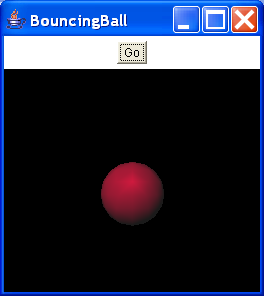
The following example combines these techniques. You start it by clicking on the button,
then the ball bounces up and down, and you can press a or s to move the ball left or
right.


*/

import java.applet.Applet;
import java.awt.BorderLayout;
import java.awt.Button;
import java.awt.GraphicsConfiguration;
import java.awt.Panel;
import java.awt.event.ActionEvent;
import java.awt.event.ActionListener;
import java.awt.event.KeyEvent;
import java.awt.event.KeyListener;

import javax.media.j3d.AmbientLight;
import javax.media.j3d.BoundingSphere;
import javax.media.j3d.BranchGroup;
import javax.media.j3d.Canvas3D;
import javax.media.j3d.DirectionalLight;
import javax.media.j3d.Transform3D;
import javax.media.j3d.TransformGroup;
import javax.swing.Timer;
import javax.vecmath.Color3f;
import javax.vecmath.Point3d;
import javax.vecmath.Vector3d;
import javax.vecmath.Vector3f;

import com.sun.j3d.utils.applet.MainFrame;
import com.sun.j3d.utils.geometry.Sphere;
import com.sun.j3d.utils.universe.SimpleUniverse;

public class BouncingBall extends Applet implements ActionListener, KeyListener {
  private Button go = new Button("Go");

  private TransformGroup objTrans;

  private Transform3D trans = new Transform3D();

  private float height = 0.0f;

  private float sign = 1.0f; // going up or down

  private Timer timer;

  private float xloc = 0.0f;

  public BranchGroup createSceneGraph() {
    // Create the root of the branch graph
    BranchGroup objRoot = new BranchGroup();
    objTrans = new TransformGroup();
    objTrans.setCapability(TransformGroup.ALLOW_TRANSFORM_WRITE);
    objRoot.addChild(objTrans);

    // Create a simple shape leaf node, add it to the scene graph.
    Sphere sphere = new Sphere(0.25f);
    objTrans = new TransformGroup();
    objTrans.setCapability(TransformGroup.ALLOW_TRANSFORM_WRITE);
    Transform3D pos1 = new Transform3D();
    pos1.setTranslation(new Vector3f(0.0f, 0.0f, 0.0f));
    objTrans.setTransform(pos1);
    objTrans.addChild(sphere);
    objRoot.addChild(objTrans);
    BoundingSphere bounds = new BoundingSphere(new Point3d(0.0, 0.0, 0.0),
        100.0);

    Color3f light1Color = new Color3f(1.0f, 0.0f, 0.2f);
    Vector3f light1Direction = new Vector3f(4.0f, -7.0f, -12.0f);
    DirectionalLight light1 = new DirectionalLight(light1Color,
        light1Direction);
    light1.setInfluencingBounds(bounds);
    objRoot.addChild(light1);

    // Set up the ambient light
    Color3f ambientColor = new Color3f(1.0f, 1.0f, 1.0f);
    AmbientLight ambientLightNode = new AmbientLight(ambientColor);
    ambientLightNode.setInfluencingBounds(bounds);
    objRoot.addChild(ambientLightNode);

    return objRoot;
  }

  public BouncingBall() {
    setLayout(new BorderLayout());
    GraphicsConfiguration config = SimpleUniverse
        .getPreferredConfiguration();
    Canvas3D c = new Canvas3D(config);
    add("Center", c);
    c.addKeyListener(this);
    timer = new Timer(100, this);
    //timer.start();
    Panel p = new Panel();
    p.add(go);
    add("North", p);
    go.addActionListener(this);
    go.addKeyListener(this);
    // Create a simple scene and attach it to the virtual universe
    BranchGroup scene = createSceneGraph();

    SimpleUniverse u = new SimpleUniverse(c);
    u.getViewingPlatform().setNominalViewingTransform();
    u.addBranchGraph(scene);
  }

  public void keyPressed(KeyEvent e) {
    //Invoked when a key has been pressed.
    if (e.getKeyChar() == 's') {
      xloc = xloc + .1f;
    }
    if (e.getKeyChar() == 'a') {
      xloc = xloc - .1f;
    }
  }

  public void keyReleased(KeyEvent e) {
    // Invoked when a key has been released.
  }

  public void keyTyped(KeyEvent e) {
    //Invoked when a key has been typed.
  }

  public void actionPerformed(ActionEvent e) {
    // start timer when button is pressed
    if (e.getSource() == go) {
      if (!timer.isRunning()) {
        timer.start();
      }
    } else {
      height += .1 * sign;
      if (Math.abs(height * 2) >= 1)
        sign = -1.0f * sign;
      if (height < -0.4f) {
        trans.setScale(new Vector3d(1.0, .8, 1.0));
      } else {
        trans.setScale(new Vector3d(1.0, 1.0, 1.0));
      }
      trans.setTranslation(new Vector3f(xloc, height, 0.0f));
      objTrans.setTransform(trans);
    }
  }

  public static void main(String[] args) {
    System.out.println("Program Started");
    BouncingBall bb = new BouncingBall();
    bb.addKeyListener(bb);
    MainFrame mf = new MainFrame(bb, 256, 256);
  }
}
Related examples in the same category