Creates a cone using the utility class Cone
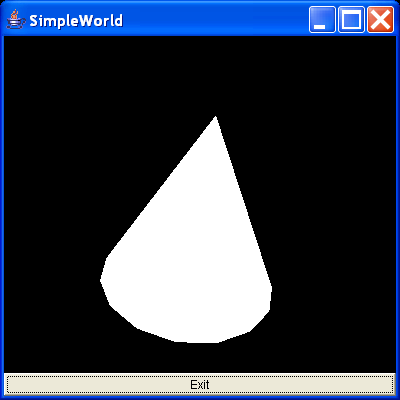
/*
Essential Java 3D Fast

Ian Palmer

Publisher: Springer-Verlag

ISBN: 1-85233-394-4

*/

import java.awt.BorderLayout;
import java.awt.Button;
import java.awt.Frame;
import java.awt.event.ActionEvent;
import java.awt.event.ActionListener;

import javax.media.j3d.Appearance;
import javax.media.j3d.BranchGroup;
import javax.media.j3d.Canvas3D;
import javax.media.j3d.Locale;
import javax.media.j3d.Node;
import javax.media.j3d.PhysicalBody;
import javax.media.j3d.PhysicalEnvironment;
import javax.media.j3d.Transform3D;
import javax.media.j3d.TransformGroup;
import javax.media.j3d.View;
import javax.media.j3d.ViewPlatform;
import javax.media.j3d.VirtualUniverse;
import javax.vecmath.AxisAngle4d;
import javax.vecmath.Vector3f;

import com.sun.j3d.utils.geometry.Cone;

/**
 * Creates a cone using the utility class Cone.
 *
 * @author I.J.Palmer
 * @version 1.0
 */
public class SimpleCone extends Frame implements ActionListener {
  protected Canvas3D myCanvas3D = new Canvas3D(null);

  protected Button myButton = new Button("Exit");

  /**
   * This function builds the view branch of the scene graph. It creates a
   * branch group and then creates the necessary view elements to give a
   * useful view of our content.
   *
   * @param c
   *            Canvas3D that will display the view
   * @return BranchGroup that is the root of the view elements
   */
  protected BranchGroup buildViewBranch(Canvas3D c) {
    BranchGroup viewBranch = new BranchGroup();
    Transform3D viewXfm = new Transform3D();
    viewXfm.set(new Vector3f(0.0f, 0.0f, 5.0f));
    TransformGroup viewXfmGroup = new TransformGroup(viewXfm);
    ViewPlatform myViewPlatform = new ViewPlatform();
    PhysicalBody myBody = new PhysicalBody();
    PhysicalEnvironment myEnvironment = new PhysicalEnvironment();
    viewXfmGroup.addChild(myViewPlatform);
    viewBranch.addChild(viewXfmGroup);
    View myView = new View();
    myView.addCanvas3D(c);
    myView.attachViewPlatform(myViewPlatform);
    myView.setPhysicalBody(myBody);
    myView.setPhysicalEnvironment(myEnvironment);
    return viewBranch;
  }

  /**
   * This builds the content branch of our scene graph. It uses the buildShape
   * function to create the actual shape, adding to to the transform group so
   * that the shape is slightly tilted to reveal its 3D shape.
   *
   * @param shape
   *            Node that represents the geometry for the content
   * @return BranchGroup that is the root of the content branch
   */
  protected BranchGroup buildContentBranch() {
    BranchGroup contentBranch = new BranchGroup();
    Transform3D rotateCube = new Transform3D();
    rotateCube.set(new AxisAngle4d(1.0, 1.0, 0.0, Math.PI / 4.0));
    TransformGroup rotationGroup = new TransformGroup(rotateCube);
    contentBranch.addChild(rotationGroup);
    rotationGroup.addChild(new Cone(1.0f, 2.0f, 0, new Appearance()));
    return contentBranch;
  }

  /**
   * This simply builds the shape using the Cone utility class.
   *
   * @param Node
   *            that the is the Cone created
   */
  protected Node buildShape() {
    return new Cone(1.0f, 2.0f, Cone.GENERATE_NORMALS, new Appearance());
  }

  /**
   * Handles the exit button action to quit the program.
   */
  public void actionPerformed(ActionEvent e) {
    dispose();
    System.exit(0);
  }

  public SimpleCone() {
    VirtualUniverse myUniverse = new VirtualUniverse();
    Locale myLocale = new Locale(myUniverse);
    myLocale.addBranchGraph(buildViewBranch(myCanvas3D));
    myLocale.addBranchGraph(buildContentBranch());
    setTitle("SimpleWorld");
    setSize(400, 400);
    setLayout(new BorderLayout());
    add("Center", myCanvas3D);
    add("South", myButton);
    myButton.addActionListener(this);
    setVisible(true);
  }

  public static void main(String[] args) {
    SimpleCone sw = new SimpleCone();
  }
}
Related examples in the same category