Game: four by four
/*
FourByFour
To run:
appletviewer FourByFour.html
Press the "Instructions" button to get instructions on
how to play FourByFour.
Four By Four
Description:
A three dimensional game of tic-tac-toe on a 4x4x4 cube.
Object:
Be the first to score four in a row.
Instructions:
1. It's you versus the computer.
2. There are five skill levels. Press the "Skill Level" button to select your level
of play. The program defaults to the hardest level. Changing the skill level in
the middle of a game will force the start of a new game.
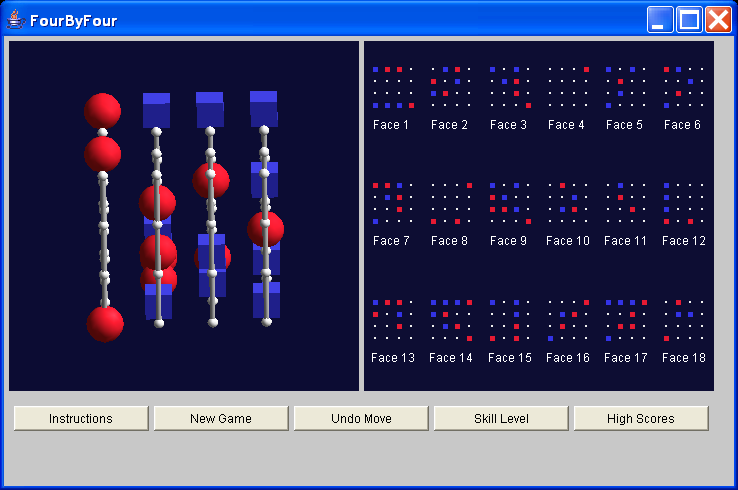
3. The screen on the left is a 3D window. A mouse drag in this window will rotate the
view to any desired position.
4. The screen on the right is a 2D window which displays all 18 faces that exist in the
4x4x4 array.
5. Click on any of the small gray spheres (in either the 2D or 3D window) to select a position.
6. Positions owned by you will be marked in red. Positions owned by the computer will be
marked in blue.
7. Click the "Undo Move" button to take back a move.
8. Clicking on any of words "Face X" in the 2D window will cause that particular face to highlight
in the 3D window. Clicking the word again will un-highlight the face.
9. The final score is based on skill level, number of moves, and time. Select the button
"High Scores" to see a list of the top 20 scores. There is no penalty for using the
undo button.
10. Good luck.
General Strategy:
1. There are a 64 positions from which to choose. In total, there are 72 possible winning
combinations.
2. The outer four corners and the inner "core" of eight have the most winning combinations,
7 each, and should perhaps be chosen first.
3. Use the 2D window to keep an eye on all the faces.
4. The computer plays well at the highest skill level (the default). There are, however,
faults in it's logic that can be exploited. Thus the human player can win even at the
highest skill level. In the beginning, however, you may want to start at the lower skill
levels and work your way up.
*/
/*
* @(#)FourByFour.java 1.17 02/10/21 13:39:27
*
* Copyright (c) 1996-2002 Sun Microsystems, Inc. All Rights Reserved.
*
* Redistribution and use in source and binary forms, with or without
* modification, are permitted provided that the following conditions
* are met:
*
* - Redistributions of source code must retain the above copyright
* notice, this list of conditions and the following disclaimer.
*
* - Redistribution in binary form must reproduce the above copyright
* notice, this list of conditions and the following disclaimer in
* the documentation and/or other materials provided with the
* distribution.
*
* Neither the name of Sun Microsystems, Inc. or the names of
* contributors may be used to endorse or promote products derived
* from this software without specific prior written permission.
*
* This software is provided "AS IS," without a warranty of any
* kind. ALL EXPRESS OR IMPLIED CONDITIONS, REPRESENTATIONS AND
* WARRANTIES, INCLUDING ANY IMPLIED WARRANTY OF MERCHANTABILITY,
* FITNESS FOR A PARTICULAR PURPOSE OR NON-INFRINGEMENT, ARE HEREBY
* EXCLUDED. SUN AND ITS LICENSORS SHALL NOT BE LIABLE FOR ANY DAMAGES
* SUFFERED BY LICENSEE AS A RESULT OF USING, MODIFYING OR
* DISTRIBUTING THE SOFTWARE OR ITS DERIVATIVES. IN NO EVENT WILL SUN
* OR ITS LICENSORS BE LIABLE FOR ANY LOST REVENUE, PROFIT OR DATA, OR
* FOR DIRECT, INDIRECT, SPECIAL, CONSEQUENTIAL, INCIDENTAL OR
* PUNITIVE DAMAGES, HOWEVER CAUSED AND REGARDLESS OF THE THEORY OF
* LIABILITY, ARISING OUT OF THE USE OF OR INABILITY TO USE SOFTWARE,
* EVEN IF SUN HAS BEEN ADVISED OF THE POSSIBILITY OF SUCH DAMAGES.
*
* You acknowledge that Software is not designed,licensed or intended
* for use in the design, construction, operation or maintenance of
* any nuclear facility.
*/
import java.applet.Applet;
import java.awt.AWTEvent;
import java.awt.Button;
import java.awt.Canvas;
import java.awt.Checkbox;
import java.awt.CheckboxGroup;
import java.awt.Color;
import java.awt.Graphics;
import java.awt.Image;
import java.awt.Label;
import java.awt.Panel;
import java.awt.TextArea;
import java.awt.TextField;
import java.awt.event.ActionEvent;
import java.awt.event.ActionListener;
import java.awt.event.MouseEvent;
import java.awt.event.MouseListener;
import java.awt.event.WindowAdapter;
import java.awt.event.WindowEvent;
import java.io.BufferedInputStream;
import java.io.BufferedReader;
import java.io.FileInputStream;
import java.io.FileOutputStream;
import java.io.IOException;
import java.io.InputStream;
import java.io.InputStreamReader;
import java.io.OutputStream;
import java.io.OutputStreamWriter;
import java.io.Reader;
import java.io.StreamTokenizer;
import java.net.URL;
import java.util.BitSet;
import java.util.Enumeration;
import javax.media.j3d.AmbientLight;
import javax.media.j3d.Appearance;
import javax.media.j3d.Background;
import javax.media.j3d.Behavior;
import javax.media.j3d.BoundingLeaf;
import javax.media.j3d.BoundingSphere;
import javax.media.j3d.BranchGroup;
import javax.media.j3d.Canvas3D;
import javax.media.j3d.CapabilityNotSetException;
import javax.media.j3d.DirectionalLight;
import javax.media.j3d.Group;
import javax.media.j3d.Material;
import javax.media.j3d.Node;
import javax.media.j3d.PickRay;
import javax.media.j3d.QuadArray;
import javax.media.j3d.SceneGraphPath;
import javax.media.j3d.Shape3D;
import javax.media.j3d.Switch;
import javax.media.j3d.Transform3D;
import javax.media.j3d.TransformGroup;
import javax.media.j3d.View;
import javax.media.j3d.WakeupCriterion;
import javax.media.j3d.WakeupOnAWTEvent;
import javax.media.j3d.WakeupOr;
import javax.vecmath.Color3f;
import javax.vecmath.Point3d;
import javax.vecmath.Vector3d;
import javax.vecmath.Vector3f;
import com.sun.j3d.utils.applet.MainFrame;
import com.sun.j3d.utils.geometry.Sphere;
import com.sun.j3d.utils.universe.SimpleUniverse;
/**
* Class FourByFour
*
* Description: High level class for the game FourByFour
*
* Version: 1.2
*
*/
public class FourByFour extends Applet implements ActionListener {
String host; // Host from which this applet came from
int port; // Port number for writing high scores
Image backbuffer2D; // Backbuffer image used for 2D double buffering
int width, height; // Size of the graphics window in pixels
int score; // Final game score
int level_weight; // Weighting factor for skill level
int move_weight; // Weighting factor for number of moves to win
int time_weight; // Weighting factor for amount of time it took to win
int skill_level; // Skill level, 0 - 4
Canvas2D canvas2D; // 2D rendering canvas
Canvas3D canvas3D; // 3D rendering canvas
Board board; // Game board object
Panel b_container; // Container to hold the buttons
Panel c_container; // Container to hold the canvas
Panel l_container; // Container to hold the labels
Panel skill_panel; // Panel to hold skill levels
Panel instruct_panel; // Panel to hold instructions
Panel winner_panel; // Panel to hold winner announcement
Panel high_panel; // Panel to hold high scores
Button instruct_button; // Instructions button
Button new_button; // New Game button
Button skill_button; // Skill Level button
Button high_button; // High Scores button
Button undo_button; // Undo Move button
Label skill_label; // Label on skill panel
Label winner_label; // Label on winner panel
Label winner_score_label; // Score label on winner panel
Label winner_name_label; // Name label on winner panel
Label winner_top_label; // Top 20 label on winner panel
Label high_label; // High score label
Label high_places[]; // Labels to hold places
Label high_names[]; // Labels to hold names
Label high_scores[]; // Labels to hold scores
TextArea instruct_text; // TextArea object that holds instructions
TextArea high_text; // TextArea object that holds top 20 scores
TextField winner_name; // TextField object that holds winner's name
Button instruct_return_button; // Return button for instruction panel
Button skill_return_button; // Return button for skill level panel
Button winner_return_button; // Return button for winner panel
Button high_return_button; // Return button for high scores panel
CheckboxGroup group; // CheckboxGroup object for skill level panel
InputStream inStream; // Input stream for reading instructions and high
// scores
OutputStream outStream; // Output stream for writing high scores
static boolean appletFlag = true; // Applet flag
boolean winner_flag = false; // Winner flag
byte text[]; // Temporary storage area for reading instructions file
byte outText[]; // Temporary storage area for writing high scores file
String textString; // Storage area for instructions
String scoresString; // String used for writing high scores file
int places[]; // Storage area for high score places
int scores[]; // Storage area for high score scores
String names[]; // Storage area for high score names
Positions positions; // Positions object, used to render player positions
private SimpleUniverse universe = null;
/**
* Initialization
*/
public void init() {
// Set the port number.
port = 4111;
// Set the graphics window size.
width = 350;
height = 350;
// Set the weighting factors used for scoring.
level_weight = 1311;
move_weight = 111;
time_weight = 1000;
// Create the "base" color for the AWT components.
setBackground(new Color(200, 200, 200));
// Read the instructions file.
if (appletFlag) {
// Get the host from which this applet came.
host = getCodeBase().getHost();
try {
inStream = new BufferedInputStream(new URL(getCodeBase(),
"instructions.txt").openStream(), 8192);
text = new byte[5000];
int character = inStream.read();
int count = 0;
while (character != -1) {
text[count++] = (byte) character;
character = inStream.read();
}
textString = new String(text);
inStream.close();
} catch (Exception e) {
System.out.println("Error: " + e.toString());
}
} else {
try {
inStream = new BufferedInputStream(new FileInputStream(
"instructions.txt"));
text = new byte[5000];
int character = inStream.read();
int count = 0;
while (character != -1) {
text[count++] = (byte) character;
character = inStream.read();
}
textString = new String(text);
inStream.close();
} catch (Exception e) {
System.out.println("Error: " + e.toString());
}
}
// Read the high-scores file.
places = new int[20];
scores = new int[20];
names = new String[20];
if (appletFlag) {
try {
inStream = new BufferedInputStream(new URL(getCodeBase(),
"scores.txt").openStream(), 8192);
Reader read = new BufferedReader(
new InputStreamReader(inStream));
StreamTokenizer st = new StreamTokenizer(read);
st.whitespaceChars(32, 44);
st.eolIsSignificant(false);
int count = 0;
int token = st.nextToken();
boolean scoreFlag = true;
String string;
while (count < 20) {
places[count] = (int) st.nval;
string = new String("");
token = st.nextToken();
while (token == StreamTokenizer.TT_WORD) {
string += st.sval;
string += " ";
token = st.nextToken();
}
names[count] = string;
scores[count] = (int) st.nval;
token = st.nextToken();
count++;
}
inStream.close();
} catch (Exception e) {
System.out.println("Error: " + e.toString());
}
} else {
try {
inStream = new BufferedInputStream(new FileInputStream(
"scores.txt"));
Reader read = new BufferedReader(
new InputStreamReader(inStream));
StreamTokenizer st = new StreamTokenizer(read);
st.whitespaceChars(32, 44);
st.eolIsSignificant(false);
int count = 0;
int token = st.nextToken();
boolean scoreFlag = true;
String string;
while (count < 20) {
places[count] = (int) st.nval;
string = new String("");
token = st.nextToken();
while (token == StreamTokenizer.TT_WORD) {
string += st.sval;
string += " ";
token = st.nextToken();
}
names[count] = string;
scores[count] = (int) st.nval;
token = st.nextToken();
count++;
}
inStream.close();
} catch (Exception e) {
System.out.println("Error: " + e.toString());
}
}
// The positions object sets up the switch nodes which
// control the rendering of the player's positions.
positions = new Positions();
// Create the game board object which is responsible
// for keeping track of the moves on the game board
// and determining what move the computer should make.
board = new Board(this, positions, width, height);
positions.setBoard(board);
// Create a 2D graphics canvas.
canvas2D = new Canvas2D(board);
canvas2D.setSize(width, height);
canvas2D.setLocation(width + 10, 5);
canvas2D.addMouseListener(canvas2D);
board.setCanvas(canvas2D);
// Create the 2D backbuffer
backbuffer2D = createImage(width, height);
canvas2D.setBuffer(backbuffer2D);
// Create a 3D graphics canvas.
canvas3D = new Canvas3D(SimpleUniverse.getPreferredConfiguration());
canvas3D.setSize(width, height);
canvas3D.setLocation(5, 5);
// Create the scene branchgroup.
BranchGroup scene3D = createScene3D();
// Create a universe with the Java3D universe utility.
universe = new SimpleUniverse(canvas3D);
universe.addBranchGraph(scene3D);
// Use parallel projection.
View view = universe.getViewer().getView();
view.setProjectionPolicy(View.PARALLEL_PROJECTION);
// Set the universe Transform3D object.
TransformGroup tg = universe.getViewingPlatform()
.getViewPlatformTransform();
Transform3D transform = new Transform3D();
transform.set(65.f, new Vector3f(0.0f, 0.0f, 400.0f));
tg.setTransform(transform);
// Create the canvas container.
c_container = new Panel();
c_container.setSize(720, 360);
c_container.setLocation(0, 0);
c_container.setVisible(true);
c_container.setLayout(null);
add(c_container);
// Add the 2D and 3D canvases to the container.
c_container.add(canvas2D);
c_container.add(canvas3D);
// Turn off the layout manager, widgets will be sized
// and positioned explicitly.
setLayout(null);
// Create the button container.
b_container = new Panel();
b_container.setSize(720, 70);
b_container.setLocation(0, 360);
b_container.setVisible(true);
b_container.setLayout(null);
// Create the buttons.
instruct_button = new Button("Instructions");
instruct_button.setSize(135, 25);
instruct_button.setLocation(10, 10);
instruct_button.setVisible(true);
instruct_button.addActionListener(this);
new_button = new Button("New Game");
new_button.setSize(135, 25);
new_button.setLocation(150, 10);
new_button.setVisible(true);
new_button.addActionListener(this);
undo_button = new Button("Undo Move");
undo_button.setSize(135, 25);
undo_button.setLocation(290, 10);
undo_button.setVisible(true);
undo_button.addActionListener(this);
skill_button = new Button("Skill Level");
skill_button.setSize(135, 25);
skill_button.setLocation(430, 10);
skill_button.setVisible(true);
skill_button.addActionListener(this);
high_button = new Button("High Scores");
high_button.setSize(135, 25);
high_button.setLocation(570, 10);
high_button.setVisible(true);
high_button.addActionListener(this);
b_container.add(new_button);
b_container.add(undo_button);
b_container.add(skill_button);
b_container.add(high_button);
b_container.add(instruct_button);
// Add the button container to the applet.
add(b_container);
// Create the "Skill Level" dialog box.
skill_panel = new Panel();
skill_panel.setSize(400, 300);
skill_panel.setLocation(200, 20);
skill_panel.setLayout(null);
skill_label = new Label("Pick your skill level:");
skill_label.setSize(200, 25);
skill_label.setLocation(25, 20);
skill_label.setVisible(true);
skill_panel.add(skill_label);
group = new CheckboxGroup();
Checkbox skill_1 = new Checkbox("Babe in the Woods ", group,
false);
Checkbox skill_2 = new Checkbox("Walk and Chew Gum ", group,
false);
Checkbox skill_3 = new Checkbox("Jeopardy Contestant ", group,
false);
Checkbox skill_4 = new Checkbox("Rocket Scientist ", group,
false);
Checkbox skill_5 = new Checkbox("Be afraid, be very afraid", group,
true);
skill_1.setSize(170, 25);
skill_1.setLocation(80, 60);
skill_1.setVisible(true);
skill_2.setSize(170, 25);
skill_2.setLocation(80, 100);
skill_2.setVisible(true);
skill_3.setSize(170, 25);
skill_3.setLocation(80, 140);
skill_3.setVisible(true);
skill_4.setSize(170, 25);
skill_4.setLocation(80, 180);
skill_4.setVisible(true);
skill_5.setSize(170, 25);
skill_5.setLocation(80, 220);
skill_5.setVisible(true);
skill_return_button = new Button("Return");
skill_return_button.setSize(120, 25);
skill_return_button.setLocation(300, 370);
skill_return_button.setVisible(false);
skill_return_button.addActionListener(this);
skill_panel.add(skill_1);
skill_panel.add(skill_2);
skill_panel.add(skill_3);
skill_panel.add(skill_4);
skill_panel.add(skill_5);
skill_panel.setVisible(false);
add(skill_return_button);
add(skill_panel);
// Create the "Instructions" panel.
instruct_return_button = new Button("Return");
instruct_return_button.setLocation(300, 370);
instruct_return_button.setSize(120, 25);
instruct_return_button.setVisible(false);
instruct_return_button.addActionListener(this);
instruct_text = new TextArea(textString, 100, 200,
TextArea.SCROLLBARS_VERTICAL_ONLY);
instruct_text.setSize(715, 350);
instruct_text.setLocation(0, 0);
instruct_text.setVisible(false);
add(instruct_text);
add(instruct_return_button);
high_panel = new Panel();
high_panel.setSize(715, 350);
high_panel.setLocation(0, 0);
high_panel.setVisible(false);
high_panel.setLayout(null);
high_label = new Label("High Scores");
high_label.setLocation(330, 5);
high_label.setSize(200, 30);
high_label.setVisible(true);
high_panel.add(high_label);
high_places = new Label[20];
high_names = new Label[20];
high_scores = new Label[20];
for (int i = 0; i < 20; i++) {
high_places[i] = new Label(Integer.toString(i + 1));
high_places[i].setSize(20, 30);
high_places[i].setVisible(true);
high_names[i] = new Label(names[i]);
high_names[i].setSize(150, 30);
high_names[i].setVisible(true);
high_scores[i] = new Label(Integer.toString(scores[i]));
high_scores[i].setSize(150, 30);
high_scores[i].setVisible(true);
if (i < 10) {
high_places[i].setLocation(70, i * 30 + 40);
high_names[i].setLocation(100, i * 30 + 40);
high_scores[i].setLocation(260, i * 30 + 40);
} else {
high_places[i].setLocation(425, (i - 10) * 30 + 40);
high_names[i].setLocation(455, (i - 10) * 30 + 40);
high_scores[i].setLocation(615, (i - 10) * 30 + 40);
}
high_panel.add(high_places[i]);
high_panel.add(high_names[i]);
high_panel.add(high_scores[i]);
}
high_return_button = new Button("Return");
high_return_button.setSize(120, 25);
high_return_button.setLocation(300, 370);
high_return_button.setVisible(false);
high_return_button.addActionListener(this);
add(high_return_button);
add(high_panel);
// Create the "Winner" dialog box
winner_panel = new Panel();
winner_panel.setLayout(null);
winner_panel.setSize(600, 500);
winner_panel.setLocation(0, 0);
winner_return_button = new Button("Return");
winner_return_button.setSize(120, 25);
winner_return_button.setLocation(300, 360);
winner_return_button.addActionListener(this);
winner_panel.add(winner_return_button);
winner_label = new Label("");
winner_label.setSize(200, 30);
winner_label.setLocation(270, 110);
winner_score_label = new Label("");
winner_score_label.setSize(200, 30);
winner_top_label = new Label("You have a score in the top 20.");
winner_top_label.setSize(200, 25);
winner_top_label.setLocation(260, 185);
winner_top_label.setVisible(false);
winner_name_label = new Label("Enter your name here:");
winner_name_label.setSize(150, 25);
winner_name_label.setLocation(260, 210);
winner_name_label.setVisible(false);
winner_name = new TextField("");
winner_name.setSize(200, 30);
winner_name.setLocation(260, 240);
winner_name.setVisible(false);
winner_panel.add(winner_label);
winner_panel.add(winner_score_label);
winner_panel.add(winner_top_label);
winner_panel.add(winner_name_label);
winner_panel.add(winner_name);
winner_panel.setVisible(false);
add(winner_panel);
}
public void destroy() {
universe.cleanup();
}
/**
* Create the scenegraph for the 3D view.
*/
public BranchGroup createScene3D() {
// Define colors
Color3f white = new Color3f(1.0f, 1.0f, 1.0f);
Color3f black = new Color3f(0.0f, 0.0f, 0.0f);
Color3f red = new Color3f(0.80f, 0.20f, 0.2f);
Color3f ambient = new Color3f(0.25f, 0.25f, 0.25f);
Color3f diffuse = new Color3f(0.7f, 0.7f, 0.7f);
Color3f specular = new Color3f(0.9f, 0.9f, 0.9f);
Color3f ambientRed = new Color3f(0.2f, 0.05f, 0.0f);
Color3f bgColor = new Color3f(0.05f, 0.05f, 0.2f);
// Create the branch group
BranchGroup branchGroup = new BranchGroup();
// Create the bounding leaf node
BoundingSphere bounds = new BoundingSphere(new Point3d(0.0, 0.0, 0.0),
1000.0);
BoundingLeaf boundingLeaf = new BoundingLeaf(bounds);
branchGroup.addChild(boundingLeaf);
// Create the background
Background bg = new Background(bgColor);
bg.setApplicationBounds(bounds);
branchGroup.addChild(bg);
// Create the ambient light
AmbientLight ambLight = new AmbientLight(white);
ambLight.setInfluencingBounds(bounds);
branchGroup.addChild(ambLight);
// Create the directional light
Vector3f dir = new Vector3f(-1.0f, -1.0f, -1.0f);
DirectionalLight dirLight = new DirectionalLight(white, dir);
dirLight.setInfluencingBounds(bounds);
branchGroup.addChild(dirLight);
// Create the pole appearance
Material poleMaterial = new Material(ambient, black, diffuse, specular,
110.f);
poleMaterial.setLightingEnable(true);
Appearance poleAppearance = new Appearance();
poleAppearance.setMaterial(poleMaterial);
// Create the transform group node
TransformGroup transformGroup = new TransformGroup();
transformGroup.setCapability(TransformGroup.ALLOW_TRANSFORM_READ);
transformGroup.setCapability(TransformGroup.ALLOW_TRANSFORM_WRITE);
branchGroup.addChild(transformGroup);
// Create the poles
Poles poles = new Poles(poleAppearance);
transformGroup.addChild(poles.getChild());
// Add the position markers to the transform group
transformGroup.addChild(positions.getChild());
// Let the positions object know about the transform group
positions.setTransformGroup(transformGroup);
// Create the mouse pick and drag behavior node
PickDragBehavior behavior = new PickDragBehavior(canvas2D, canvas3D,
positions, branchGroup, transformGroup);
behavior.setSchedulingBounds(bounds);
transformGroup.addChild(behavior);
return branchGroup;
}
public void actionPerformed(ActionEvent event) {
Object target = event.getSource();
// Process the button events.
if (target == skill_return_button) {
skill_panel.setVisible(false);
skill_return_button.setVisible(false);
c_container.setVisible(true);
b_container.setVisible(true);
newGame();
} else if (target == winner_return_button) {
if (winner_flag) {
String name = winner_name.getText();
String tmp_name = new String("");
int tmp_score = 0;
boolean insert_flag = false;
winner_flag = false;
for (int i = 0; i < 20; i++) {
if (insert_flag) {
name = names[i];
score = scores[i];
names[i] = tmp_name;
scores[i] = tmp_score;
tmp_name = name;
tmp_score = score;
}
if (!insert_flag && score > scores[i]) {
tmp_name = names[i];
tmp_score = scores[i];
scores[i] = score;
names[i] = name;
insert_flag = true;
}
high_names[i].setText(names[i]);
high_scores[i].setText(Integer.toString(scores[i]));
}
scoresString = new String("");
int place;
for (int i = 0; i < 20; i++) {
place = (int) places[i];
scoresString += Integer.toString(place);
scoresString += "\t";
scoresString += names[i];
scoresString += " ";
scoresString += Integer.toString(scores[i]);
scoresString += "\n";
}
if (appletFlag) {
// Use this section of code when writing the high
// scores file back to a server. Requires the use
// of a deamon on the server to receive the socket
// connection.
//
// Create the output stream.
// try {
// Socket socket = new Socket(host, port);
// outStream = new BufferedOutputStream
// (socket.getOutputStream(), 8192);
// }
// catch(IOException ioe) {
// System.out.println("Error: " + ioe.toString());
// }
// System.out.println("Output stream opened");
//
// Write the scores to the file back on the server.
// outText = scoresString.getBytes();
// try {
// outStream.write(outText);
// outStream.flush();
// outStream.close();
// outStream = null;
// }
// catch (IOException ioe) {
// System.out.println("Error: " + ioe.toString());
// }
// System.out.println("Output stream written");
try {
OutputStreamWriter outFile = new OutputStreamWriter(
new FileOutputStream("scores.txt"));
outFile.write(scoresString);
outFile.flush();
outFile.close();
outFile = null;
} catch (IOException ioe) {
System.out.println("Error: " + ioe.toString());
} catch (Exception e) {
System.out.println("Error: " + e.toString());
}
} else {
try {
OutputStreamWriter outFile = new OutputStreamWriter(
new FileOutputStream("scores.txt"));
outFile.write(scoresString);
outFile.flush();
outFile.close();
outFile = null;
} catch (IOException ioe) {
System.out.println("Error: " + ioe.toString());
}
}
}
winner_panel.setVisible(false);
winner_return_button.setVisible(false);
winner_label.setVisible(false);
winner_score_label.setVisible(false);
winner_name_label.setVisible(false);
winner_top_label.setVisible(false);
winner_name.setVisible(false);
c_container.setVisible(true);
b_container.setVisible(true);
} else if (target == high_return_button) {
high_return_button.setVisible(false);
high_panel.setVisible(false);
c_container.setVisible(true);
b_container.setVisible(true);
} else if (target == instruct_return_button) {
instruct_text.setVisible(false);
instruct_return_button.setVisible(false);
instruct_text.repaint();
c_container.setVisible(true);
b_container.setVisible(true);
} else if (target == undo_button) {
board.undo_move();
canvas2D.repaint();
} else if (target == instruct_button) {
c_container.setVisible(false);
b_container.setVisible(false);
instruct_text.setVisible(true);
instruct_return_button.setVisible(true);
} else if (target == new_button) {
newGame();
} else if (target == skill_button) {
c_container.setVisible(false);
b_container.setVisible(false);
skill_panel.setVisible(true);
skill_return_button.setVisible(true);
} else if (target == high_button) {
// Read the high scores file.
if (appletFlag) {
try {
inStream = new BufferedInputStream(new URL(getCodeBase(),
"scores.txt").openStream(), 8192);
Reader read = new BufferedReader(new InputStreamReader(
inStream));
StreamTokenizer st = new StreamTokenizer(read);
st.whitespaceChars(32, 44);
st.eolIsSignificant(false);
int count = 0;
int token = st.nextToken();
boolean scoreFlag = true;
String string;
while (count < 20) {
places[count] = (int) st.nval;
string = new String("");
token = st.nextToken();
while (token == StreamTokenizer.TT_WORD) {
string += st.sval;
string += " ";
token = st.nextToken();
}
names[count] = string;
scores[count] = (int) st.nval;
token = st.nextToken();
count++;
}
inStream.close();
} catch (Exception ioe) {
System.out.println("Error: " + ioe.toString());
}
} else {
try {
inStream = new BufferedInputStream(new FileInputStream(
"scores.txt"));
Reader read = new BufferedReader(new InputStreamReader(
inStream));
StreamTokenizer st = new StreamTokenizer(read);
st.whitespaceChars(32, 44);
st.eolIsSignificant(false);
int count = 0;
int token = st.nextToken();
boolean scoreFlag = true;
String string;
while (count < 20) {
places[count] = (int) st.nval;
string = new String("");
token = st.nextToken();
while (token == StreamTokenizer.TT_WORD) {
string += st.sval;
string += " ";
token = st.nextToken();
}
names[count] = string;
scores[count] = (int) st.nval;
token = st.nextToken();
count++;
}
inStream.close();
} catch (Exception ioe) {
System.out.println("Error: " + ioe.toString());
}
}
c_container.setVisible(false);
b_container.setVisible(false);
high_panel.setVisible(true);
high_return_button.setVisible(true);
}
Checkbox box = group.getSelectedCheckbox();
String label = box.getLabel();
if (label.equals("Babe in the Woods ")) {
board.set_skill_level(0);
} else if (label.equals("Walk and Chew Gum ")) {
board.set_skill_level(1);
} else if (label.equals("Jeopardy Contestant ")) {
board.set_skill_level(2);
} else if (label.equals("Rocket Scientist ")) {
board.set_skill_level(3);
} else if (label.equals("Be afraid, be very afraid")) {
board.set_skill_level(4);
}
}
public void newGame() {
board.newGame();
canvas2D.repaint();
}
public void start() {
if (appletFlag)
showStatus("FourByFour");
}
public void winner(int player, int level, int nmoves, long time) {
if (player == 1) {
score = level * level_weight + (66 - nmoves) * move_weight
- (int) Math.min(time * time_weight, 5000);
winner_label.setText("Game over, you win!");
winner_label.setLocation(290, 90);
winner_score_label.setText("Score = " + score);
winner_score_label.setVisible(true);
winner_score_label.setLocation(315, 120);
if (score > scores[19]) {
winner_name_label.setVisible(true);
winner_top_label.setVisible(true);
winner_name.setVisible(true);
winner_flag = true;
}
} else {
winner_label.setText("Game over, the computer wins!");
winner_label.setLocation(250, 150);
}
c_container.setVisible(false);
b_container.setVisible(false);
winner_panel.setVisible(true);
winner_label.setVisible(true);
winner_return_button.setVisible(true);
repaint();
}
/**
* Inner class used to "kill" the window when running as an application.
*/
static class killAdapter extends WindowAdapter {
public void windowClosing(WindowEvent event) {
System.exit(0);
}
}
/**
* Main method, only used when running as an application.
*/
public static void main(String[] args) {
FourByFour.appletFlag = false;
new MainFrame(new FourByFour(), 730, 450);
}
}
/**
* Class: Poles
*
* Description: Creates the "poles" in the 3D window.
*
* Version: 1.0
*
*/
class Poles extends Object {
private Group group;
public Poles(Appearance appearance) {
float x = -30.0f;
float z = -30.0f;
group = new Group();
for (int i = 0; i < 4; i++) {
for (int j = 0; j < 4; j++) {
Cylinder c = new Cylinder(x, z, 1.0f, 60.0f, 10, appearance);
group.addChild(c.getShape());
x += 20.0f;
}
x = -30.0f;
z += 20.0f;
}
}
public Group getChild() {
return group;
}
}
/**
* Class: Board
*
* Description: Handles all logic with respect to play. Also renders the 2D
* window.
*
* Version: 1.1
*
*/
class Board {
final static int UNOCCUPIED = 0;
final static int HUMAN = 1;
final static int MACHINE = 2;
final static int END = 3;
private int[] moves;
private int[] occupied;
private int[][] combinations;
private int[][] outside_four;
private int[][] inside_four;
private int[][] faces;
private int[][] pos_to_comb;
private int[][] best_picks;
private int num_points;
private int num_balls;
private int num_polygons;
private int num_pt_indexes;
private int num_normal_indexes;
private int pt_start;
private int color_index;
private int width;
private int height;
private int center_x;
private int center_y;
private int player;
private int skill_level;
private int outside_four_index;
private int inside_four_index;
private int face_index;
private int nmoves;
private int current_face;
private int min = 1000;
private int max = 0;
private long[] sort_array;
private long time;
private long beg_time;
private long end_time;
private Color[] color_ramp;
private Color background;
private Color label_color;
private Color red;
private Color blue;
private Color white;
private Color gray;
private Color yellow;
private double max_dist;
private FourByFour panel;
private boolean debug;
private boolean outside_four_flag;
private boolean inside_four_flag;
private boolean face_flag;
private boolean label_flag;
private boolean block_chair_flag;
private boolean undoFlag;
private boolean[] highlight;
private int block_chair_next_move;
private int block_chair_face;
private Positions positions;
private Canvas2D canvas;
Board(FourByFour panel, Positions positions, int width, int height) {
// Set the debug state.
debug = false;
// Store arguments
this.width = width;
this.height = height;
this.panel = panel;
this.positions = positions;
// Initialize flags
label_flag = false;
outside_four_flag = false;
inside_four_flag = false;
block_chair_flag = false;
undoFlag = false;
// Total number of board positions.
num_points = 64;
// Allocate the logic arrays.
moves = new int[64];
occupied = new int[64];
combinations = new int[76][7];
outside_four = new int[18][6];
inside_four = new int[18][6];
faces = new int[18][18];
pos_to_comb = new int[64][8];
best_picks = new int[64][8];
highlight = new boolean[18];
// Initialize the logic arrays.
init_combinations();
init_faces();
init_outside_four();
init_inside_four();
// Set the player with the first move.
player = HUMAN;
// Set the default skill level.
skill_level = 4;
// Initialize the number of moves.
nmoves = 0;
// Define colors
background = new Color(13, 13, 51);
red = new Color(230, 26, 51);
blue = new Color(51, 51, 230);
white = new Color(255, 255, 255);
gray = new Color(240, 240, 240);
yellow = new Color(240, 240, 0);
// Record the start time
beg_time = System.currentTimeMillis();
}
public void setCanvas(Canvas2D canvas) {
this.canvas = canvas;
}
public void init_combinations() {
// The combination array contains all possible winning combinations.
//
// Each combination has the following format:
//
// combinations[x][0] = status: 0 = no player has selected positons in
// this row
// -1 = both players have men in this row
// 1 to 4 = number of positions occupied by player
//
// combinations[x][1] = player who owns this row (valid only if status =
// 1-4)
// combinations[x][2] = postion that define the row
// combinations[x][3] = postion that define the row
// combinations[x][4] = postion that define the row
// combinations[x][5] = postion that define the row
// Horizontal, Z
combinations[0][0] = 0;
combinations[1][0] = 0;
combinations[2][0] = 0;
combinations[3][0] = 0;
combinations[0][1] = 0;
combinations[1][1] = 0;
combinations[2][1] = 0;
combinations[3][1] = 0;
combinations[0][2] = 0;
combinations[1][2] = 4;
combinations[2][2] = 8;
combinations[3][2] = 12;
combinations[0][3] = 1;
combinations[1][3] = 5;
combinations[2][3] = 9;
combinations[3][3] = 13;
combinations[0][4] = 2;
combinations[1][4] = 6;
combinations[2][4] = 10;
combinations[3][4] = 14;
combinations[0][5] = 3;
combinations[1][5] = 7;
combinations[2][5] = 11;
combinations[3][5] = 15;
combinations[4][0] = 0;
combinations[5][0] = 0;
combinations[6][0] = 0;
combinations[7][0] = 0;
combinations[4][1] = 0;
combinations[5][1] = 0;
combinations[6][1] = 0;
combinations[7][1] = 0;
combinations[4][2] = 16;
combinations[5][2] = 20;
combinations[6][2] = 24;
combinations[7][2] = 28;
combinations[4][3] = 17;
combinations[5][3] = 21;
combinations[6][3] = 25;
combinations[7][3] = 29;
combinations[4][4] = 18;
combinations[5][4] = 22;
combinations[6][4] = 26;
combinations[7][4] = 30;
combinations[4][5] = 19;
combinations[5][5] = 23;
combinations[6][5] = 27;
combinations[7][5] = 31;
combinations[8][0] = 0;
combinations[9][0] = 0;
combinations[10][0] = 0;
combinations[11][0] = 0;
combinations[8][1] = 0;
combinations[9][1] = 0;
combinations[10][1] = 0;
combinations[11][1] = 0;
combinations[8][2] = 32;
combinations[9][2] = 36;
combinations[10][2] = 40;
combinations[11][2] = 44;
combinations[8][3] = 33;
combinations[9][3] = 37;
combinations[10][3] = 41;
combinations[11][3] = 45;
combinations[8][4] = 34;
combinations[9][4] = 38;
combinations[10][4] = 42;
combinations[11][4] = 46;
combinations[8][5] = 35;
combinations[9][5] = 39;
combinations[10][5] = 43;
combinations[11][5] = 47;
combinations[12][0] = 0;
combinations[13][0] = 0;
combinations[14][0] = 0;
combinations[15][0] = 0;
combinations[12][1] = 0;
combinations[13][1] = 0;
combinations[14][1] = 0;
combinations[15][1] = 0;
combinations[12][2] = 48;
combinations[13][2] = 52;
combinations[14][2] = 56;
combinations[15][2] = 60;
combinations[12][3] = 49;
combinations[13][3] = 53;
combinations[14][3] = 57;
combinations[15][3] = 61;
combinations[12][4] = 50;
combinations[13][4] = 54;
combinations[14][4] = 58;
combinations[15][4] = 62;
combinations[12][5] = 51;
combinations[13][5] = 55;
combinations[14][5] = 59;
combinations[15][5] = 63;
// Vertical, Z
combinations[16][0] = 0;
combinations[17][0] = 0;
combinations[18][0] = 0;
combinations[19][0] = 0;
combinations[16][1] = 0;
combinations[17][1] = 0;
combinations[18][1] = 0;
combinations[19][1] = 0;
combinations[16][2] = 0;
combinations[17][2] = 1;
combinations[18][2] = 2;
combinations[19][2] = 3;
combinations[16][3] = 4;
combinations[17][3] = 5;
combinations[18][3] = 6;
combinations[19][3] = 7;
combinations[16][4] = 8;
combinations[17][4] = 9;
combinations[18][4] = 10;
combinations[19][4] = 11;
combinations[16][5] = 12;
combinations[17][5] = 13;
combinations[18][5] = 14;
combinations[19][5] = 15;
combinations[20][0] = 0;
combinations[21][0] = 0;
combinations[22][0] = 0;
combinations[23][0] = 0;
combinations[20][1] = 0;
combinations[21][1] = 0;
combinations[22][1] = 0;
combinations[23][1] = 0;
combinations[20][2] = 16;
combinations[21][2] = 17;
combinations[22][2] = 18;
combinations[23][2] = 19;
combinations[20][3] = 20;
combinations[21][3] = 21;
combinations[22][3] = 22;
combinations[23][3] = 23;
combinations[20][4] = 24;
combinations[21][4] = 25;
combinations[22][4] = 26;
combinations[23][4] = 27;
combinations[20][5] = 28;
combinations[21][5] = 29;
combinations[22][5] = 30;
combinations[23][5] = 31;
combinations[24][0] = 0;
combinations[25][0] = 0;
combinations[26][0] = 0;
combinations[27][0] = 0;
combinations[24][1] = 0;
combinations[25][1] = 0;
combinations[26][1] = 0;
combinations[27][1] = 0;
combinations[24][2] = 32;
combinations[25][2] = 33;
combinations[26][2] = 34;
combinations[27][2] = 35;
combinations[24][3] = 36;
combinations[25][3] = 37;
combinations[26][3] = 38;
combinations[27][3] = 39;
combinations[24][4] = 40;
combinations[25][4] = 41;
combinations[26][4] = 42;
combinations[27][4] = 43;
combinations[24][5] = 44;
combinations[25][5] = 45;
combinations[26][5] = 46;
combinations[27][5] = 47;
combinations[28][0] = 0;
combinations[29][0] = 0;
combinations[30][0] = 0;
combinations[31][0] = 0;
combinations[28][1] = 0;
combinations[29][1] = 0;
combinations[30][1] = 0;
combinations[31][1] = 0;
combinations[28][2] = 48;
combinations[29][2] = 49;
combinations[30][2] = 50;
combinations[31][2] = 51;
combinations[28][3] = 52;
combinations[29][3] = 53;
combinations[30][3] = 54;
combinations[31][3] = 55;
combinations[28][4] = 56;
combinations[29][4] = 57;
combinations[30][4] = 58;
combinations[31][4] = 59;
combinations[28][5] = 60;
combinations[29][5] = 61;
combinations[30][5] = 62;
combinations[31][5] = 63;
// Diagonal, Z
combinations[32][0] = 0;
combinations[33][0] = 0;
combinations[34][0] = 0;
combinations[35][0] = 0;
combinations[32][1] = 0;
combinations[33][1] = 0;
combinations[34][1] = 0;
combinations[35][1] = 0;
combinations[32][2] = 0;
combinations[33][2] = 16;
combinations[34][2] = 32;
combinations[35][2] = 48;
combinations[32][3] = 5;
combinations[33][3] = 21;
combinations[34][3] = 37;
combinations[35][3] = 53;
combinations[32][4] = 10;
combinations[33][4] = 26;
combinations[34][4] = 42;
combinations[35][4] = 58;
combinations[32][5] = 15;
combinations[33][5] = 31;
combinations[34][5] = 47;
combinations[35][5] = 63;
combinations[36][0] = 0;
combinations[37][0] = 0;
combinations[38][0] = 0;
combinations[39][0] = 0;
combinations[36][1] = 0;
combinations[37][1] = 0;
combinations[38][1] = 0;
combinations[39][1] = 0;
combinations[36][2] = 3;
combinations[37][2] = 19;
combinations[38][2] = 35;
combinations[39][2] = 51;
combinations[36][3] = 6;
combinations[37][3] = 22;
combinations[38][3] = 38;
combinations[39][3] = 54;
combinations[36][4] = 9;
combinations[37][4] = 25;
combinations[38][4] = 41;
combinations[39][4] = 57;
combinations[36][5] = 12;
combinations[37][5] = 28;
combinations[38][5] = 44;
combinations[39][5] = 60;
// Horizontal, X
combinations[40][0] = 0;
combinations[41][0] = 0;
combinations[42][0] = 0;
combinations[43][0] = 0;
combinations[40][1] = 0;
combinations[41][1] = 0;
combinations[42][1] = 0;
combinations[43][1] = 0;
combinations[40][2] = 51;
combinations[41][2] = 55;
combinations[42][2] = 59;
combinations[43][2] = 63;
combinations[40][3] = 35;
combinations[41][3] = 39;
combinations[42][3] = 43;
combinations[43][3] = 47;
combinations[40][4] = 19;
combinations[41][4] = 23;
combinations[42][4] = 27;
combinations[43][4] = 31;
combinations[40][5] = 3;
combinations[41][5] = 7;
combinations[42][5] = 11;
combinations[43][5] = 15;
combinations[44][0] = 0;
combinations[45][0] = 0;
combinations[46][0] = 0;
combinations[47][0] = 0;
combinations[44][1] = 0;
combinations[45][1] = 0;
combinations[46][1] = 0;
combinations[47][1] = 0;
combinations[44][2] = 50;
combinations[45][2] = 54;
combinations[46][2] = 58;
combinations[47][2] = 62;
combinations[44][3] = 34;
combinations[45][3] = 38;
combinations[46][3] = 42;
combinations[47][3] = 46;
combinations[44][4] = 18;
combinations[45][4] = 22;
combinations[46][4] = 26;
combinations[47][4] = 30;
combinations[44][5] = 2;
combinations[45][5] = 6;
combinations[46][5] = 10;
combinations[47][5] = 14;
combinations[48][0] = 0;
combinations[49][0] = 0;
combinations[50][0] = 0;
combinations[51][0] = 0;
combinations[48][1] = 0;
combinations[49][1] = 0;
combinations[50][1] = 0;
combinations[51][1] = 0;
combinations[48][2] = 49;
combinations[49][2] = 53;
combinations[50][2] = 57;
combinations[51][2] = 61;
combinations[48][3] = 33;
combinations[49][3] = 37;
combinations[50][3] = 41;
combinations[51][3] = 45;
combinations[48][4] = 17;
combinations[49][4] = 21;
combinations[50][4] = 25;
combinations[51][4] = 29;
combinations[48][5] = 1;
combinations[49][5] = 5;
combinations[50][5] = 9;
combinations[51][5] = 13;
combinations[52][0] = 0;
combinations[53][0] = 0;
combinations[54][0] = 0;
combinations[55][0] = 0;
combinations[52][1] = 0;
combinations[53][1] = 0;
combinations[54][1] = 0;
combinations[55][1] = 0;
combinations[52][2] = 48;
combinations[53][2] = 52;
combinations[54][2] = 56;
combinations[55][2] = 60;
combinations[52][3] = 32;
combinations[53][3] = 36;
combinations[54][3] = 40;
combinations[55][3] = 44;
combinations[52][4] = 16;
combinations[53][4] = 20;
combinations[54][4] = 24;
combinations[55][4] = 28;
combinations[52][5] = 0;
combinations[53][5] = 4;
combinations[54][5] = 8;
combinations[55][5] = 12;
// Diagonal, X
combinations[56][0] = 0;
combinations[57][0] = 0;
combinations[58][0] = 0;
combinations[59][0] = 0;
combinations[56][1] = 0;
combinations[57][1] = 0;
combinations[58][1] = 0;
combinations[59][1] = 0;
combinations[56][2] = 51;
combinations[57][2] = 50;
combinations[58][2] = 49;
combinations[59][2] = 48;
combinations[56][3] = 39;
combinations[57][3] = 38;
combinations[58][3] = 37;
combinations[59][3] = 36;
combinations[56][4] = 27;
combinations[57][4] = 26;
combinations[58][4] = 25;
combinations[59][4] = 24;
combinations[56][5] = 15;
combinations[57][5] = 14;
combinations[58][5] = 13;
combinations[59][5] = 12;
combinations[60][0] = 0;
combinations[61][0] = 0;
combinations[62][0] = 0;
combinations[63][0] = 0;
combinations[60][1] = 0;
combinations[61][1] = 0;
combinations[62][1] = 0;
combinations[63][1] = 0;
combinations[60][2] = 3;
combinations[61][2] = 2;
combinations[62][2] = 1;
combinations[63][2] = 0;
combinations[60][3] = 23;
combinations[61][3] = 22;
combinations[62][3] = 21;
combinations[63][3] = 20;
combinations[60][4] = 43;
combinations[61][4] = 42;
combinations[62][4] = 41;
combinations[63][4] = 40;
combinations[60][5] = 63;
combinations[61][5] = 62;
combinations[62][5] = 61;
combinations[63][5] = 60;
// Diagonal, Y
combinations[64][0] = 0;
combinations[65][0] = 0;
combinations[66][0] = 0;
combinations[67][0] = 0;
combinations[64][1] = 0;
combinations[65][1] = 0;
combinations[66][1] = 0;
combinations[67][1] = 0;
combinations[64][2] = 63;
combinations[65][2] = 59;
combinations[66][2] = 55;
combinations[67][2] = 51;
combinations[64][3] = 46;
combinations[65][3] = 42;
combinations[66][3] = 38;
combinations[67][3] = 34;
combinations[64][4] = 29;
combinations[65][4] = 25;
combinations[66][4] = 21;
combinations[67][4] = 17;
combinations[64][5] = 12;
combinations[65][5] = 8;
combinations[66][5] = 4;
combinations[67][5] = 0;
combinations[68][0] = 0;
combinations[69][0] = 0;
combinations[70][0] = 0;
combinations[71][0] = 0;
combinations[68][1] = 0;
combinations[69][1] = 0;
combinations[70][1] = 0;
combinations[71][1] = 0;
combinations[68][2] = 15;
combinations[69][2] = 11;
combinations[70][2] = 7;
combinations[71][2] = 3;
combinations[68][3] = 30;
combinations[69][3] = 26;
combinations[70][3] = 22;
combinations[71][3] = 18;
combinations[68][4] = 45;
combinations[69][4] = 41;
combinations[70][4] = 37;
combinations[71][4] = 33;
combinations[68][5] = 60;
combinations[69][5] = 56;
combinations[70][5] = 52;
combinations[71][5] = 48;
// Corner to Corner
combinations[72][0] = 0;
combinations[73][0] = 0;
combinations[74][0] = 0;
combinations[75][0] = 0;
combinations[72][1] = 0;
combinations[73][1] = 0;
combinations[74][1] = 0;
combinations[75][1] = 0;
combinations[72][2] = 0;
combinations[73][2] = 3;
combinations[74][2] = 12;
combinations[75][2] = 15;
combinations[72][3] = 21;
combinations[73][3] = 22;
combinations[74][3] = 25;
combinations[75][3] = 26;
combinations[72][4] = 42;
combinations[73][4] = 41;
combinations[74][4] = 38;
combinations[75][4] = 37;
combinations[72][5] = 63;
combinations[73][5] = 60;
combinations[74][5] = 51;
combinations[75][5] = 48;
// Initialize the combination flags to zero.
for (int i = 0; i < 76; i++)
combinations[i][6] = 0;
// Set up the pos_to_comb array to point to every winning combination
// that a given
// position may have.
setup_pos_to_comb();
// Set up the best_picks array.
update_best_picks();
}
/**
* Initialize the "outside four" array.
*/
public void init_outside_four() {
for (int i = 0; i < 18; i++) {
outside_four[i][0] = 0;
outside_four[i][1] = 0;
outside_four[i][2] = faces[i][2];
outside_four[i][3] = faces[i][5];
outside_four[i][4] = faces[i][14];
outside_four[i][5] = faces[i][17];
}
}
/**
* Initialize the "inside four" array.
*/
public void init_inside_four() {
for (int i = 0; i < 18; i++) {
inside_four[i][0] = 0;
inside_four[i][1] = 0;
inside_four[i][2] = faces[i][7];
inside_four[i][3] = faces[i][8];
inside_four[i][4] = faces[i][11];
inside_four[i][5] = faces[i][12];
}
}
/**
* Initialize the "faces" array.
*/
public void init_faces() {
faces[0][0] = 0;
faces[0][1] = 0;
faces[0][2] = 12;
faces[0][6] = 13;
faces[0][10] = 14;
faces[0][14] = 15;
faces[0][3] = 8;
faces[0][7] = 9;
faces[0][11] = 10;
faces[0][15] = 11;
faces[0][4] = 4;
faces[0][8] = 5;
faces[0][12] = 6;
faces[0][16] = 7;
faces[0][5] = 0;
faces[0][9] = 1;
faces[0][13] = 2;
faces[0][17] = 3;
faces[1][0] = 0;
faces[1][1] = 0;
faces[1][2] = 28;
faces[1][6] = 29;
faces[1][10] = 30;
faces[1][14] = 31;
faces[1][3] = 24;
faces[1][7] = 25;
faces[1][11] = 26;
faces[1][15] = 27;
faces[1][4] = 20;
faces[1][8] = 21;
faces[1][12] = 22;
faces[1][16] = 23;
faces[1][5] = 16;
faces[1][9] = 17;
faces[1][13] = 18;
faces[1][17] = 19;
faces[2][0] = 0;
faces[2][1] = 0;
faces[2][2] = 44;
faces[2][6] = 45;
faces[2][10] = 46;
faces[2][14] = 47;
faces[2][3] = 40;
faces[2][7] = 41;
faces[2][11] = 42;
faces[2][15] = 43;
faces[2][4] = 36;
faces[2][8] = 37;
faces[2][12] = 38;
faces[2][16] = 39;
faces[2][5] = 32;
faces[2][9] = 33;
faces[2][13] = 34;
faces[2][17] = 35;
faces[3][0] = 0;
faces[3][1] = 0;
faces[3][2] = 60;
faces[3][6] = 61;
faces[3][10] = 62;
faces[3][14] = 63;
faces[3][3] = 56;
faces[3][7] = 57;
faces[3][11] = 58;
faces[3][15] = 59;
faces[3][4] = 52;
faces[3][8] = 53;
faces[3][12] = 54;
faces[3][16] = 55;
faces[3][5] = 48;
faces[3][9] = 49;
faces[3][13] = 50;
faces[3][17] = 51;
faces[4][0] = 0;
faces[4][1] = 0;
faces[4][2] = 12;
faces[4][6] = 28;
faces[4][10] = 44;
faces[4][14] = 60;
faces[4][3] = 8;
faces[4][7] = 24;
faces[4][11] = 40;
faces[4][15] = 56;
faces[4][4] = 4;
faces[4][8] = 20;
faces[4][12] = 36;
faces[4][16] = 52;
faces[4][5] = 0;
faces[4][9] = 16;
faces[4][13] = 32;
faces[4][17] = 48;
faces[5][0] = 0;
faces[5][1] = 0;
faces[5][2] = 13;
faces[5][6] = 29;
faces[5][10] = 45;
faces[5][14] = 61;
faces[5][3] = 9;
faces[5][7] = 25;
faces[5][11] = 41;
faces[5][15] = 57;
faces[5][4] = 5;
faces[5][8] = 21;
faces[5][12] = 37;
faces[5][16] = 53;
faces[5][5] = 1;
faces[5][9] = 17;
faces[5][13] = 33;
faces[5][17] = 49;
faces[6][0] = 0;
faces[6][1] = 0;
faces[6][2] = 14;
faces[6][6] = 30;
faces[6][10] = 46;
faces[6][14] = 62;
faces[6][3] = 10;
faces[6][7] = 26;
faces[6][11] = 42;
faces[6][15] = 58;
faces[6][4] = 6;
faces[6][8] = 22;
faces[6][12] = 38;
faces[6][16] = 54;
faces[6][5] = 2;
faces[6][9] = 18;
faces[6][13] = 34;
faces[6][17] = 50;
faces[7][0] = 0;
faces[7][1] = 0;
faces[7][2] = 15;
faces[7][6] = 31;
faces[7][10] = 47;
faces[7][14] = 63;
faces[7][3] = 11;
faces[7][7] = 27;
faces[7][11] = 43;
faces[7][15] = 59;
faces[7][4] = 7;
faces[7][8] = 23;
faces[7][12] = 39;
faces[7][16] = 55;
faces[7][5] = 3;
faces[7][9] = 19;
faces[7][13] = 35;
faces[7][17] = 51;
faces[8][0] = 0;
faces[8][1] = 0;
faces[8][2] = 12;
faces[8][6] = 28;
faces[8][10] = 44;
faces[8][14] = 60;
faces[8][3] = 13;
faces[8][7] = 29;
faces[8][11] = 45;
faces[8][15] = 61;
faces[8][4] = 14;
faces[8][8] = 30;
faces[8][12] = 46;
faces[8][16] = 62;
faces[8][5] = 15;
faces[8][9] = 31;
faces[8][13] = 47;
faces[8][17] = 63;
faces[9][0] = 0;
faces[9][1] = 0;
faces[9][2] = 8;
faces[9][6] = 24;
faces[9][10] = 40;
faces[9][14] = 56;
faces[9][3] = 9;
faces[9][7] = 25;
faces[9][11] = 41;
faces[9][15] = 57;
faces[9][4] = 10;
faces[9][8] = 26;
faces[9][12] = 42;
faces[9][16] = 58;
faces[9][5] = 11;
faces[9][9] = 27;
faces[9][13] = 43;
faces[9][17] = 59;
faces[10][0] = 0;
faces[10][1] = 0;
faces[10][2] = 4;
faces[10][6] = 20;
faces[10][10] = 36;
faces[10][14] = 52;
faces[10][3] = 5;
faces[10][7] = 21;
faces[10][11] = 37;
faces[10][15] = 53;
faces[10][4] = 6;
faces[10][8] = 22;
faces[10][12] = 38;
faces[10][16] = 54;
faces[10][5] = 7;
faces[10][9] = 23;
faces[10][13] = 39;
faces[10][17] = 55;
faces[11][0] = 0;
faces[11][1] = 0;
faces[11][2] = 0;
faces[11][6] = 16;
faces[11][10] = 32;
faces[11][14] = 48;
faces[11][3] = 1;
faces[11][7] = 17;
faces[11][11] = 33;
faces[11][15] = 49;
faces[11][4] = 2;
faces[11][8] = 18;
faces[11][12] = 34;
faces[11][16] = 50;
faces[11][5] = 3;
faces[11][9] = 19;
faces[11][13] = 35;
faces[11][17] = 51;
faces[12][0] = 0;
faces[12][1] = 0;
faces[12][2] = 12;
faces[12][6] = 13;
faces[12][10] = 14;
faces[12][14] = 15;
faces[12][3] = 24;
faces[12][7] = 25;
faces[12][11] = 26;
faces[12][15] = 27;
faces[12][4] = 36;
faces[12][8] = 37;
faces[12][12] = 38;
faces[12][16] = 39;
faces[12][5] = 48;
faces[12][9] = 49;
faces[12][13] = 50;
faces[12][17] = 51;
faces[13][0] = 0;
faces[13][1] = 0;
faces[13][2] = 0;
faces[13][6] = 1;
faces[13][10] = 2;
faces[13][14] = 3;
faces[13][3] = 20;
faces[13][7] = 21;
faces[13][11] = 22;
faces[13][15] = 23;
faces[13][4] = 40;
faces[13][8] = 41;
faces[13][12] = 42;
faces[13][16] = 43;
faces[13][5] = 60;
faces[13][9] = 61;
faces[13][13] = 62;
faces[13][17] = 63;
faces[14][0] = 0;
faces[14][1] = 0;
faces[14][2] = 12;
faces[14][6] = 28;
faces[14][10] = 44;
faces[14][14] = 60;
faces[14][3] = 9;
faces[14][7] = 25;
faces[14][11] = 41;
faces[14][15] = 57;
faces[14][4] = 6;
faces[14][8] = 22;
faces[14][12] = 38;
faces[14][16] = 54;
faces[14][5] = 3;
faces[14][9] = 19;
faces[14][13] = 35;
faces[14][17] = 51;
faces[15][0] = 0;
faces[15][1] = 0;
faces[15][2] = 15;
faces[15][6] = 31;
faces[15][10] = 47;
faces[15][14] = 63;
faces[15][3] = 10;
faces[15][7] = 26;
faces[15][11] = 42;
faces[15][15] = 58;
faces[15][4] = 5;
faces[15][8] = 21;
faces[15][12] = 37;
faces[15][16] = 53;
faces[15][5] = 0;
faces[15][9] = 16;
faces[15][13] = 32;
faces[15][17] = 48;
faces[16][0] = 0;
faces[16][1] = 0;
faces[16][2] = 12;
faces[16][6] = 29;
faces[16][10] = 46;
faces[16][14] = 63;
faces[16][3] = 8;
faces[16][7] = 25;
faces[16][11] = 42;
faces[16][15] = 59;
faces[16][4] = 4;
faces[16][8] = 21;
faces[16][12] = 38;
faces[16][16] = 55;
faces[16][5] = 0;
faces[16][9] = 17;
faces[16][13] = 34;
faces[16][17] = 51;
faces[17][0] = 0;
faces[17][1] = 0;
faces[17][2] = 15;
faces[17][6] = 30;
faces[17][10] = 45;
faces[17][14] = 60;
faces[17][3] = 11;
faces[17][7] = 26;
faces[17][11] = 41;
faces[17][15] = 56;
faces[17][4] = 7;
faces[17][8] = 22;
faces[17][12] = 37;
faces[17][16] = 52;
faces[17][5] = 3;
faces[17][9] = 18;
faces[17][13] = 33;
faces[17][17] = 48;
}
/**
* Render the current face set in the 2D window.
*/
public void render2D(Graphics gc) {
gc.setColor(background);
gc.fillRect(0, 0, width, height);
int id;
int x, y;
float begX;
float begY;
for (int l = 0; l < 3; l++) {
begY = 28.0f + l * (5.f * 23.3f);
for (int k = 0; k < 6; k++) {
begX = 11.65f + k * (5.f * 11.65f);
int count = 0;
int face = l * 6 + k;
for (int i = 0; i < 4; i++) {
for (int j = 0; j < 4; j++) {
x = (int) begX + i * 12;
y = (int) begY + j * 12;
id = faces[face][count + 2];
if (occupied[id] == HUMAN) {
x -= 2;
y -= 2;
gc.setColor(red);
gc.fillRect(x, y, 5, 5);
} else if (occupied[id] == MACHINE) {
x -= 2;
y -= 2;
gc.setColor(blue);
gc.fillRect(x, y, 5, 5);
} else {
x -= 1;
y -= 1;
gc.setColor(gray);
gc.fillRect(x, y, 2, 2);
}
if (highlight[face]) {
gc.setColor(yellow);
positions.setHighlight(faces[face][count + 2]);
}
count++;
}
}
if (highlight[face])
gc.setColor(yellow);
else
gc.setColor(white);
if ((face + 1) < 10)
gc.drawString("Face " + (face + 1), (int) begX - 2,
(int) begY + 60);
else
gc.drawString("Face " + (face + 1), (int) begX - 4,
(int) begY + 60);
}
}
}
/**
* Determine what position has been selected in the 2D window.
*/
public void checkSelection2D(int x, int y, int player) {
int id;
int posX, posY;
float begX;
float begY;
for (int l = 0; l < 3; l++) {
begY = 28.0f + l * (5.f * 23.3f);
for (int k = 0; k < 6; k++) {
begX = 11.65f + k * (5.f * 11.65f);
int count = 0;
int face = l * 6 + k;
for (int i = 0; i < 4; i++) {
for (int j = 0; j < 4; j++) {
posX = (int) begX + i * 12;
posY = (int) begY + j * 12;
if (x > posX - 4 && x < posX + 4 && y > posY - 4
&& y < posY + 4) {
id = faces[face][count + 2];
if (occupied[id] == UNOCCUPIED) {
positions.set(id, player);
selection(id, player);
canvas.repaint();
}
return;
}
count++;
}
}
if ((x > begX - 4 && x < begX + 40)
&& (y > begY + 45 && y < begY + 60)) {
count = 0;
for (int i = 0; i < 4; i++) {
for (int j = 0; j < 4; j++) {
if (highlight[face])
positions
.clearHighlight(faces[face][count + 2]);
count++;
}
}
if (highlight[face])
highlight[face] = false;
else
highlight[face] = true;
canvas.repaint();
}
}
}
}
/**
* Record the player's move.
*/
public void selection(int pos, int player) {
int num_combinations;
int comb;
this.player = player;
if (player == HUMAN) {
// If position is already occupied, return.
if (occupied[pos] != 0)
return;
// Mark the position as HUMAN.
occupied[pos] = HUMAN;
// Update the logic arrays.
this.player = update_logic_arrays(pos);
// Have the computer determine its move.
choose_move();
}
}
/**
* Determine the computer's move.
*/
public void choose_move() {
if (player == MACHINE) {
// Babe in the woods.
if (skill_level == 0) {
if (!block_winning_move()) {
if (!pick_7()) {
if (!check_outside_four()) {
pick_best_position();
}
}
}
}
// Walk and chew gum.
else if (skill_level == 1) {
if (!block_winning_move()) {
if (!block_intersecting_rows()) {
if (!block_inside_four()) {
if (!block_outside_four()) {
pick_best_position();
}
}
}
}
}
// Jeopordy contestant.
else if (skill_level == 2) {
if (!block_winning_move()) {
if (!block_intersecting_rows()) {
if (!block_inside_four()) {
if (!block_outside_four()) {
if (!pick_7()) {
pick_best_position();
}
}
}
}
}
}
// Rocket scientist.
else if (skill_level == 3) {
if (!block_winning_move()) {
if (!block_intersecting_rows()) {
if (!block_chair_move()) {
if (!check_face_three()) {
if (!block_central_four()) {
if (!block_inside_four()) {
if (!block_outside_four()) {
if (!take_inside_four()) {
if (!take_outside_four()) {
if (!pick_7()) {
if (!check_outside_four()) {
pick_best_position();
}
}
}
}
}
}
}
}
}
}
}
}
// Be afraid, be very afraid.
else if (skill_level == 4) {
if (!block_winning_move()) {
if (!block_intersecting_rows()) {
if (!block_chair_move()) {
if (!block_walk_move()) {
if (!block_central_four()) {
if (!block_inside_four()) {
if (!block_outside_four()) {
if (!check_face_three()) {
if (!check_intersecting_rows2()) {
if (!take_inside_four()) {
if (!take_outside_four()) {
if (!pick_7()) {
if (!check_outside_four()) {
pick_best_position();
}
}
}
}
}
}
}
}
}
}
}
}
}
}
}
}
/**
* Check for a winning move.
*/
public boolean block_winning_move() {
// Loop through each combination and see if any player occupies
// three positions. If so, take the last remaining position.
int pos;
for (int i = 0; i < 76; i++) {
if (combinations[i][0] == 3) {
for (int j = 2; j < 6; j++) {
pos = combinations[i][j];
if (occupied[pos] == 0) {
occupied[pos] = MACHINE;
positions.set(pos, MACHINE);
player = update_logic_arrays(pos);
if (debug)
System.out.println("block_winning_move: true");
return true;
}
}
}
}
if (debug)
System.out.println("check_winning_move: false");
return false;
}
/**
* Block outside four
*/
public boolean block_outside_four() {
int pos;
int index = 0;
int max = 0;
// Block the opponent, if necessary.
for (int i = 0; i < 18; i++) {
if (outside_four[i][0] > 0 && outside_four[i][1] == HUMAN) {
if (outside_four[i][0] > max) {
index = i;
max = outside_four[i][0];
}
}
}
if (max > 0) {
for (int j = 2; j < 6; j++) {
pos = outside_four[index][j];
if (occupied[pos] == 0) {
occupied[pos] = MACHINE;
positions.set(pos, MACHINE);
player = update_logic_arrays(pos);
if (debug)
System.out.println("block_outside_four: true");
return true;
}
}
}
if (debug)
System.out.println("block_outside_four: false");
return false;
}
/**
* Block central four
*/
public boolean block_central_four() {
int pos;
int index = 0;
int max = 0;
// Block the opponent, if necessary.
for (int i = 1; i < 3; i++) {
if (inside_four[i][0] > 0 && inside_four[i][1] == HUMAN) {
if (inside_four[i][0] > max) {
index = i;
max = inside_four[i][0];
}
}
}
if (max > 0) {
for (int j = 2; j < 6; j++) {
pos = inside_four[index][j];
if (occupied[pos] == 0) {
occupied[pos] = MACHINE;
positions.set(pos, MACHINE);
player = update_logic_arrays(pos);
if (debug)
System.out.println("block_central_four: true");
return true;
}
}
}
if (debug)
System.out.println("block_central_four: false");
return false;
}
/**
* Check each face for a forced win.
*/
public boolean check_face_three() {
int pos;
int index = 0;
int human = 0;
int machine = 0;
// Block the opponent from a forced win.
for (int i = 0; i < 18; i++) {
if (outside_four[i][0] == -1) {
human = 0;
machine = 0;
for (int j = 2; j < 6; j++) {
if (occupied[outside_four[i][j]] == MACHINE)
machine++;
else if (occupied[outside_four[i][j]] == HUMAN)
human++;
}
if (debug)
System.out.println("machine = " + machine);
if (debug)
System.out.println("human = " + human);
if (human == 3 && machine == 1) {
if (debug)
System.out.println("human == 3 && machine == 1");
for (int j = 2; j < 18; j++) {
pos = faces[i][j];
if (occupied[pos] == 0) {
for (int k = 0; k < 76; k++) {
if (combinations[i][0] == 2
& combinations[i][1] == HUMAN) {
for (int l = 0; l < 4; l++) {
if (combinations[i][l] == pos) {
occupied[pos] = MACHINE;
positions.set(pos, MACHINE);
player = update_logic_arrays(pos);
if (debug)
System.out
.println("check_face_three: true");
return true;
}
}
}
}
}
}
}
}
}
if (debug)
System.out.println("check_face_three: false");
return false;
}
/**
* Block inside four
*/
public boolean block_inside_four() {
int pos;
int index = 0;
int max = 0;
// Block the opponent, if necessary.
for (int i = 0; i < 18; i++) {
if (inside_four[i][0] > 0 && inside_four[i][1] == HUMAN) {
if (inside_four[i][0] > max) {
index = i;
max = inside_four[i][0];
}
}
}
if (max > 0) {
for (int j = 2; j < 6; j++) {
pos = inside_four[index][j];
if (occupied[pos] == 0) {
occupied[pos] = MACHINE;
positions.set(pos, MACHINE);
player = update_logic_arrays(pos);
if (debug)
System.out.println("block_inside_four: true");
return true;
}
}
}
if (debug)
System.out.println("block_inside_four: false");
return false;
}
public boolean block_chair_move() {
int pos;
int ncorners = 0; // Number of corners owned by human
int corner = 0; // Corner owned by machine
if (debug)
System.out.println("inside block_chair_move");
// Loop through all of the faces.
for (int i = 0; i < 18; i++) {
// Determine which corners the human owns.
if (occupied[faces[i][2]] == HUMAN)
ncorners++;
else if (occupied[faces[i][2]] == MACHINE)
corner = 2;
if (occupied[faces[i][5]] == HUMAN)
ncorners++;
else if (occupied[faces[i][5]] == MACHINE)
corner = 5;
if (occupied[faces[i][14]] == HUMAN)
ncorners++;
else if (occupied[faces[i][14]] == MACHINE)
corner = 14;
if (occupied[faces[i][17]] == HUMAN)
ncorners++;
else if (occupied[faces[i][17]] == MACHINE)
corner = 17;
// If the human owns three corners, continue with the search.
if (ncorners == 3) {
if (corner == 2) {
if (occupied[faces[i][3]] == HUMAN
&& occupied[faces[i][7]] == 0
&& occupied[faces[i][8]] == 0
&& occupied[faces[i][11]] == 0
&& occupied[faces[i][15]] == 0
&& occupied[faces[i][16]] == 0) {
pos = faces[i][11];
occupied[pos] = MACHINE;
positions.set(pos, MACHINE);
player = update_logic_arrays(pos);
if (debug)
System.out.println("block_chair_move: found");
return true;
}
if (occupied[faces[i][4]] == HUMAN
&& occupied[faces[i][8]] == 0
&& occupied[faces[i][11]] == 0
&& occupied[faces[i][12]] == 0
&& occupied[faces[i][15]] == 0
&& occupied[faces[i][16]] == 0) {
pos = faces[i][12];
occupied[pos] = MACHINE;
positions.set(pos, MACHINE);
player = update_logic_arrays(pos);
if (debug)
System.out.println("block_chair_move: found");
return true;
}
if (occupied[faces[i][6]] == HUMAN
&& occupied[faces[i][7]] == 0
&& occupied[faces[i][8]] == 0
&& occupied[faces[i][9]] == 0
&& occupied[faces[i][11]] == 0
&& occupied[faces[i][13]] == 0) {
pos = faces[i][8];
occupied[pos] = MACHINE;
positions.set(pos, MACHINE);
player = update_logic_arrays(pos);
if (debug)
System.out.println("block_chair_move: found");
return true;
}
if (occupied[faces[i][10]] == HUMAN
&& occupied[faces[i][8]] == 0
&& occupied[faces[i][9]] == 0
&& occupied[faces[i][11]] == 0
&& occupied[faces[i][12]] == 0
&& occupied[faces[i][13]] == 0) {
pos = faces[i][11];
occupied[pos] = MACHINE;
positions.set(pos, MACHINE);
player = update_logic_arrays(pos);
if (debug)
System.out.println("block_chair_move: found");
return true;
}
if (occupied[faces[i][7]] == HUMAN
&& occupied[faces[i][3]] == 0
&& occupied[faces[i][8]] == 0
&& occupied[faces[i][11]] == 0
&& occupied[faces[i][15]] == 0
&& occupied[faces[i][16]] == 0) {
pos = faces[i][11];
occupied[pos] = MACHINE;
positions.set(pos, MACHINE);
player = update_logic_arrays(pos);
if (debug)
System.out.println("block_chair_move: found");
return true;
}
if (occupied[faces[i][12]] == HUMAN
&& occupied[faces[i][4]] == 0
&& occupied[faces[i][8]] == 0
&& occupied[faces[i][11]] == 0
&& occupied[faces[i][15]] == 0
&& occupied[faces[i][16]] == 0) {
pos = faces[i][16];
occupied[pos] = MACHINE;
positions.set(pos, MACHINE);
player = update_logic_arrays(pos);
if (debug)
System.out.println("block_chair_move: found");
return true;
}
} else if (corner == 5) {
if (occupied[faces[i][9]] == HUMAN
&& occupied[faces[i][6]] == 0
&& occupied[faces[i][7]] == 0
&& occupied[faces[i][8]] == 0
&& occupied[faces[i][10]] == 0
&& occupied[faces[i][12]] == 0) {
pos = faces[i][7];
occupied[pos] = MACHINE;
positions.set(pos, MACHINE);
player = update_logic_arrays(pos);
if (debug)
System.out.println("block_chair_move: found");
return true;
}
if (occupied[faces[i][13]] == HUMAN
&& occupied[faces[i][7]] == 0
&& occupied[faces[i][7]] == 0
&& occupied[faces[i][10]] == 0
&& occupied[faces[i][11]] == 0
&& occupied[faces[i][12]] == 0) {
pos = faces[i][12];
occupied[pos] = MACHINE;
positions.set(pos, MACHINE);
player = update_logic_arrays(pos);
if (debug)
System.out.println("block_chair_move: found");
return true;
}
if (occupied[faces[i][4]] == HUMAN
&& occupied[faces[i][8]] == 0
&& occupied[faces[i][11]] == 0
&& occupied[faces[i][12]] == 0
&& occupied[faces[i][15]] == 0
&& occupied[faces[i][16]] == 0) {
pos = faces[i][12];
occupied[pos] = MACHINE;
positions.set(pos, MACHINE);
player = update_logic_arrays(pos);
if (debug)
System.out.println("block_chair_move: found");
return true;
}
if (occupied[faces[i][3]] == HUMAN
&& occupied[faces[i][7]] == 0
&& occupied[faces[i][11]] == 0
&& occupied[faces[i][12]] == 0
&& occupied[faces[i][15]] == 0
&& occupied[faces[i][16]] == 0) {
pos = faces[i][7];
occupied[pos] = MACHINE;
positions.set(pos, MACHINE);
player = update_logic_arrays(pos);
if (debug)
System.out.println("block_chair_move: found");
return true;
}
if (occupied[faces[i][8]] == HUMAN
&& occupied[faces[i][4]] == 0
&& occupied[faces[i][11]] == 0
&& occupied[faces[i][12]] == 0
&& occupied[faces[i][15]] == 0
&& occupied[faces[i][16]] == 0) {
pos = faces[i][12];
occupied[pos] = MACHINE;
positions.set(pos, MACHINE);
player = update_logic_arrays(pos);
if (debug)
System.out.println("block_chair_move: found");
return true;
}
if (occupied[faces[i][11]] == HUMAN
&& occupied[faces[i][3]] == 0
&& occupied[faces[i][7]] == 0
&& occupied[faces[i][12]] == 0
&& occupied[faces[i][15]] == 0
&& occupied[faces[i][16]] == 0) {
pos = faces[i][7];
occupied[pos] = MACHINE;
positions.set(pos, MACHINE);
player = update_logic_arrays(pos);
if (debug)
System.out.println("block_chair_move: found");
return true;
}
} else if (corner == 14) {
if (occupied[faces[i][6]] == HUMAN
&& occupied[faces[i][7]] == 0
&& occupied[faces[i][8]] == 0
&& occupied[faces[i][9]] == 0
&& occupied[faces[i][11]] == 0
&& occupied[faces[i][13]] == 0) {
pos = faces[i][7];
occupied[pos] = MACHINE;
positions.set(pos, MACHINE);
player = update_logic_arrays(pos);
if (debug)
System.out.println("block_chair_move: found");
return true;
}
if (occupied[faces[i][10]] == HUMAN
&& occupied[faces[i][8]] == 0
&& occupied[faces[i][9]] == 0
&& occupied[faces[i][11]] == 0
&& occupied[faces[i][12]] == 0
&& occupied[faces[i][13]] == 0) {
pos = faces[i][12];
occupied[pos] = MACHINE;
positions.set(pos, MACHINE);
player = update_logic_arrays(pos);
if (debug)
System.out.println("block_chair_move: found");
return true;
}
if (occupied[faces[i][15]] == HUMAN
&& occupied[faces[i][3]] == 0
&& occupied[faces[i][4]] == 0
&& occupied[faces[i][7]] == 0
&& occupied[faces[i][11]] == 0
&& occupied[faces[i][12]] == 0) {
pos = faces[i][3];
occupied[pos] = MACHINE;
positions.set(pos, MACHINE);
player = update_logic_arrays(pos);
if (debug)
System.out.println("block_chair_move: found");
return true;
}
if (occupied[faces[i][16]] == HUMAN
&& occupied[faces[i][3]] == 0
&& occupied[faces[i][4]] == 0
&& occupied[faces[i][7]] == 0
&& occupied[faces[i][8]] == 0
&& occupied[faces[i][12]] == 0) {
pos = faces[i][12];
occupied[pos] = MACHINE;
positions.set(pos, MACHINE);
player = update_logic_arrays(pos);
if (debug)
System.out.println("block_chair_move: found");
return true;
}
if (occupied[faces[i][11]] == HUMAN
&& occupied[faces[i][3]] == 0
&& occupied[faces[i][4]] == 0
&& occupied[faces[i][7]] == 0
&& occupied[faces[i][12]] == 0
&& occupied[faces[i][15]] == 0) {
pos = faces[i][7];
occupied[pos] = MACHINE;
positions.set(pos, MACHINE);
player = update_logic_arrays(pos);
if (debug)
System.out.println("block_chair_move: found");
return true;
}
if (occupied[faces[i][8]] == HUMAN
&& occupied[faces[i][6]] == 0
&& occupied[faces[i][7]] == 0
&& occupied[faces[i][9]] == 0
&& occupied[faces[i][12]] == 0
&& occupied[faces[i][13]] == 0) {
pos = faces[i][7];
occupied[pos] = MACHINE;
positions.set(pos, MACHINE);
player = update_logic_arrays(pos);
if (debug)
System.out.println("block_chair_move: found");
return true;
}
} else if (corner == 17) {
if (occupied[faces[i][9]] == HUMAN
&& occupied[faces[i][6]] == 0
&& occupied[faces[i][7]] == 0
&& occupied[faces[i][8]] == 0
&& occupied[faces[i][10]] == 0
&& occupied[faces[i][11]] == 0) {
pos = faces[i][8];
occupied[pos] = MACHINE;
positions.set(pos, MACHINE);
player = update_logic_arrays(pos);
if (debug)
System.out.println("block_chair_move: found");
return true;
}
if (occupied[faces[i][13]] == HUMAN
&& occupied[faces[i][6]] == 0
&& occupied[faces[i][8]] == 0
&& occupied[faces[i][10]] == 0
&& occupied[faces[i][11]] == 0
&& occupied[faces[i][12]] == 0) {
pos = faces[i][11];
occupied[pos] = MACHINE;
positions.set(pos, MACHINE);
player = update_logic_arrays(pos);
if (debug)
System.out.println("block_chair_move: found");
return true;
}
if (occupied[faces[i][15]] == HUMAN
&& occupied[faces[i][3]] == 0
&& occupied[faces[i][4]] == 0
&& occupied[faces[i][7]] == 0
&& occupied[faces[i][8]] == 0
&& occupied[faces[i][11]] == 0) {
pos = faces[i][11];
occupied[pos] = MACHINE;
positions.set(pos, MACHINE);
player = update_logic_arrays(pos);
if (debug)
System.out.println("block_chair_move: found");
return true;
}
if (occupied[faces[i][16]] == HUMAN
&& occupied[faces[i][3]] == 0
&& occupied[faces[i][4]] == 0
&& occupied[faces[i][8]] == 0
&& occupied[faces[i][11]] == 0
&& occupied[faces[i][12]] == 0) {
pos = faces[i][8];
occupied[pos] = MACHINE;
positions.set(pos, MACHINE);
player = update_logic_arrays(pos);
if (debug)
System.out.println("block_chair_move: found");
return true;
}
if (occupied[faces[i][12]] == HUMAN
&& occupied[faces[i][3]] == 0
&& occupied[faces[i][4]] == 0
&& occupied[faces[i][8]] == 0
&& occupied[faces[i][11]] == 0
&& occupied[faces[i][16]] == 0) {
pos = faces[i][8];
occupied[pos] = MACHINE;
positions.set(pos, MACHINE);
player = update_logic_arrays(pos);
if (debug)
System.out.println("block_chair_move: found");
return true;
}
if (occupied[faces[i][7]] == HUMAN
&& occupied[faces[i][3]] == 0
&& occupied[faces[i][4]] == 0
&& occupied[faces[i][8]] == 0
&& occupied[faces[i][11]] == 0
&& occupied[faces[i][15]] == 0) {
pos = faces[i][11];
occupied[pos] = MACHINE;
positions.set(pos, MACHINE);
player = update_logic_arrays(pos);
if (debug)
System.out.println("block_chair_move: found");
return true;
}
}
}
ncorners = 0;
corner = -1;
}
if (debug)
System.out.println("block_chair_move: false");
return false;
}
public boolean block_walk_move() {
int pos;
if (debug)
System.out.println("inside block_walk_move");
// Loop through all of the faces.
for (int i = 0; i < 18; i++) {
// Look for a matching pattern.
if (occupied[faces[i][2]] == HUMAN
&& occupied[faces[i][14]] == HUMAN
&& occupied[faces[i][3]] == HUMAN
&& occupied[faces[i][15]] == HUMAN
&& occupied[faces[i][6]] == 0
&& occupied[faces[i][10]] == 0
&& occupied[faces[i][7]] == 0
&& occupied[faces[i][11]] == 0) {
if (occupied[faces[i][8]] == HUMAN
&& occupied[faces[i][9]] == 0) {
pos = faces[i][6];
occupied[pos] = MACHINE;
positions.set(pos, MACHINE);
player = update_logic_arrays(pos);
return true;
} else if (occupied[faces[i][12]] == HUMAN
&& occupied[faces[i][13]] == 0) {
pos = faces[i][10];
occupied[pos] = MACHINE;
positions.set(pos, MACHINE);
player = update_logic_arrays(pos);
return true;
}
}
// Look for a matching pattern.
if (occupied[faces[i][14]] == HUMAN
&& occupied[faces[i][17]] == HUMAN
&& occupied[faces[i][10]] == HUMAN
&& occupied[faces[i][13]] == HUMAN
&& occupied[faces[i][15]] == 0
&& occupied[faces[i][16]] == 0
&& occupied[faces[i][11]] == 0
&& occupied[faces[i][12]] == 0) {
if (occupied[faces[i][7]] == HUMAN
&& occupied[faces[i][3]] == 0) {
pos = faces[i][15];
occupied[pos] = MACHINE;
positions.set(pos, MACHINE);
player = update_logic_arrays(pos);
return true;
} else if (occupied[faces[i][8]] == HUMAN
&& occupied[faces[i][4]] == 0) {
pos = faces[i][16];
occupied[pos] = MACHINE;
positions.set(pos, MACHINE);
player = update_logic_arrays(pos);
return true;
}
}
// Look for a matching pattern.
if (occupied[faces[i][4]] == HUMAN
&& occupied[faces[i][16]] == HUMAN
&& occupied[faces[i][5]] == HUMAN
&& occupied[faces[i][17]] == HUMAN
&& occupied[faces[i][8]] == 0
&& occupied[faces[i][12]] == 0
&& occupied[faces[i][9]] == 0
&& occupied[faces[i][13]] == 0) {
if (occupied[faces[i][11]] == HUMAN
&& occupied[faces[i][10]] == 0) {
pos = faces[i][18];
occupied[pos] = MACHINE;
positions.set(pos, MACHINE);
player = update_logic_arrays(pos);
return true;
} else if (occupied[faces[i][7]] == HUMAN
&& occupied[faces[i][6]] == 0) {
pos = faces[i][9];
occupied[pos] = MACHINE;
positions.set(pos, MACHINE);
player = update_logic_arrays(pos);
return true;
}
}
// Look for a matching pattern.
if (occupied[faces[i][6]] == HUMAN
&& occupied[faces[i][9]] == HUMAN
&& occupied[faces[i][2]] == HUMAN
&& occupied[faces[i][5]] == HUMAN
&& occupied[faces[i][7]] == 0 && occupied[faces[i][8]] == 0
&& occupied[faces[i][3]] == 0 && occupied[faces[i][4]] == 0) {
if (occupied[faces[i][11]] == HUMAN
&& occupied[faces[i][15]] == 0) {
pos = faces[i][3];
occupied[pos] = MACHINE;
positions.set(pos, MACHINE);
player = update_logic_arrays(pos);
return true;
} else if (occupied[faces[i][12]] == HUMAN
&& occupied[faces[i][16]] == 0) {
pos = faces[i][4];
occupied[pos] = MACHINE;
positions.set(pos, MACHINE);
player = update_logic_arrays(pos);
return true;
}
}
// Look for a matching pattern.
if (occupied[faces[i][2]] == HUMAN
&& occupied[faces[i][14]] == HUMAN
&& occupied[faces[i][4]] == HUMAN
&& occupied[faces[i][16]] == HUMAN
&& occupied[faces[i][6]] == 0
&& occupied[faces[i][10]] == 0
&& occupied[faces[i][8]] == 0
&& occupied[faces[i][12]] == 0) {
if ((occupied[faces[i][7]] == HUMAN && occupied[faces[i][9]] == 0)
|| (occupied[faces[i][9]] == HUMAN && occupied[faces[i][7]] == 0)) {
pos = faces[i][6];
occupied[pos] = MACHINE;
positions.set(pos, MACHINE);
player = update_logic_arrays(pos);
return true;
} else if ((occupied[faces[i][11]] == HUMAN && occupied[faces[i][13]] == 0)
|| (occupied[faces[i][13]] == HUMAN && occupied[faces[i][11]] == 0)) {
pos = faces[i][10];
occupied[pos] = MACHINE;
positions.set(pos, MACHINE);
player = update_logic_arrays(pos);
return true;
}
}
// Look for a matching pattern.
if (occupied[faces[i][14]] == HUMAN
&& occupied[faces[i][17]] == HUMAN
&& occupied[faces[i][6]] == HUMAN
&& occupied[faces[i][9]] == HUMAN
&& occupied[faces[i][15]] == 0
&& occupied[faces[i][16]] == 0
&& occupied[faces[i][7]] == 0 && occupied[faces[i][8]] == 0) {
if ((occupied[faces[i][11]] == HUMAN && occupied[faces[i][3]] == 0)
|| (occupied[faces[i][3]] == HUMAN && occupied[faces[i][11]] == 0)) {
pos = faces[i][15];
occupied[pos] = MACHINE;
positions.set(pos, MACHINE);
player = update_logic_arrays(pos);
return true;
} else if ((occupied[faces[i][12]] == HUMAN && occupied[faces[i][4]] == 0)
|| (occupied[faces[i][4]] == HUMAN && occupied[faces[i][12]] == 0)) {
pos = faces[i][16];
occupied[pos] = MACHINE;
positions.set(pos, MACHINE);
player = update_logic_arrays(pos);
return true;
}
}
// Look for a matching pattern.
if (occupied[faces[i][3]] == HUMAN
&& occupied[faces[i][15]] == HUMAN
&& occupied[faces[i][5]] == HUMAN
&& occupied[faces[i][17]] == HUMAN
&& occupied[faces[i][7]] == 0
&& occupied[faces[i][11]] == 0
&& occupied[faces[i][9]] == 0
&& occupied[faces[i][13]] == 0) {
if ((occupied[faces[i][6]] == HUMAN && occupied[faces[i][8]] == 0)
|| (occupied[faces[i][8]] == HUMAN && occupied[faces[i][6]] == 0)) {
pos = faces[i][9];
occupied[pos] = MACHINE;
positions.set(pos, MACHINE);
player = update_logic_arrays(pos);
return true;
} else if ((occupied[faces[i][10]] == HUMAN && occupied[faces[i][12]] == 0)
|| (occupied[faces[i][12]] == HUMAN && occupied[faces[i][10]] == 0)) {
pos = faces[i][13];
occupied[pos] = MACHINE;
positions.set(pos, MACHINE);
player = update_logic_arrays(pos);
return true;
}
}
// Look for a matching pattern.
if (occupied[faces[i][10]] == HUMAN
&& occupied[faces[i][13]] == HUMAN
&& occupied[faces[i][2]] == HUMAN
&& occupied[faces[i][5]] == HUMAN
&& occupied[faces[i][11]] == 0
&& occupied[faces[i][12]] == 0
&& occupied[faces[i][3]] == 0 && occupied[faces[i][4]] == 0) {
if ((occupied[faces[i][7]] == HUMAN && occupied[faces[i][15]] == 0)
|| (occupied[faces[i][15]] == HUMAN && occupied[faces[i][7]] == 0)) {
pos = faces[i][3];
occupied[pos] = MACHINE;
positions.set(pos, MACHINE);
player = update_logic_arrays(pos);
return true;
} else if ((occupied[faces[i][8]] == HUMAN && occupied[faces[i][16]] == 0)
|| (occupied[faces[i][16]] == HUMAN && occupied[faces[i][8]] == 0)) {
pos = faces[i][4];
occupied[pos] = MACHINE;
positions.set(pos, MACHINE);
player = update_logic_arrays(pos);
return true;
}
}
}
if (debug)
System.out.println("block_walk_move: false");
return false;
}
public boolean check_chair_move() {
int pos;
// If the "block chair flag" is set, all we need to do is
// block the winning path...
if (block_chair_flag) {
pos = faces[block_chair_face][block_chair_next_move];
occupied[pos] = MACHINE;
positions.set(pos, MACHINE);
player = update_logic_arrays(pos);
if (debug)
System.out.println("block_chair_move: march");
return true;
}
int ncorners = 0; // Number of corners owned by human
int corner = 0; // Corner owned by machine
// Loop through all of the faces.
for (int i = 0; i < 18; i++) {
// Determine which corners the human owns.
if (faces[i][2] == HUMAN)
ncorners++;
else
corner = 2;
if (faces[i][5] == HUMAN)
ncorners++;
else
corner = 5;
if (faces[i][14] == HUMAN)
ncorners++;
else
corner = 14;
if (faces[i][17] == HUMAN)
ncorners++;
else
corner = 17;
// If the human owns three corners, continue with the search.
if (ncorners == 3) {
if (corner == 2) {
if (faces[i][3] == HUMAN && faces[i][7] == 0
&& faces[i][8] == 0 && faces[i][11] == 0
&& faces[i][15] == 0 && faces[i][16] == 0) {
block_chair_flag = true;
block_chair_next_move = 11;
block_chair_face = i;
pos = faces[i][15];
occupied[pos] = MACHINE;
positions.set(pos, MACHINE);
player = update_logic_arrays(pos);
if (debug)
System.out.println("block_chair_move: found");
return true;
}
if (faces[i][4] == HUMAN && faces[i][8] == 0
&& faces[i][11] == 0 && faces[i][12] == 0
&& faces[i][15] == 0 && faces[i][16] == 0) {
block_chair_flag = true;
block_chair_next_move = 16;
block_chair_face = i;
pos = faces[i][8];
occupied[pos] = MACHINE;
positions.set(pos, MACHINE);
player = update_logic_arrays(pos);
if (debug)
System.out.println("block_chair_move: found");
return true;
}
} else if (corner == 5) {
block_chair_flag = true;
block_chair_next_move = 11;
block_chair_face = i;
pos = faces[i][15];
occupied[pos] = MACHINE;
positions.set(pos, MACHINE);
player = update_logic_arrays(pos);
if (debug)
System.out.println("check_face_three: true");
return true;
} else if (corner == 14) {
block_chair_flag = true;
block_chair_next_move = 11;
block_chair_face = i;
pos = faces[i][15];
occupied[pos] = MACHINE;
positions.set(pos, MACHINE);
player = update_logic_arrays(pos);
if (debug)
System.out.println("check_face_three: true");
return true;
} else if (corner == 17) {
block_chair_flag = true;
block_chair_next_move = 11;
block_chair_face = i;
pos = faces[i][15];
occupied[pos] = MACHINE;
positions.set(pos, MACHINE);
player = update_logic_arrays(pos);
if (debug)
System.out.println("check_face_three: true");
return true;
}
}
}
return false;
}
/**
* Take inside four
*/
public boolean take_inside_four() {
int pos = 0;
boolean found = false;
if (occupied[21] == 0) {
found = true;
pos = 21;
} else if (occupied[22] == 0) {
found = true;
pos = 22;
} else if (occupied[25] == 0) {
found = true;
pos = 25;
} else if (occupied[26] == 0) {
found = true;
pos = 26;
} else if (occupied[37] == 0) {
found = true;
pos = 37;
} else if (occupied[38] == 0) {
found = true;
pos = 38;
} else if (occupied[41] == 0) {
found = true;
pos = 41;
} else if (occupied[42] == 0) {
found = true;
pos = 42;
}
if (found) {
occupied[pos] = MACHINE;
positions.set(pos, MACHINE);
player = update_logic_arrays(pos);
if (debug)
System.out.println("take_inside_four: true");
return true;
}
if (debug)
System.out.println("take_inside_four: false");
return false;
}
/**
* Check occupancy of outside four.
*/
public boolean check_outside_four() {
int pos = 0;
// Finish off the four corner combination.
if (outside_four_flag) {
if (occupied[faces[face_index][7]] == 0) {
pos = faces[face_index][7];
} else if (occupied[faces[face_index][6]] == 0) {
pos = faces[face_index][6];
}
if (occupied[pos] == 0) {
occupied[pos] = MACHINE;
positions.set(pos, MACHINE);
player = update_logic_arrays(pos);
return true;
}
}
// Look for a four corner combination.
for (int i = 0; i < 18; i++) {
if (outside_four[i][0] == 4 && outside_four[i][1] == MACHINE) {
if (faces[i][0] > 0 && faces[i][1] == MACHINE) {
if (occupied[faces[i][8]] == 0) {
pos = faces[i][8];
outside_four_flag = true;
face_index = i;
}
if (occupied[pos] == 0) {
occupied[pos] = MACHINE;
positions.set(pos, MACHINE);
player = update_logic_arrays(pos);
if (debug)
System.out.println("check_outside_four: true");
return true;
}
}
}
}
// Take the corners, if available.
for (int i = 0; i < 18; i++) {
if (outside_four[i][0] > 0 && outside_four[i][1] == MACHINE) {
if (faces[i][0] > 0 && faces[i][1] == MACHINE) {
for (int j = 2; j < 6; j++) {
pos = outside_four[i][j];
if (occupied[pos] == 0) {
occupied[pos] = MACHINE;
positions.set(pos, MACHINE);
player = update_logic_arrays(pos);
if (debug)
System.out.println("check_outside_four: true");
return true;
}
}
}
}
}
// Look for an "outside four" combination in a face in which the
// opponent holds no positions.
for (int i = 0; i < 18; i++) {
if (outside_four[i][0] == 0
|| (outside_four[i][0] > 0 && outside_four[i][1] == MACHINE)) {
if (outside_four[i][1] == MACHINE)
outside_four_flag = true;
for (int j = 2; j < 6; j++) {
pos = outside_four[i][j];
if (occupied[pos] == 0) {
occupied[pos] = MACHINE;
positions.set(pos, MACHINE);
player = update_logic_arrays(pos);
if (debug)
System.out.println("check_outside_four: true");
return true;
}
}
}
}
if (debug)
System.out.println("check_outside_four: false");
return false;
}
/**
* Take outside four
*/
public boolean take_outside_four() {
int pos = 0;
boolean found = false;
if (occupied[0] == 0) {
found = true;
pos = 0;
} else if (occupied[3] == 0) {
found = true;
pos = 3;
} else if (occupied[12] == 0) {
found = true;
pos = 12;
} else if (occupied[15] == 0) {
found = true;
pos = 15;
} else if (occupied[48] == 0) {
found = true;
pos = 48;
} else if (occupied[51] == 0) {
found = true;
pos = 51;
} else if (occupied[60] == 0) {
found = true;
pos = 60;
} else if (occupied[63] == 0) {
found = true;
pos = 63;
}
if (found) {
occupied[pos] = MACHINE;
positions.set(pos, MACHINE);
player = update_logic_arrays(pos);
if (debug)
System.out.println("take_outside_four: true");
return true;
}
if (debug)
System.out.println("take_outside_four: false");
return false;
}
/**
* Check for a forced win by intersecting rows. Block if necessary.
*/
public boolean block_intersecting_rows() {
int pos;
// Loop through each row and check for rows that have two
// positions occupied by the human and two positions which are empty.
// Make sure that none of the empty positions in this row intersect
// with another row that also contains two positions held by the human.
// If so, block the row by taking the position at the intersection
// of these two row.
// Loop through each row.
for (int i = 0; i < 76; i++) {
// Look for a row that has two positions held by the human.
if (combinations[i][0] == 2 && combinations[i][1] == HUMAN) {
if (debug)
System.out.println(" row " + i
+ "has 2 positions occupied by the human");
// Mark this row with a flag.
combinations[i][6] = 1;
// Check each position in the row.
for (int j = 2; j < 6; j++) {
// Look for the empty positions in the row.
pos = combinations[i][j];
if (occupied[pos] == 0) {
// Loop through the rows again.
for (int k = 0; k < 76; k++) {
if (debug)
System.out.println(" row " + k);
// Look for another row that has two positions held
// by the human (and which is unmarked.) modified
if (combinations[k][0] == 2
&& combinations[k][1] == HUMAN
&& combinations[k][6] == 0) {
if (debug)
System.out
.println("found an intersecting row: row "
+ k);
// Check the positions in this row and see if
// any match the position we're looking for. If
// we find a match, grab the position and
// return.
for (int l = 2; l < 6; l++) {
if (pos == combinations[k][l]) {
combinations[i][6] = 0;
occupied[pos] = MACHINE;
positions.set(pos, MACHINE);
player = update_logic_arrays(pos);
if (debug)
System.out
.println("block_intersecting_rows: true");
return true;
}
}
}
}
}
}
// Unmark the combination before moving on.
combinations[i][6] = 0;
}
}
if (debug)
System.out.println("block_intersecting_rows: false");
return false;
}
/**
* Check for a forced win by intersecting rows. Block if necessary.
*/
public boolean check_intersecting_rows2() {
int pos;
// Loop through each row and check for rows that have two
// positions occupied by the human and two positions which are empty.
// Make sure that none of the empty positions in this row intersect
// with another row that also contains two positions held by the human.
// If so, block the row by taking the position at the intersection
// of these two row.
// Loop through each row.
for (int i = 0; i < 76; i++) {
// Look for a row that has two positions held by the human.
if (combinations[i][0] == 2 && combinations[i][1] == HUMAN) {
if (debug) {
System.out.println(" row " + i
+ "has 2 positions occupied by the human");
}
// Mark this row with a flag.
combinations[i][6] = 1;
// Check each position in the row.
for (int j = 2; j < 6; j++) {
// Look for the empty positions in the row.
pos = combinations[i][j];
if (occupied[pos] == 0) {
// Loop through the rows again.
for (int k = 0; k < 76; k++) {
if (debug)
System.out.println(" row " + k);
// Look for another row that has two positions held
// by the human (and which is unmarked.) modified
if (combinations[k][0] == 1
&& combinations[k][1] == HUMAN
&& combinations[k][6] == 0) {
if (debug)
System.out
.println("found an intersecting row: row "
+ k);
// Check the positions in this row and see if
// any match the position we're looking for. If
// we find a match, grab the position and
// return.
for (int l = 2; l < 6; l++) {
if (pos == combinations[k][l]) {
combinations[i][6] = 0;
occupied[pos] = MACHINE;
positions.set(pos, MACHINE);
player = update_logic_arrays(pos);
if (debug)
System.out
.println("check_intersecting_rows: true");
return true;
}
}
}
}
}
}
// Unmark the combination before moving on.
combinations[i][6] = 0;
}
}
if (debug)
System.out.println("check_intersecting_rows: false");
return false;
}
/**
* Check for a forced win by intersecting rows. Block if necessary.
*/
public boolean check_for_two() {
int pos;
// Loop through the rows.
for (int i = 0; i < 76; i++) {
// Look for a row that has two positions held
// by the human (and which is unmarked.)
if (combinations[i][0] == 2 && combinations[i][1] == HUMAN
&& combinations[i][6] == 0) {
// Take the first available spot.
for (int j = 2; j < 6; j++) {
pos = combinations[i][j];
if (occupied[pos] == 0) {
occupied[pos] = MACHINE;
positions.set(pos, MACHINE);
player = update_logic_arrays(pos);
if (debug)
System.out.println("check_for_two: true");
return true;
}
}
}
}
if (debug)
System.out.println("check_for_two: false");
return false;
}
public void undo_move() {
// Return if no moves are recorded
if (nmoves == 0)
return;
// Set the undo flag
undoFlag = true;
// Undo the last two moves
positions.clear(moves[--nmoves]);
positions.clear(moves[--nmoves]);
// Undo the winner flag in the positions object
positions.noWinner();
// Repaint the 2D canvas.
canvas.repaint();
// Reset the inside/outside flags
inside_four_flag = false;
outside_four_flag = false;
block_chair_flag = false;
// Reset the board
for (int i = 0; i < 64; i++) {
occupied[i] = 0;
}
// Reset the inside/outside arrays
for (int i = 0; i < 18; i++) {
inside_four[i][0] = 0;
inside_four[i][1] = 0;
outside_four[i][0] = 0;
outside_four[i][1] = 0;
}
// Reset the faces array
for (int i = 0; i < 18; i++) {
faces[i][0] = 0;
faces[i][1] = 0;
}
// Reset the combinations array
for (int i = 0; i < 76; i++) {
combinations[i][0] = 0;
combinations[i][1] = 0;
}
if (nmoves == 0) {
undoFlag = false;
player = HUMAN;
return;
}
// Update the logic arrays
int pos;
player = HUMAN;
for (int i = 0; i < nmoves; i++) {
pos = moves[i];
occupied[pos] = player;
player = update_logic_arrays(pos);
}
// Reset the "best picks" array
update_best_picks();
// Reset the player and undo flag
player = HUMAN;
undoFlag = false;
}
/**
* Update the logic arrays that keep track of positions and status. If we
* have a winner, stop the game.
*/
public int update_logic_arrays(int pos) {
// Record the move.
if (!undoFlag) {
moves[nmoves++] = pos;
}
// Get the number of combinations that this position has.
int num_combinations = pos_to_comb[pos][0];
// Go through each combination associated with this position
// and update the status. If we have a winner, stop the game.
int comb;
for (int j = 0; j < num_combinations; j++) {
comb = pos_to_comb[pos][j + 1];
if (combinations[comb][1] != player && combinations[comb][1] != 0) {
combinations[comb][0] = -1;
} else {
combinations[comb][0]++;
if (combinations[comb][0] == 4) {
end_time = System.currentTimeMillis();
time = (end_time - beg_time) / 1000;
panel.winner(player, skill_level, nmoves, time);
panel.repaint();
canvas.repaint();
positions.winner();
return END;
} else {
combinations[comb][1] = player;
}
}
}
// Update the best_picks array.
update_best_picks();
// Update the inside_four array.
for (int i = 0; i < 18; i++) {
for (int j = 2; j < 6; j++) {
if (pos == inside_four[i][j]) {
if (inside_four[i][0] == 0) {
inside_four[i][0] = 1;
inside_four[i][1] = player;
} else if (inside_four[i][1] == player) {
inside_four[i][0]++;
inside_four[i][1] = player;
} else {
inside_four[i][0] = -1;
}
}
}
}
// Update the outside_four array.
for (int i = 0; i < 18; i++) {
for (int j = 2; j < 6; j++) {
if (pos == outside_four[i][j]) {
if (outside_four[i][0] == 0) {
outside_four[i][0] = 1;
outside_four[i][1] = player;
} else if (outside_four[i][1] == player) {
outside_four[i][0]++;
outside_four[i][1] = player;
} else {
outside_four[i][0] = -1;
}
}
}
}
// Update the faces array.
for (int i = 0; i < 18; i++) {
for (int j = 2; j < 18; j++) {
if (pos == faces[i][j]) {
if (faces[i][0] == 0) {
faces[i][0] = 1;
faces[i][1] = player;
} else if (faces[i][1] == player) {
faces[i][0]++;
} else {
faces[i][0] = -1;
}
}
}
}
// Switch players.
if (player == HUMAN)
return MACHINE;
else
return HUMAN;
}
/**
* Start a new game.
*/
public void newGame() {
// Initialize the inside/outside flags.
inside_four_flag = false;
outside_four_flag = false;
block_chair_flag = false;
// Initialize the inside/outside arrays.
for (int i = 0; i < 18; i++) {
inside_four[i][0] = 0;
inside_four[i][1] = 0;
outside_four[i][0] = 0;
outside_four[i][1] = 0;
}
// Initialize the faces array.
for (int i = 0; i < 18; i++) {
faces[i][0] = 0;
faces[i][1] = 0;
}
// Initialize the board.
for (int i = 0; i < 64; i++) {
occupied[i] = 0;
}
for (int i = 0; i < 76; i++) {
combinations[i][0] = 0;
combinations[i][1] = 0;
}
// Reset the best_picks array.
update_best_picks();
// Set the player with the first move.
player = HUMAN;
// Initialize the number of moves.
nmoves = 0;
// Reset the playing positions.
positions.newGame();
}
/**
* Set the skill level.
*/
public void set_skill_level(int level) {
skill_level = level;
}
/**
* Set up the pos_to_comb array.
*/
public void setup_pos_to_comb() {
// Set up the pos_to_comb array to point to every winning
// combination a given position may have.
int count;
for (int i = 0; i < 64; i++) {
count = 1;
pos_to_comb[i][0] = 0;
for (int j = 0; j < 76; j++) {
for (int k = 2; k < 6; k++) {
if (combinations[j][k] == i) {
pos_to_comb[i][0]++;
pos_to_comb[i][count++] = j;
}
}
}
}
if (debug) {
for (int i = 0; i < 64; i++) {
System.out.println("");
for (int j = 0; j < 8; j++) {
System.out.println("pos_to_comb[" + i + "][" + j + "] = "
+ pos_to_comb[i][j]);
}
}
}
}
/**
* Update the best_picks array.
*/
public void update_best_picks() {
// Re-calculate the best_picks array to point to every (current) winning
// combination a given position may have.
int count;
for (int i = 0; i < 64; i++) {
count = 1;
best_picks[i][0] = 0;
if (occupied[i] == 0) {
for (int j = 0; j < 76; j++) {
if (combinations[j][0] == 0
|| combinations[j][1] == MACHINE) {
for (int k = 2; k < 6; k++) {
if (combinations[j][k] == i) {
best_picks[i][0]++;
best_picks[i][count++] = j;
}
}
}
}
}
}
if (debug) {
for (int i = 0; i < 64; i++) {
System.out.println("");
for (int j = 0; j < 8; j++) {
System.out.println("best_picks[" + i + "][" + j + "] = "
+ best_picks[i][j]);
}
}
}
}
/**
* Pick the computer's best possible move based on the number of
* combinations per position. Choose the position with the most
* combinations.
*/
public void pick_best_position() {
int pos = 0;
int max_num = 0;
for (int i = 0; i < 64; i++) {
if (best_picks[i][0] > max_num && occupied[i] == 0) {
pos = i;
max_num = best_picks[i][0];
}
}
// Mark the position as MACHINE.
occupied[pos] = MACHINE;
positions.set(pos, MACHINE);
// Udate the logic arrays and reset the player.
player = update_logic_arrays(pos);
}
public boolean pick_7() {
for (int i = 0; i < 64; i++) {
if (best_picks[i][0] == 7) {
occupied[i] = MACHINE;
positions.set(i, MACHINE);
player = update_logic_arrays(i);
return true;
}
}
return false;
}
public void change_face() {
current_face = ++current_face % 18;
}
public void label() {
label_flag ^= true;
}
public boolean unoccupied(int pos) {
if (occupied[pos] == UNOCCUPIED)
return true;
else
return false;
}
}
/**
* Class: Canvas2D
*
* Description: Used to respond to mouse events in the 2D window.
*
* Version: 1.0
*
*/
class Canvas2D extends Canvas implements MouseListener {
Image backbuffer; // Backbuffer image
Graphics gc; // Graphics context of backbuffer
Board board; // Game board
Canvas2D(Board board) {
this.board = board;
}
public void setBuffer(Image backbuffer) {
this.backbuffer = backbuffer;
gc = backbuffer.getGraphics();
}
public void update(Graphics g) {
paint(g);
}
public void paint(Graphics g) {
if (board != null) {
board.render2D(gc);
g.drawImage(backbuffer, 0, 0, this);
}
}
public void mousePressed(MouseEvent e) {
board.checkSelection2D(e.getX(), e.getY(), 1);
repaint();
}
public void mouseClicked(MouseEvent e) {
}
public void mouseReleased(MouseEvent e) {
}
public void mouseEntered(MouseEvent e) {
}
public void mouseExited(MouseEvent e) {
}
}
class Cube extends Object {
private Shape3D shape3D;
private static final float[] verts = {
// Front Face
1.0f, -1.0f, 1.0f, 1.0f, 1.0f, 1.0f, -1.0f, 1.0f, 1.0f, -1.0f,
-1.0f, 1.0f,
// Back Face
-1.0f, -1.0f, -1.0f, -1.0f, 1.0f, -1.0f, 1.0f, 1.0f, -1.0f, 1.0f,
-1.0f, -1.0f,
// Right Face
1.0f, -1.0f, -1.0f, 1.0f, 1.0f, -1.0f, 1.0f, 1.0f, 1.0f, 1.0f,
-1.0f, 1.0f,
// Left Face
-1.0f, -1.0f, 1.0f, -1.0f, 1.0f, 1.0f, -1.0f, 1.0f, -1.0f, -1.0f,
-1.0f, -1.0f,
// Top Face
1.0f, 1.0f, 1.0f, 1.0f, 1.0f, -1.0f, -1.0f, 1.0f, -1.0f, -1.0f,
1.0f, 1.0f,
// Bottom Face
-1.0f, -1.0f, 1.0f, -1.0f, -1.0f, -1.0f, 1.0f, -1.0f, -1.0f, 1.0f,
-1.0f, 1.0f, };
private static final float[] normals = {
// Front Face
0.0f, 0.0f, 1.0f, 0.0f, 0.0f, 1.0f, 0.0f, 0.0f, 1.0f, 0.0f, 0.0f,
1.0f,
// Back Face
0.0f, 0.0f, -1.0f, 0.0f, 0.0f, -1.0f, 0.0f, 0.0f, -1.0f, 0.0f,
0.0f, -1.0f,
// Right Face
1.0f, 0.0f, 0.0f, 1.0f, 0.0f, 0.0f, 1.0f, 0.0f, 0.0f, 1.0f, 0.0f,
0.0f,
// Left Face
-1.0f, 0.0f, 0.0f, -1.0f, 0.0f, 0.0f, -1.0f, 0.0f, 0.0f, -1.0f,
0.0f, 0.0f,
// Top Face
0.0f, 1.0f, 0.0f, 0.0f, 1.0f, 0.0f, 0.0f, 1.0f, 0.0f, 0.0f, 1.0f,
0.0f,
// Bottom Face
0.0f, -1.0f, 0.0f, 0.0f, -1.0f, 0.0f, 0.0f, -1.0f, 0.0f, 0.0f,
-1.0f, 0.0f, };
public Cube(Appearance appearance) {
QuadArray quadArray = new QuadArray(24, QuadArray.COORDINATES
| QuadArray.NORMALS | QuadArray.TEXTURE_COORDINATE_2);
quadArray.setCoordinates(0, verts);
quadArray.setNormals(0, normals);
shape3D = new Shape3D(quadArray, appearance);
shape3D.setCapability(Shape3D.ALLOW_GEOMETRY_READ);
shape3D.setCapability(Shape3D.ALLOW_GEOMETRY_WRITE);
shape3D.setCapability(Shape3D.ALLOW_APPEARANCE_READ);
shape3D.setCapability(Shape3D.ALLOW_APPEARANCE_WRITE);
}
public Cube(Appearance appearance, float size) {
QuadArray quadArray = new QuadArray(24, QuadArray.COORDINATES
| QuadArray.NORMALS);
for (int i = 0; i < 72; i++)
verts[i] *= size;
quadArray.setCoordinates(0, verts);
quadArray.setNormals(0, normals);
shape3D = new Shape3D(quadArray, appearance);
shape3D.setCapability(Shape3D.ALLOW_GEOMETRY_READ);
shape3D.setCapability(Shape3D.ALLOW_GEOMETRY_WRITE);
shape3D.setCapability(Shape3D.ALLOW_APPEARANCE_READ);
shape3D.setCapability(Shape3D.ALLOW_APPEARANCE_WRITE);
}
public Shape3D getChild() {
return shape3D;
}
}
/**
* Class BigCube
*
* Description: Creates the "big" cube used to mark the computer's position.
*
* Version: 1.0
*
* Copyright (C) 1998 Sun Microsystems, Inc. All Rights Reserved.
*/
class BigCube extends Object {
private Shape3D shape3D;
private static final float[] verts = {
// Front Face
5.0f, -5.0f, 5.0f, 5.0f, 5.0f, 5.0f, -5.0f, 5.0f, 5.0f, -5.0f,
-5.0f, 5.0f,
// Back Face
-5.0f, -5.0f, -5.0f, -5.0f, 5.0f, -5.0f, 5.0f, 5.0f, -5.0f, 5.0f,
-5.0f, -5.0f,
// Right Face
5.0f, -5.0f, -5.0f, 5.0f, 5.0f, -5.0f, 5.0f, 5.0f, 5.0f, 5.0f,
-5.0f, 5.0f,
// Left Face
-5.0f, -5.0f, 5.0f, -5.0f, 5.0f, 5.0f, -5.0f, 5.0f, -5.0f, -5.0f,
-5.0f, -5.0f,
// Top Face
5.0f, 5.0f, 5.0f, 5.0f, 5.0f, -5.0f, -5.0f, 5.0f, -5.0f, -5.0f,
5.0f, 5.0f,
// Bottom Face
-5.0f, -5.0f, 5.0f, -5.0f, -5.0f, -5.0f, 5.0f, -5.0f, -5.0f, 5.0f,
-5.0f, 5.0f, };
private static final float[] normals = {
// Front Face
0.0f, 0.0f, 1.0f, 0.0f, 0.0f, 1.0f, 0.0f, 0.0f, 1.0f, 0.0f, 0.0f,
1.0f,
// Back Face
0.0f, 0.0f, -1.0f, 0.0f, 0.0f, -1.0f, 0.0f, 0.0f, -1.0f, 0.0f,
0.0f, -1.0f,
// Right Face
1.0f, 0.0f, 0.0f, 1.0f, 0.0f, 0.0f, 1.0f, 0.0f, 0.0f, 1.0f, 0.0f,
0.0f,
// Left Face
-1.0f, 0.0f, 0.0f, -1.0f, 0.0f, 0.0f, -1.0f, 0.0f, 0.0f, -1.0f,
0.0f, 0.0f,
// Top Face
0.0f, 1.0f, 0.0f, 0.0f, 1.0f, 0.0f, 0.0f, 1.0f, 0.0f, 0.0f, 1.0f,
0.0f,
// Bottom Face
0.0f, -1.0f, 0.0f, 0.0f, -1.0f, 0.0f, 0.0f, -1.0f, 0.0f, 0.0f,
-1.0f, 0.0f, };
public BigCube(Appearance appearance) {
QuadArray quadArray = new QuadArray(24, QuadArray.COORDINATES
| QuadArray.NORMALS);
quadArray.setCoordinates(0, verts);
quadArray.setNormals(0, normals);
shape3D = new Shape3D(quadArray, appearance);
shape3D.setCapability(Shape3D.ALLOW_GEOMETRY_READ);
shape3D.setCapability(Shape3D.ALLOW_GEOMETRY_WRITE);
shape3D.setCapability(Shape3D.ALLOW_APPEARANCE_READ);
shape3D.setCapability(Shape3D.ALLOW_APPEARANCE_WRITE);
}
public BigCube(Appearance appearance, float size) {
QuadArray quadArray = new QuadArray(24, QuadArray.COORDINATES
| QuadArray.NORMALS);
for (int i = 0; i < 72; i++)
verts[i] *= size;
quadArray.setCoordinates(0, verts);
quadArray.setNormals(0, normals);
shape3D = new Shape3D(quadArray, appearance);
shape3D.setCapability(Shape3D.ALLOW_GEOMETRY_READ);
shape3D.setCapability(Shape3D.ALLOW_GEOMETRY_WRITE);
shape3D.setCapability(Shape3D.ALLOW_APPEARANCE_READ);
shape3D.setCapability(Shape3D.ALLOW_APPEARANCE_WRITE);
}
public Shape3D getChild() {
return shape3D;
}
}
/**
* Class: Positions
*
* Description: Creates the position markers.
*
* Version: 1.0
*
*/
class Positions extends Object {
final static int UNOCCUPIED = 0;
final static int HUMAN = 1;
final static int MACHINE = 2;
final static int END = 3;
private Vector3f point[];
private Switch posSwitch;
private Switch humanSwitch;
private Switch machineSwitch;
private BitSet posMask;
private BitSet humanMask;
private BitSet machineMask;
private Group group;
private Material redMat;
private Material blueMat;
private Material yellowMat;
private Material whiteMat;
private Appearance redApp;
private Appearance blueApp;
private Appearance yellowApp;
private Appearance whiteApp;
private Board board;
private Sphere posSphere[];
private BigCube cube[];
private TransformGroup tgroup;
private boolean winnerFlag = false;
public Positions() {
// Define colors for lighting
Color3f white = new Color3f(1.0f, 1.0f, 1.0f);
Color3f black = new Color3f(0.0f, 0.0f, 0.0f);
Color3f red = new Color3f(0.9f, 0.1f, 0.2f);
Color3f blue = new Color3f(0.3f, 0.3f, 0.8f);
Color3f yellow = new Color3f(1.0f, 1.0f, 0.0f);
Color3f ambRed = new Color3f(0.3f, 0.03f, 0.03f);
Color3f ambBlue = new Color3f(0.03f, 0.03f, 0.3f);
Color3f ambYellow = new Color3f(0.3f, 0.3f, 0.03f);
Color3f ambWhite = new Color3f(0.3f, 0.3f, 0.3f);
Color3f specular = new Color3f(1.0f, 1.0f, 1.0f);
// Create the red appearance node
redMat = new Material(ambRed, black, red, specular, 100.f);
redMat.setLightingEnable(true);
redApp = new Appearance();
redApp.setMaterial(redMat);
// Create the blue appearance node
blueMat = new Material(ambBlue, black, blue, specular, 100.f);
blueMat.setLightingEnable(true);
blueApp = new Appearance();
blueApp.setMaterial(blueMat);
// Create the yellow appearance node
yellowMat = new Material(ambYellow, black, yellow, specular, 100.f);
yellowMat.setLightingEnable(true);
yellowApp = new Appearance();
yellowApp.setMaterial(yellowMat);
// Create the white appearance node
whiteMat = new Material(ambWhite, black, white, specular, 100.f);
whiteMat.setLightingEnable(true);
whiteApp = new Appearance();
whiteApp.setMaterial(whiteMat);
// Load the point array with the offset (coordinates) for each of
// the 64 positions.
point = new Vector3f[64];
int count = 0;
for (int i = -30; i < 40; i += 20) {
for (int j = -30; j < 40; j += 20) {
for (int k = -30; k < 40; k += 20) {
point[count] = new Vector3f((float) k, (float) j, (float) i);
count++;
}
}
}
// Create the switch nodes
posSwitch = new Switch(Switch.CHILD_MASK);
humanSwitch = new Switch(Switch.CHILD_MASK);
machineSwitch = new Switch(Switch.CHILD_MASK);
// Set the capability bits
posSwitch.setCapability(Switch.ALLOW_SWITCH_READ);
posSwitch.setCapability(Switch.ALLOW_SWITCH_WRITE);
humanSwitch.setCapability(Switch.ALLOW_SWITCH_READ);
humanSwitch.setCapability(Switch.ALLOW_SWITCH_WRITE);
machineSwitch.setCapability(Switch.ALLOW_SWITCH_READ);
machineSwitch.setCapability(Switch.ALLOW_SWITCH_WRITE);
// Create the bit masks
posMask = new BitSet();
humanMask = new BitSet();
machineMask = new BitSet();
// Create the small white spheres that mark unoccupied
// positions.
posSphere = new Sphere[64];
for (int i = 0; i < 64; i++) {
Transform3D transform3D = new Transform3D();
transform3D.set(point[i]);
TransformGroup transformGroup = new TransformGroup(transform3D);
posSphere[i] = new Sphere(2.0f, Sphere.GENERATE_NORMALS
| Sphere.ENABLE_APPEARANCE_MODIFY, 12, whiteApp);
Shape3D shape = posSphere[i].getShape();
ID id = new ID(i);
shape.setUserData(id);
transformGroup.addChild(posSphere[i]);
posSwitch.addChild(transformGroup);
posMask.set(i);
}
// Create the red spheres that mark the user's positions.
for (int i = 0; i < 64; i++) {
Transform3D transform3D = new Transform3D();
transform3D.set(point[i]);
TransformGroup transformGroup = new TransformGroup(transform3D);
transformGroup.addChild(new Sphere(7.0f, redApp));
humanSwitch.addChild(transformGroup);
humanMask.clear(i);
}
// Create the blue cubes that mark the computer's positions.
for (int i = 0; i < 64; i++) {
Transform3D transform3D = new Transform3D();
transform3D.set(point[i]);
TransformGroup transformGroup = new TransformGroup(transform3D);
BigCube cube = new BigCube(blueApp);
transformGroup.addChild(cube.getChild());
machineSwitch.addChild(transformGroup);
machineMask.clear(i);
}
// Set the positions mask
posSwitch.setChildMask(posMask);
humanSwitch.setChildMask(humanMask);
machineSwitch.setChildMask(machineMask);
// Throw everything into a single group
group = new Group();
group.addChild(posSwitch);
group.addChild(humanSwitch);
group.addChild(machineSwitch);
}
public void setTransformGroup(TransformGroup transformGroup) {
tgroup = transformGroup;
}
public Group getChild() {
return group;
}
public void setBoard(Board board) {
this.board = board;
}
public void winner() {
winnerFlag = true;
}
public void noWinner() {
winnerFlag = false;
}
public void setHighlight(int pos) {
posSphere[pos].setAppearance(yellowApp);
}
public void clearHighlight(int pos) {
posSphere[pos].setAppearance(whiteApp);
}
public void newGame() {
// Clear the board
for (int i = 0; i < 64; i++) {
posMask.set(i);
humanMask.clear(i);
machineMask.clear(i);
}
posSwitch.setChildMask(posMask);
humanSwitch.setChildMask(humanMask);
machineSwitch.setChildMask(machineMask);
// The following three lines fix a bug in J3D
Transform3D t = new Transform3D();
tgroup.getTransform(t);
tgroup.setTransform(t);
// Reset the winner flag
winnerFlag = false;
}
public void set(int pos, int player) {
// Stop accepting selections when the game
// is over.
if (winnerFlag)
return;
// Make sure the position is not occupied.
if (player == HUMAN)
if (!board.unoccupied(pos))
return;
// Turn off the position marker for the given position
posMask.clear(pos);
posSwitch.setChildMask(posMask);
// Turn on the player marker
if (player == Positions.HUMAN) {
humanMask.set(pos);
humanSwitch.setChildMask(humanMask);
board.selection(pos, Positions.HUMAN);
} else {
machineMask.set(pos);
machineSwitch.setChildMask(machineMask);
}
// The following three lines fix a bug in J3D
Transform3D t = new Transform3D();
tgroup.getTransform(t);
tgroup.setTransform(t);
}
public void clear(int pos) {
// Turn on the position marker
posMask.set(pos);
posSwitch.setChildMask(posMask);
// Turn off the player marker
humanMask.clear(pos);
humanSwitch.setChildMask(humanMask);
machineMask.clear(pos);
machineSwitch.setChildMask(machineMask);
// The following three lines are a workaround for a bug
// in dev09 in which the transform3D of certain items are
// not updated properly. Scheduled to be fixed in dev10
Transform3D t = new Transform3D();
tgroup.getTransform(t);
tgroup.setTransform(t);
}
}
/**
* Class: PickDragBehavior
*
* Description: Used to respond to mouse pick and drag events in the 3D window.
*
* Version: 1.0
*
*/
class PickDragBehavior extends Behavior {
WakeupCriterion[] mouseEvents;
WakeupOr mouseCriterion;
int x, y;
int x_last, y_last;
double x_angle, y_angle;
double x_factor, y_factor;
Transform3D modelTrans;
Transform3D transformX;
Transform3D transformY;
TransformGroup transformGroup;
BranchGroup branchGroup;
Canvas2D canvas2D;
Canvas3D canvas3D;
Positions positions;
PickRay pickRay = new PickRay();
SceneGraphPath sceneGraphPath[];
Appearance highlight;
boolean parallel;
PickDragBehavior(Canvas2D canvas2D, Canvas3D canvas3D, Positions positions,
BranchGroup branchGroup, TransformGroup transformGroup) {
this.canvas2D = canvas2D;
this.canvas3D = canvas3D;
this.positions = positions;
this.branchGroup = branchGroup;
this.transformGroup = transformGroup;
modelTrans = new Transform3D();
transformX = new Transform3D();
transformY = new Transform3D();
Color3f white = new Color3f(1.0f, 1.0f, 1.0f);
Color3f black = new Color3f(0.0f, 0.0f, 0.0f);
Color3f green = new Color3f(0.0f, 1.0f, 0.0f);
highlight = new Appearance();
highlight.setMaterial(new Material(green, black, green, white, 80.f));
parallel = true;
}
public void initialize() {
x = 0;
y = 0;
x_last = 0;
y_last = 0;
x_angle = 0;
y_angle = 0;
x_factor = .02;
y_factor = .02;
mouseEvents = new WakeupCriterion[2];
mouseEvents[0] = new WakeupOnAWTEvent(MouseEvent.MOUSE_DRAGGED);
mouseEvents[1] = new WakeupOnAWTEvent(MouseEvent.MOUSE_PRESSED);
mouseCriterion = new WakeupOr(mouseEvents);
wakeupOn(mouseCriterion);
}
public void processStimulus(Enumeration criteria) {
WakeupCriterion wakeup;
AWTEvent[] event;
int id;
int dx, dy;
while (criteria.hasMoreElements()) {
wakeup = (WakeupCriterion) criteria.nextElement();
if (wakeup instanceof WakeupOnAWTEvent) {
event = ((WakeupOnAWTEvent) wakeup).getAWTEvent();
for (int i = 0; i < event.length; i++) {
id = event[i].getID();
if (id == MouseEvent.MOUSE_DRAGGED) {
x = ((MouseEvent) event[i]).getX();
y = ((MouseEvent) event[i]).getY();
dx = x - x_last;
dy = y - y_last;
x_angle = dy * y_factor;
y_angle = dx * x_factor;
transformX.rotX(x_angle);
transformY.rotY(y_angle);
modelTrans.mul(transformX, modelTrans);
modelTrans.mul(transformY, modelTrans);
transformGroup.setTransform(modelTrans);
x_last = x;
y_last = y;
} else if (id == MouseEvent.MOUSE_PRESSED) {
x = x_last = ((MouseEvent) event[i]).getX();
y = y_last = ((MouseEvent) event[i]).getY();
Point3d eyePos = new Point3d();
canvas3D.getCenterEyeInImagePlate(eyePos);
Point3d mousePos = new Point3d();
canvas3D.getPixelLocationInImagePlate(x, y, mousePos);
Transform3D transform3D = new Transform3D();
canvas3D.getImagePlateToVworld(transform3D);
transform3D.transform(eyePos);
transform3D.transform(mousePos);
Vector3d mouseVec;
if (parallel) {
mouseVec = new Vector3d(0.f, 0.f, -1.f);
} else {
mouseVec = new Vector3d();
mouseVec.sub(mousePos, eyePos);
mouseVec.normalize();
}
pickRay.set(mousePos, mouseVec);
sceneGraphPath = branchGroup.pickAllSorted(pickRay);
if (sceneGraphPath != null) {
for (int j = 0; j < sceneGraphPath.length; j++) {
if (sceneGraphPath[j] != null) {
Node node = sceneGraphPath[j].getObject();
if (node instanceof Shape3D) {
try {
ID posID = (ID) node.getUserData();
if (posID != null) {
int pos = posID.get();
positions.set(pos,
Positions.HUMAN);
canvas2D.repaint();
break;
}
} catch (CapabilityNotSetException e) {
// Catch all CapabilityNotSet
// exceptions and
// throw them away, prevents
// renderer from
// locking up when encountering
// "non-selectable"
// objects.
}
}
}
}
}
}
}
}
}
wakeupOn(mouseCriterion);
}
}
class ID {
int id;
public ID(int id) {
this.id = id;
}
public int get() {
return id;
}
public void set(int id) {
this.id = id;
}
}
class Cylinder {
float verts[];
float normals[];
QuadArray quad = null;
float div = 3.0f;
Shape3D shape;
public Cylinder(float x, float z, float radius, float length, int quality,
Appearance a) {
if (quality < 3)
quality = 3;
div = (float) quality;
verts = new float[quality * 12];
normals = new float[quality * 12];
double inc = 2.0 * Math.PI / (double) div;
for (int i = 0; i < quality; i++) {
float z1 = radius * (float) Math.sin((double) i * inc) + z;
float x1 = radius * (float) Math.cos((double) i * inc) + x;
float z2 = radius * (float) Math.sin((double) (i + 1) * inc) + z;
float x2 = radius * (float) Math.cos((double) (i + 1) * inc) + x;
verts[12 * i] = x1;
verts[12 * i + 1] = -length / 2.f;
verts[12 * i + 2] = z1;
verts[12 * i + 3] = x1;
verts[12 * i + 4] = length / 2.f;
verts[12 * i + 5] = z1;
verts[12 * i + 6] = x2;
verts[12 * i + 7] = length / 2.f;
verts[12 * i + 8] = z2;
verts[12 * i + 9] = x2;
verts[12 * i + 10] = -length / 2.f;
verts[12 * i + 11] = z2;
float nz1 = (float) Math.sin((double) i * inc);
float nx1 = (float) Math.cos((double) i * inc);
float nz2 = (float) Math.sin((double) (i + 1) * inc);
float nx2 = (float) Math.cos((double) (i + 1) * inc);
normals[12 * i] = nx1;
normals[12 * i + 1] = 0.0f;
normals[12 * i + 2] = nz1;
normals[12 * i + 3] = nx1;
normals[12 * i + 4] = 0.0f;
normals[12 * i + 5] = nz1;
normals[12 * i + 6] = nx2;
normals[12 * i + 7] = 0.0f;
normals[12 * i + 8] = nz2;
normals[12 * i + 9] = nx2;
normals[12 * i + 10] = 0.0f;
normals[12 * i + 11] = nz2;
}
quad = new QuadArray(quality * 4, QuadArray.COORDINATES
| QuadArray.NORMALS);
quad.setCoordinates(0, verts);
quad.setNormals(0, normals);
shape = new Shape3D(quad, a);
}
Shape3D getShape() {
return shape;
}
}
Related examples in the same category