Int Sort
/*--------------------------------------------------
* IntSort.java
*
* Sort records that contain multiple Java
* data types. Sort using integer type.
*
* Uses: Streams, Enumeration, RecordComparator
*
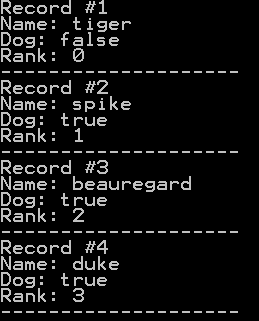
* No GUI interface, all output is to the console
* Example from the book:     Core J2ME Technology
* Copyright John W. Muchow   http://www.CoreJ2ME.com
* You may use/modify for any non-commercial purpose
*-------------------------------------------------*/
import java.io.*;
import javax.microedition.midlet.*;
import javax.microedition.rms.*;

public class IntSort extends MIDlet
{
  private RecordStore rs = null;    // Record store
  static final String REC_STORE = "db_4"; // Name of record store

  public IntSort()
  {
    openRecStore();   // Create the record store

    writeTestData();  // Write a series of records
    readStream();     // Read back the records

    closeRecStore();  // Close record store
    deleteRecStore(); // Remove the record store
  }

  public void destroyApp( boolean unconditional )
  {
  }

  public void startApp()
  {
    // There is no user interface, go ahead and shutdown
    destroyApp(false);
    notifyDestroyed();
  }

  public void pauseApp()
  {
  }

  public void openRecStore()
  {
    try
    {
      // The second parameter indicates that the record store
      // should be created if it does not exist
      rs = RecordStore.openRecordStore(REC_STORE, true );
    }
    catch (Exception e)
    {
      // We should pay attention to the actual error thrown
      db(e.toString());
    }
  }

  public void closeRecStore()
  {
    try
    {
      rs.closeRecordStore();
    }
    catch (Exception e)
    {
      db(e.toString());
    }
  }

  public void deleteRecStore()
  {
    if (RecordStore.listRecordStores() != null)
    {
      try
      {
        RecordStore.deleteRecordStore(REC_STORE);
      }
      catch (Exception e)
      {
        db(e.toString());
      }
    }
  }

  /*--------------------------------------------------
  * Create three arrays to write to record store
  *-------------------------------------------------*/
  public void writeTestData()
  {
   String[] pets = {"duke", "tiger", "spike", "beauregard"};
   boolean[] dog = {true, false, true, true};
   int[] rank = {3, 0, 1, 2};

   writeStream(pets, dog, rank);
  }

  /*--------------------------------------------------
  * Write to record store using streams.
  *-------------------------------------------------*/
  public void writeStream(String[] sData, boolean[] bData, int[] iData)
  {
    try
    {
       // Write data into an internal byte array
      ByteArrayOutputStream strmBytes = new ByteArrayOutputStream();

      // Write Java data types into the above byte array
      DataOutputStream strmDataType = new DataOutputStream(strmBytes);

      byte[] record;

      for (int i = 0; i < sData.length; i++)
      {
        // Write Java data types
        strmDataType.writeUTF(sData[i]);
        strmDataType.writeBoolean(bData[i]);
        strmDataType.writeInt(iData[i]);

        // Clear any buffered data
        strmDataType.flush();

        // Get stream data into byte array and write record
        record = strmBytes.toByteArray();
        rs.addRecord(record, 0, record.length);

        // Toss any data in the internal array so writes
        // starts at beginning (of the internal array)
        strmBytes.reset();
      }

      strmBytes.close();
      strmDataType.close();

    }
    catch (Exception e)
    {
       db(e.toString());
    }
  }

  /*--------------------------------------------------
  * Read from the record store using streams
  *-------------------------------------------------*/
  public void readStream()
  {
    try
    {
      // Careful: Make sure this is big enough!
      // Better yet, test and reallocate if necessary
      byte[] recData = new byte[50];

       // Read from the specified byte array
      ByteArrayInputStream strmBytes = new ByteArrayInputStream(recData);

      // Read Java data types from the above byte array
      DataInputStream strmDataType = new DataInputStream(strmBytes);

      if (rs.getNumRecords() > 0)
      {
        ComparatorInt comp = new ComparatorInt();

        int i = 1;
        RecordEnumeration re = rs.enumerateRecords(null, comp, false);
        while (re.hasNextElement())
        {
          // Get data into the byte array
          rs.getRecord(re.nextRecordId(), recData, 0);

          // Read back the data types
          System.out.println("Record #" + i++);

          System.out.println("Name: " + strmDataType.readUTF());
          System.out.println("Dog: " + strmDataType.readBoolean());
          System.out.println("Rank: " + strmDataType.readInt());
          System.out.println("--------------------");

          // Reset so read starts at beginning of array
          strmBytes.reset();
        }

        comp.compareIntClose();

        // Free enumerator
        re.destroy();
      }

      strmBytes.close();
      strmDataType.close();

    }
    catch (Exception e)
    {
       db(e.toString());
    }
  }

  /*--------------------------------------------------
  * Simple message to console for debug/errors
  * When used with Exceptions we should handle the
  * error in a more appropriate manner.
  *-------------------------------------------------*/
  private void db(String str)
  {
    System.err.println("Msg: " + str);
  }
}

/*--------------------------------------------------
* Compares two integers to determine sort order
* Each record passed in contains multiple Java data
* types - use only the integer data for sorting
*-------------------------------------------------*/
class ComparatorInt implements RecordComparator
{
  private byte[] recData = new byte[10];

  // Read from a specified byte array
  private ByteArrayInputStream strmBytes = null;

  // Read Java data types from the above byte array
  private DataInputStream strmDataType = null;

  public void compareIntClose()
  {
    try
    {
      if (strmBytes != null)
        strmBytes.close();
      if (strmDataType != null)
        strmDataType.close();
    }
    catch (Exception e)
    {}
  }

  public int compare(byte[] rec1, byte[] rec2)
  {
    int x1, x2;

    try
    {
      // If either record is larger than our buffer, reallocate
      int maxsize = Math.max(rec1.length, rec2.length);
      if (maxsize > recData.length)
        recData = new byte[maxsize];

      // Read record #1
      // We want the integer from the record, which is
      // the last "field" thus we must read the String
      // and boolean to get to the integer
      strmBytes = new ByteArrayInputStream(rec1);
      strmDataType = new DataInputStream(strmBytes);
      strmDataType.readUTF();
      strmDataType.readBoolean();
      x1 = strmDataType.readInt();  // Here's our data

      // Read record #2
      strmBytes = new ByteArrayInputStream(rec2);
      strmDataType = new DataInputStream(strmBytes);
      strmDataType.readUTF();
      strmDataType.readBoolean();
      x2 = strmDataType.readInt();  // Here's our data

      // Compare record #1 and #2
      if (x1 == x2)
        return RecordComparator.EQUIVALENT;
      else if (x1 < x2)
        return RecordComparator.PRECEDES;
      else
        return RecordComparator.FOLLOWS;

    }
    catch (Exception e)
    {
      return RecordComparator.EQUIVALENT;
    }
  }
}
Related examples in the same category