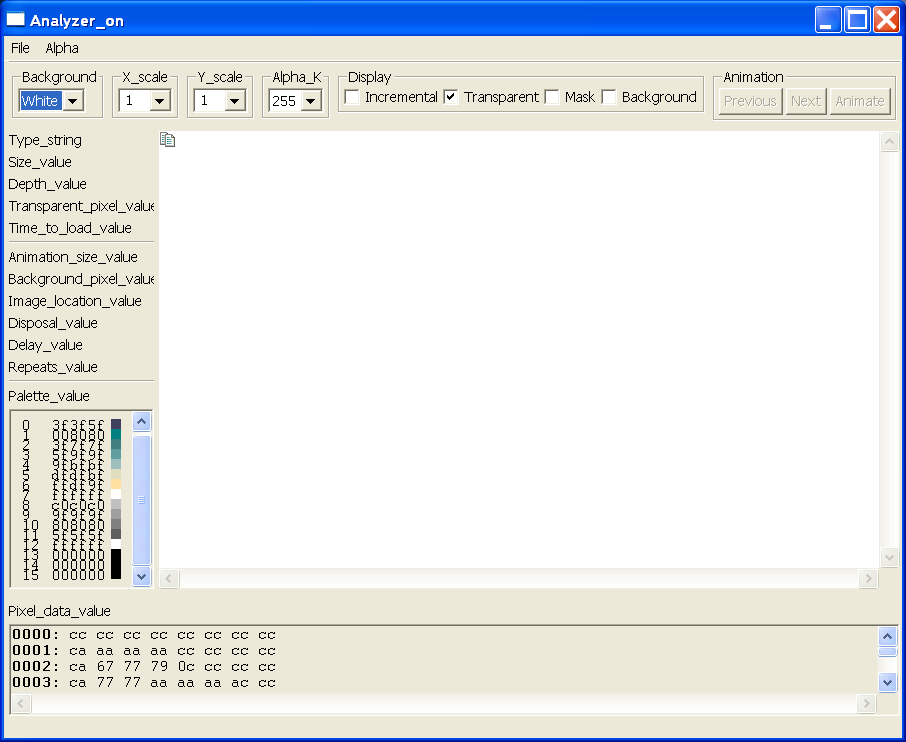
Image Analyzer in SWT
import java.io.InputStream;
import java.net.URL;
import java.text.MessageFormat;
import java.util.ResourceBundle;
import java.util.Vector;
import org.eclipse.swt.SWT;
import org.eclipse.swt.SWTError;
import org.eclipse.swt.SWTException;
import org.eclipse.swt.custom.StyleRange;
import org.eclipse.swt.custom.StyledText;
import org.eclipse.swt.events.ControlAdapter;
import org.eclipse.swt.events.ControlEvent;
import org.eclipse.swt.events.DisposeEvent;
import org.eclipse.swt.events.DisposeListener;
import org.eclipse.swt.events.KeyAdapter;
import org.eclipse.swt.events.KeyEvent;
import org.eclipse.swt.events.MouseAdapter;
import org.eclipse.swt.events.MouseEvent;
import org.eclipse.swt.events.MouseMoveListener;
import org.eclipse.swt.events.PaintEvent;
import org.eclipse.swt.events.PaintListener;
import org.eclipse.swt.events.SelectionAdapter;
import org.eclipse.swt.events.SelectionEvent;
import org.eclipse.swt.events.SelectionListener;
import org.eclipse.swt.events.ShellAdapter;
import org.eclipse.swt.events.ShellEvent;
import org.eclipse.swt.graphics.Color;
import org.eclipse.swt.graphics.Cursor;
import org.eclipse.swt.graphics.Font;
import org.eclipse.swt.graphics.GC;
import org.eclipse.swt.graphics.Image;
import org.eclipse.swt.graphics.ImageData;
import org.eclipse.swt.graphics.ImageLoader;
import org.eclipse.swt.graphics.ImageLoaderEvent;
import org.eclipse.swt.graphics.ImageLoaderListener;
import org.eclipse.swt.graphics.Point;
import org.eclipse.swt.graphics.RGB;
import org.eclipse.swt.graphics.Rectangle;
import org.eclipse.swt.layout.GridData;
import org.eclipse.swt.layout.GridLayout;
import org.eclipse.swt.layout.RowLayout;
import org.eclipse.swt.printing.PrintDialog;
import org.eclipse.swt.printing.Printer;
import org.eclipse.swt.printing.PrinterData;
import org.eclipse.swt.widgets.Button;
import org.eclipse.swt.widgets.Canvas;
import org.eclipse.swt.widgets.Combo;
import org.eclipse.swt.widgets.Composite;
import org.eclipse.swt.widgets.Dialog;
import org.eclipse.swt.widgets.Display;
import org.eclipse.swt.widgets.FileDialog;
import org.eclipse.swt.widgets.Group;
import org.eclipse.swt.widgets.Label;
import org.eclipse.swt.widgets.Menu;
import org.eclipse.swt.widgets.MenuItem;
import org.eclipse.swt.widgets.MessageBox;
import org.eclipse.swt.widgets.Sash;
import org.eclipse.swt.widgets.ScrollBar;
import org.eclipse.swt.widgets.Shell;
import org.eclipse.swt.widgets.Text;
public class ImageAnalyzer {
Display display;
Shell shell;
Canvas imageCanvas, paletteCanvas;
Label typeLabel, sizeLabel, depthLabel, transparentPixelLabel,
timeToLoadLabel, screenSizeLabel, backgroundPixelLabel,
locationLabel, disposalMethodLabel, delayTimeLabel,
repeatCountLabel, paletteLabel, dataLabel, statusLabel;
Combo backgroundCombo, scaleXCombo, scaleYCombo, alphaCombo;
Button incrementalCheck, transparentCheck, maskCheck, backgroundCheck;
Button previousButton, nextButton, animateButton;
StyledText dataText;
Sash sash;
Color whiteColor, blackColor, redColor, greenColor, blueColor,
canvasBackground;
Font fixedWidthFont;
Cursor crossCursor;
GC imageCanvasGC;
int paletteWidth = 140; // recalculated and used as a width hint
int ix = 0, iy = 0, py = 0; // used to scroll the image and palette
float xscale = 1, yscale = 1; // used to scale the image
int alpha = 255; // used to modify the alpha value of the image
boolean incremental = false; // used to incrementally display an image
boolean transparent = true; // used to display an image with transparency
boolean showMask = false; // used to display an icon mask or transparent
// image mask
boolean showBackground = false; // used to display the background of an
// animated image
boolean animate = false; // used to animate a multi-image file
Thread animateThread; // draws animated images
Thread incrementalThread; // draws incremental images
String lastPath; // used to seed the file dialog
String currentName; // the current image file or URL name
String fileName; // the current image file
ImageLoader loader; // the loader for the current image file
ImageData[] imageDataArray; // all image data read from the current file
int imageDataIndex; // the index of the current image data
ImageData imageData; // the currently-displayed image data
Image image; // the currently-displayed image
Vector incrementalEvents; // incremental image events
long loadTime = 0; // the time it took to load the current image
static final int INDEX_DIGITS = 4;
static final int ALPHA_CONSTANT = 0;
static final int ALPHA_X = 1;
static final int ALPHA_Y = 2;
class TextPrompter extends Dialog {
String message = "";
String result = null;
Shell dialog;
Text text;
public TextPrompter(Shell parent, int style) {
super(parent, style);
}
public TextPrompter(Shell parent) {
this(parent, SWT.APPLICATION_MODAL);
}
public String getMessage() {
return message;
}
public void setMessage(String string) {
message = string;
}
public String open() {
dialog = new Shell(getParent(), getStyle());
dialog.setText(getText());
dialog.setLayout(new GridLayout());
Label label = new Label(dialog, SWT.NULL);
label.setText(message);
label.setLayoutData(new GridData(GridData.FILL_HORIZONTAL));
text = new Text(dialog, SWT.SINGLE | SWT.BORDER);
GridData data = new GridData(GridData.FILL_HORIZONTAL);
data.widthHint = 300;
text.setLayoutData(data);
Composite buttons = new Composite(dialog, SWT.NONE);
GridLayout grid = new GridLayout();
grid.numColumns = 2;
buttons.setLayout(grid);
buttons.setLayoutData(new GridData(GridData.HORIZONTAL_ALIGN_END));
Button ok = new Button(buttons, SWT.PUSH);
ok.setText("OK");
data = new GridData();
data.widthHint = 75;
ok.setLayoutData(data);
ok.addSelectionListener(new SelectionAdapter() {
public void widgetSelected(SelectionEvent e) {
result = text.getText();
dialog.dispose();
}
});
Button cancel = new Button(buttons, SWT.PUSH);
cancel.setText("Cancel");
data = new GridData();
data.widthHint = 75;
cancel.setLayoutData(data);
cancel.addSelectionListener(new SelectionAdapter() {
public void widgetSelected(SelectionEvent e) {
dialog.dispose();
}
});
dialog.setDefaultButton(ok);
dialog.pack();
dialog.open();
while (!dialog.isDisposed()) {
if (!display.readAndDispatch())
display.sleep();
}
return result;
}
}
public static void main(String[] args) {
Display display = new Display();
ImageAnalyzer imageAnalyzer = new ImageAnalyzer();
Shell shell = imageAnalyzer.open(display);
while (!shell.isDisposed())
if (!display.readAndDispatch())
display.sleep();
display.dispose();
}
public Shell open(Display dpy) {
// Create a window and set its title.
this.display = dpy;
shell = new Shell(display);
shell.setText("Image_analyzer");
// Hook resize and dispose listeners.
shell.addControlListener(new ControlAdapter() {
public void controlResized(ControlEvent event) {
resizeShell(event);
}
});
shell.addShellListener(new ShellAdapter() {
public void shellClosed(ShellEvent e) {
animate = false; // stop any animation in progress
if (animateThread != null) {
// wait for the thread to die before disposing the shell.
while (animateThread.isAlive()) {
if (!display.readAndDispatch())
display.sleep();
}
}
e.doit = true;
}
});
shell.addDisposeListener(new DisposeListener() {
public void widgetDisposed(DisposeEvent e) {
// Clean up.
if (image != null)
image.dispose();
whiteColor.dispose();
blackColor.dispose();
redColor.dispose();
greenColor.dispose();
blueColor.dispose();
fixedWidthFont.dispose();
crossCursor.dispose();
}
});
// Create colors and fonts.
whiteColor = new Color(display, 255, 255, 255);
blackColor = new Color(display, 0, 0, 0);
redColor = new Color(display, 255, 0, 0);
greenColor = new Color(display, 0, 255, 0);
blueColor = new Color(display, 0, 0, 255);
fixedWidthFont = new Font(display, "courier", 10, 0);
crossCursor = new Cursor(display, SWT.CURSOR_CROSS);
// Add a menu bar and widgets.
createMenuBar();
createWidgets();
shell.pack();
// Create a GC for drawing, and hook the listener to dispose it.
imageCanvasGC = new GC(imageCanvas);
imageCanvas.addDisposeListener(new DisposeListener() {
public void widgetDisposed(DisposeEvent e) {
imageCanvasGC.dispose();
}
});
// Open the window
shell.open();
return shell;
}
void createWidgets() {
// Add the widgets to the shell in a grid layout.
GridLayout layout = new GridLayout();
layout.marginHeight = 0;
layout.numColumns = 2;
shell.setLayout(layout);
// Separate the menu bar from the rest of the widgets.
Label separator = new Label(shell, SWT.SEPARATOR | SWT.HORIZONTAL);
GridData gridData = new GridData();
gridData.horizontalSpan = 2;
gridData.horizontalAlignment = GridData.FILL;
separator.setLayoutData(gridData);
// Add a composite to contain some control widgets across the top.
Composite controls = new Composite(shell, SWT.NULL);
RowLayout rowLayout = new RowLayout();
rowLayout.marginTop = 0;
rowLayout.marginBottom = 5;
rowLayout.spacing = 8;
controls.setLayout(rowLayout);
gridData = new GridData();
gridData.horizontalSpan = 2;
controls.setLayoutData(gridData);
// Combo to change the background.
Group group = new Group(controls, SWT.NULL);
group.setLayout(new RowLayout());
group.setText("Background");
backgroundCombo = new Combo(group, SWT.DROP_DOWN | SWT.READ_ONLY);
backgroundCombo.setItems(new String[] { "None",
"White", "Black",
"Red", "Green",
"Blue" });
backgroundCombo.select(backgroundCombo.indexOf("White"));
backgroundCombo.addSelectionListener(new SelectionAdapter() {
public void widgetSelected(SelectionEvent event) {
changeBackground();
}
});
// Combo to change the x scale.
String[] values = { "0.1", "0.2", "0.3", "0.4", "0.5", "0.6", "0.7",
"0.8", "0.9", "1", "1.1", "1.2", "1.3", "1.4", "1.5", "1.6",
"1.7", "1.8", "1.9", "2", "3", "4", "5", "6", "7", "8", "9",
"10", };
group = new Group(controls, SWT.NULL);
group.setLayout(new RowLayout());
group.setText("X_scale");
scaleXCombo = new Combo(group, SWT.DROP_DOWN);
for (int i = 0; i < values.length; i++) {
scaleXCombo.add(values[i]);
}
scaleXCombo.select(scaleXCombo.indexOf("1"));
scaleXCombo.addSelectionListener(new SelectionAdapter() {
public void widgetSelected(SelectionEvent event) {
scaleX();
}
});
// Combo to change the y scale.
group = new Group(controls, SWT.NULL);
group.setLayout(new RowLayout());
group.setText("Y_scale");
scaleYCombo = new Combo(group, SWT.DROP_DOWN);
for (int i = 0; i < values.length; i++) {
scaleYCombo.add(values[i]);
}
scaleYCombo.select(scaleYCombo.indexOf("1"));
scaleYCombo.addSelectionListener(new SelectionAdapter() {
public void widgetSelected(SelectionEvent event) {
scaleY();
}
});
// Combo to change the alpha value.
group = new Group(controls, SWT.NULL);
group.setLayout(new RowLayout());
group.setText("Alpha_K");
alphaCombo = new Combo(group, SWT.DROP_DOWN | SWT.READ_ONLY);
for (int i = 0; i <= 255; i += 5) {
alphaCombo.add(String.valueOf(i));
}
alphaCombo.select(alphaCombo.indexOf("255"));
alphaCombo.addSelectionListener(new SelectionAdapter() {
public void widgetSelected(SelectionEvent event) {
alpha();
}
});
// Check box to request incremental display.
group = new Group(controls, SWT.NULL);
group.setLayout(new RowLayout());
group.setText("Display");
incrementalCheck = new Button(group, SWT.CHECK);
incrementalCheck.setText("Incremental");
incrementalCheck.setSelection(incremental);
incrementalCheck.addSelectionListener(new SelectionAdapter() {
public void widgetSelected(SelectionEvent event) {
incremental = ((Button) event.widget).getSelection();
}
});
// Check box to request transparent display.
transparentCheck = new Button(group, SWT.CHECK);
transparentCheck.setText("Transparent");
transparentCheck.setSelection(transparent);
transparentCheck.addSelectionListener(new SelectionAdapter() {
public void widgetSelected(SelectionEvent event) {
transparent = ((Button) event.widget).getSelection();
if (image != null) {
imageCanvas.redraw();
}
}
});
// Check box to request mask display.
maskCheck = new Button(group, SWT.CHECK);
maskCheck.setText("Mask");
maskCheck.setSelection(showMask);
maskCheck.addSelectionListener(new SelectionAdapter() {
public void widgetSelected(SelectionEvent event) {
showMask = ((Button) event.widget).getSelection();
if (image != null) {
imageCanvas.redraw();
}
}
});
// Check box to request background display.
backgroundCheck = new Button(group, SWT.CHECK);
backgroundCheck.setText("Background");
backgroundCheck.setSelection(showBackground);
backgroundCheck.addSelectionListener(new SelectionAdapter() {
public void widgetSelected(SelectionEvent event) {
showBackground = ((Button) event.widget).getSelection();
}
});
// Group the animation buttons.
group = new Group(controls, SWT.NULL);
group.setLayout(new RowLayout());
group.setText("Animation");
// Push button to display the previous image in a multi-image file.
previousButton = new Button(group, SWT.PUSH);
previousButton.setText("Previous");
previousButton.setEnabled(false);
previousButton.addSelectionListener(new SelectionAdapter() {
public void widgetSelected(SelectionEvent event) {
previous();
}
});
// Push button to display the next image in a multi-image file.
nextButton = new Button(group, SWT.PUSH);
nextButton.setText("Next");
nextButton.setEnabled(false);
nextButton.addSelectionListener(new SelectionAdapter() {
public void widgetSelected(SelectionEvent event) {
next();
}
});
// Push button to toggle animation of a multi-image file.
animateButton = new Button(group, SWT.PUSH);
animateButton.setText("Animate");
animateButton.setEnabled(false);
animateButton.addSelectionListener(new SelectionAdapter() {
public void widgetSelected(SelectionEvent event) {
animate();
}
});
// Label to show the image file type.
typeLabel = new Label(shell, SWT.NULL);
typeLabel.setText("Type_initial");
typeLabel.setLayoutData(new GridData(GridData.HORIZONTAL_ALIGN_FILL));
// Canvas to show the image.
imageCanvas = new Canvas(shell, SWT.V_SCROLL | SWT.H_SCROLL
| SWT.NO_REDRAW_RESIZE);
imageCanvas.setBackground(whiteColor);
imageCanvas.setCursor(crossCursor);
gridData = new GridData();
gridData.verticalSpan = 15;
gridData.horizontalAlignment = GridData.FILL;
gridData.verticalAlignment = GridData.FILL;
gridData.grabExcessHorizontalSpace = true;
gridData.grabExcessVerticalSpace = true;
imageCanvas.setLayoutData(gridData);
imageCanvas.addPaintListener(new PaintListener() {
public void paintControl(PaintEvent event) {
if (image != null)
paintImage(event);
}
});
imageCanvas.addMouseMoveListener(new MouseMoveListener() {
public void mouseMove(MouseEvent event) {
if (image != null) {
showColorAt(event.x, event.y);
}
}
});
// Set up the image canvas scroll bars.
ScrollBar horizontal = imageCanvas.getHorizontalBar();
horizontal.setVisible(true);
horizontal.setMinimum(0);
horizontal.setEnabled(false);
horizontal.addSelectionListener(new SelectionAdapter() {
public void widgetSelected(SelectionEvent event) {
scrollHorizontally((ScrollBar) event.widget);
}
});
ScrollBar vertical = imageCanvas.getVerticalBar();
vertical.setVisible(true);
vertical.setMinimum(0);
vertical.setEnabled(false);
vertical.addSelectionListener(new SelectionAdapter() {
public void widgetSelected(SelectionEvent event) {
scrollVertically((ScrollBar) event.widget);
}
});
// Label to show the image size.
sizeLabel = new Label(shell, SWT.NULL);
sizeLabel.setText("Size_initial");
sizeLabel.setLayoutData(new GridData(GridData.HORIZONTAL_ALIGN_FILL));
// Label to show the image depth.
depthLabel = new Label(shell, SWT.NULL);
depthLabel.setText("Depth_initial");
depthLabel.setLayoutData(new GridData(GridData.HORIZONTAL_ALIGN_FILL));
// Label to show the transparent pixel.
transparentPixelLabel = new Label(shell, SWT.NULL);
transparentPixelLabel.setText("Transparent_pixel_initial");
transparentPixelLabel.setLayoutData(new GridData(
GridData.HORIZONTAL_ALIGN_FILL));
// Label to show the time to load.
timeToLoadLabel = new Label(shell, SWT.NULL);
timeToLoadLabel.setText("Time_to_load_initial");
timeToLoadLabel.setLayoutData(new GridData(
GridData.HORIZONTAL_ALIGN_FILL));
// Separate the animation fields from the rest of the fields.
separator = new Label(shell, SWT.SEPARATOR | SWT.HORIZONTAL);
separator.setLayoutData(new GridData(GridData.HORIZONTAL_ALIGN_FILL));
// Label to show the logical screen size for animation.
screenSizeLabel = new Label(shell, SWT.NULL);
screenSizeLabel.setText("Animation_size_initial");
screenSizeLabel.setLayoutData(new GridData(
GridData.HORIZONTAL_ALIGN_FILL));
// Label to show the background pixel.
backgroundPixelLabel = new Label(shell, SWT.NULL);
backgroundPixelLabel.setText("Background_pixel_initial");
backgroundPixelLabel.setLayoutData(new GridData(
GridData.HORIZONTAL_ALIGN_FILL));
// Label to show the image location (x, y).
locationLabel = new Label(shell, SWT.NULL);
locationLabel.setText("Image_location_initial");
locationLabel
.setLayoutData(new GridData(GridData.HORIZONTAL_ALIGN_FILL));
// Label to show the image disposal method.
disposalMethodLabel = new Label(shell, SWT.NULL);
disposalMethodLabel.setText("Disposal_initial");
disposalMethodLabel.setLayoutData(new GridData(
GridData.HORIZONTAL_ALIGN_FILL));
// Label to show the image delay time.
delayTimeLabel = new Label(shell, SWT.NULL);
delayTimeLabel.setText("Delay_initial");
delayTimeLabel.setLayoutData(new GridData(
GridData.HORIZONTAL_ALIGN_FILL));
// Label to show the background pixel.
repeatCountLabel = new Label(shell, SWT.NULL);
repeatCountLabel.setText("Repeats_initial");
repeatCountLabel.setLayoutData(new GridData(
GridData.HORIZONTAL_ALIGN_FILL));
// Separate the animation fields from the palette.
separator = new Label(shell, SWT.SEPARATOR | SWT.HORIZONTAL);
separator.setLayoutData(new GridData(GridData.HORIZONTAL_ALIGN_FILL));
// Label to show if the image has a direct or indexed palette.
paletteLabel = new Label(shell, SWT.NULL);
paletteLabel.setText("Palette_initial");
paletteLabel
.setLayoutData(new GridData(GridData.HORIZONTAL_ALIGN_FILL));
// Canvas to show the image's palette.
paletteCanvas = new Canvas(shell, SWT.BORDER | SWT.V_SCROLL
| SWT.NO_REDRAW_RESIZE);
paletteCanvas.setFont(fixedWidthFont);
paletteCanvas.getVerticalBar().setVisible(true);
gridData = new GridData();
gridData.horizontalAlignment = GridData.FILL;
gridData.verticalAlignment = GridData.FILL;
GC gc = new GC(paletteLabel);
paletteWidth = gc.stringExtent("Max_length_string").x;
gc.dispose();
gridData.widthHint = paletteWidth;
gridData.heightHint = 16 * 11; // show at least 16 colors
paletteCanvas.setLayoutData(gridData);
paletteCanvas.addPaintListener(new PaintListener() {
public void paintControl(PaintEvent event) {
if (image != null)
paintPalette(event);
}
});
// Set up the palette canvas scroll bar.
vertical = paletteCanvas.getVerticalBar();
vertical.setVisible(true);
vertical.setMinimum(0);
vertical.setIncrement(10);
vertical.setEnabled(false);
vertical.addSelectionListener(new SelectionAdapter() {
public void widgetSelected(SelectionEvent event) {
scrollPalette((ScrollBar) event.widget);
}
});
// Sash to see more of image or image data.
sash = new Sash(shell, SWT.HORIZONTAL);
gridData = new GridData();
gridData.horizontalSpan = 2;
gridData.horizontalAlignment = GridData.FILL;
sash.setLayoutData(gridData);
sash.addSelectionListener(new SelectionAdapter() {
public void widgetSelected(SelectionEvent event) {
if (event.detail != SWT.DRAG) {
((GridData) paletteCanvas.getLayoutData()).heightHint = SWT.DEFAULT;
Rectangle paletteCanvasBounds = paletteCanvas.getBounds();
int minY = paletteCanvasBounds.y + 20;
Rectangle dataLabelBounds = dataLabel.getBounds();
int maxY = statusLabel.getBounds().y
- dataLabelBounds.height - 20;
if (event.y > minY && event.y < maxY) {
Rectangle oldSash = sash.getBounds();
sash.setBounds(event.x, event.y, event.width,
event.height);
int diff = event.y - oldSash.y;
Rectangle bounds = imageCanvas.getBounds();
imageCanvas.setBounds(bounds.x, bounds.y, bounds.width,
bounds.height + diff);
bounds = paletteCanvasBounds;
paletteCanvas.setBounds(bounds.x, bounds.y,
bounds.width, bounds.height + diff);
bounds = dataLabelBounds;
dataLabel.setBounds(bounds.x, bounds.y + diff,
bounds.width, bounds.height);
bounds = dataText.getBounds();
dataText.setBounds(bounds.x, bounds.y + diff,
bounds.width, bounds.height - diff);
// shell.layout(true);
}
}
}
});
// Label to show data-specific fields.
dataLabel = new Label(shell, SWT.NULL);
dataLabel.setText("Pixel_data_initial");
gridData = new GridData();
gridData.horizontalSpan = 2;
gridData.horizontalAlignment = GridData.FILL;
dataLabel.setLayoutData(gridData);
// Text to show a dump of the data.
dataText = new StyledText(shell, SWT.BORDER | SWT.MULTI | SWT.READ_ONLY
| SWT.V_SCROLL | SWT.H_SCROLL);
dataText.setBackground(display
.getSystemColor(SWT.COLOR_WIDGET_BACKGROUND));
dataText.setFont(fixedWidthFont);
gridData = new GridData();
gridData.horizontalSpan = 2;
gridData.horizontalAlignment = GridData.FILL;
gridData.verticalAlignment = GridData.FILL;
gridData.heightHint = 128;
gridData.grabExcessVerticalSpace = true;
dataText.setLayoutData(gridData);
dataText.addMouseListener(new MouseAdapter() {
public void mouseDown(MouseEvent event) {
if (image != null && event.button == 1) {
showColorForData();
}
}
});
dataText.addKeyListener(new KeyAdapter() {
public void keyPressed(KeyEvent event) {
if (image != null) {
showColorForData();
}
}
});
// Label to show status and cursor location in image.
statusLabel = new Label(shell, SWT.NULL);
statusLabel.setText("");
gridData = new GridData();
gridData.horizontalSpan = 2;
gridData.horizontalAlignment = GridData.FILL;
statusLabel.setLayoutData(gridData);
}
Menu createMenuBar() {
// Menu bar.
Menu menuBar = new Menu(shell, SWT.BAR);
shell.setMenuBar(menuBar);
createFileMenu(menuBar);
createAlphaMenu(menuBar);
return menuBar;
}
void createFileMenu(Menu menuBar) {
// File menu
MenuItem item = new MenuItem(menuBar, SWT.CASCADE);
item.setText("File");
Menu fileMenu = new Menu(shell, SWT.DROP_DOWN);
item.setMenu(fileMenu);
// File -> Open File...
item = new MenuItem(fileMenu, SWT.PUSH);
item.setText("OpenFile");
item.setAccelerator(SWT.MOD1 + 'O');
item.addSelectionListener(new SelectionAdapter() {
public void widgetSelected(SelectionEvent event) {
menuOpenFile();
}
});
// File -> Open URL...
item = new MenuItem(fileMenu, SWT.PUSH);
item.setText("OpenURL");
item.setAccelerator(SWT.MOD1 + 'U');
item.addSelectionListener(new SelectionAdapter() {
public void widgetSelected(SelectionEvent event) {
menuOpenURL();
}
});
// File -> Reopen
item = new MenuItem(fileMenu, SWT.PUSH);
item.setText("Reopen");
item.addSelectionListener(new SelectionAdapter() {
public void widgetSelected(SelectionEvent event) {
menuReopen();
}
});
new MenuItem(fileMenu, SWT.SEPARATOR);
// File -> Save
item = new MenuItem(fileMenu, SWT.PUSH);
item.setText("Save");
item.setAccelerator(SWT.MOD1 + 'S');
item.addSelectionListener(new SelectionAdapter() {
public void widgetSelected(SelectionEvent event) {
menuSave();
}
});
// File -> Save As...
item = new MenuItem(fileMenu, SWT.PUSH);
item.setText("Save_as");
item.addSelectionListener(new SelectionAdapter() {
public void widgetSelected(SelectionEvent event) {
menuSaveAs();
}
});
// File -> Save Mask As...
item = new MenuItem(fileMenu, SWT.PUSH);
item.setText("Save_mask_as");
item.addSelectionListener(new SelectionAdapter() {
public void widgetSelected(SelectionEvent event) {
menuSaveMaskAs();
}
});
new MenuItem(fileMenu, SWT.SEPARATOR);
// File -> Print
item = new MenuItem(fileMenu, SWT.PUSH);
item.setText("Print");
item.setAccelerator(SWT.MOD1 + 'P');
item.addSelectionListener(new SelectionAdapter() {
public void widgetSelected(SelectionEvent event) {
menuPrint();
}
});
new MenuItem(fileMenu, SWT.SEPARATOR);
// File -> Exit
item = new MenuItem(fileMenu, SWT.PUSH);
item.setText("Exit");
item.addSelectionListener(new SelectionAdapter() {
public void widgetSelected(SelectionEvent event) {
shell.close();
}
});
}
void createAlphaMenu(Menu menuBar) {
// Alpha menu
MenuItem item = new MenuItem(menuBar, SWT.CASCADE);
item.setText("Alpha");
Menu alphaMenu = new Menu(shell, SWT.DROP_DOWN);
item.setMenu(alphaMenu);
// Alpha -> K
item = new MenuItem(alphaMenu, SWT.PUSH);
item.setText("K");
item.addSelectionListener(new SelectionAdapter() {
public void widgetSelected(SelectionEvent event) {
menuComposeAlpha(ALPHA_CONSTANT);
}
});
// Alpha -> (K + x) % 256
item = new MenuItem(alphaMenu, SWT.PUSH);
item.setText("(K + x) % 256");
item.addSelectionListener(new SelectionAdapter() {
public void widgetSelected(SelectionEvent event) {
menuComposeAlpha(ALPHA_X);
}
});
// Alpha -> (K + y) % 256
item = new MenuItem(alphaMenu, SWT.PUSH);
item.setText("(K + y) % 256");
item.addSelectionListener(new SelectionAdapter() {
public void widgetSelected(SelectionEvent event) {
menuComposeAlpha(ALPHA_Y);
}
});
}
void menuComposeAlpha(int alpha_op) {
if (image == null)
return;
animate = false; // stop any animation in progress
Cursor waitCursor = new Cursor(display, SWT.CURSOR_WAIT);
shell.setCursor(waitCursor);
imageCanvas.setCursor(waitCursor);
try {
if (alpha_op == ALPHA_CONSTANT) {
imageData.alpha = alpha;
} else {
imageData.alpha = -1;
switch (alpha_op) {
case ALPHA_X:
for (int y = 0; y < imageData.height; y++) {
for (int x = 0; x < imageData.width; x++) {
imageData.setAlpha(x, y, (x + alpha) % 256);
}
}
break;
case ALPHA_Y:
for (int y = 0; y < imageData.height; y++) {
for (int x = 0; x < imageData.width; x++) {
imageData.setAlpha(x, y, (y + alpha) % 256);
}
}
break;
default:
break;
}
}
displayImage(imageData);
} finally {
shell.setCursor(null);
imageCanvas.setCursor(crossCursor);
waitCursor.dispose();
}
}
void menuOpenFile() {
animate = false; // stop any animation in progress
resetScaleCombos();
// Get the user to choose an image file.
FileDialog fileChooser = new FileDialog(shell, SWT.OPEN);
if (lastPath != null)
fileChooser.setFilterPath(lastPath);
fileChooser.setFilterExtensions(new String[] {
"*.bmp; *.gif; *.ico; *.jpg; *.pcx; *.png; *.tif", "*.bmp",
"*.gif", "*.ico", "*.jpg", "*.pcx", "*.png", "*.tif" });
fileChooser.setFilterNames(new String[] {
"All_images"
+ " (bmp, gif, ico, jpg, pcx, png, tif)",
"BMP (*.bmp)", "GIF (*.gif)", "ICO (*.ico)", "JPEG (*.jpg)",
"PCX (*.pcx)", "PNG (*.png)", "TIFF (*.tif)" });
String filename = fileChooser.open();
lastPath = fileChooser.getFilterPath();
if (filename == null)
return;
Cursor waitCursor = new Cursor(display, SWT.CURSOR_WAIT);
shell.setCursor(waitCursor);
imageCanvas.setCursor(waitCursor);
try {
loader = new ImageLoader();
if (incremental) {
// Prepare to handle incremental events.
loader.addImageLoaderListener(new ImageLoaderListener() {
public void imageDataLoaded(ImageLoaderEvent event) {
incrementalDataLoaded(event);
}
});
incrementalThreadStart();
}
// Read the new image(s) from the chosen file.
long startTime = System.currentTimeMillis();
imageDataArray = loader.load(filename);
loadTime = System.currentTimeMillis() - startTime;
if (imageDataArray.length > 0) {
// Cache the filename.
currentName = filename;
fileName = filename;
// If there are multiple images in the file (typically GIF)
// then enable the Previous, Next and Animate buttons.
previousButton.setEnabled(imageDataArray.length > 1);
nextButton.setEnabled(imageDataArray.length > 1);
animateButton.setEnabled(imageDataArray.length > 1
&& loader.logicalScreenWidth > 0
&& loader.logicalScreenHeight > 0);
// Display the first image in the file.
imageDataIndex = 0;
displayImage(imageDataArray[imageDataIndex]);
resetScrollBars();
}
} catch (SWTException e) {
showErrorDialog("Loading_lc", filename, e);
} catch (SWTError e) {
showErrorDialog("Loading_lc", filename, e);
} finally {
shell.setCursor(null);
imageCanvas.setCursor(crossCursor);
waitCursor.dispose();
}
}
void menuOpenURL() {
animate = false; // stop any animation in progress
resetScaleCombos();
// Get the user to choose an image URL.
TextPrompter textPrompter = new TextPrompter(shell,
SWT.APPLICATION_MODAL | SWT.DIALOG_TRIM);
textPrompter.setText("OpenURLDialog");
textPrompter.setMessage("EnterURL");
String urlname = textPrompter.open();
if (urlname == null)
return;
Cursor waitCursor = new Cursor(display, SWT.CURSOR_WAIT);
shell.setCursor(waitCursor);
imageCanvas.setCursor(waitCursor);
try {
URL url = new URL(urlname);
InputStream stream = url.openStream();
loader = new ImageLoader();
if (incremental) {
// Prepare to handle incremental events.
loader.addImageLoaderListener(new ImageLoaderListener() {
public void imageDataLoaded(ImageLoaderEvent event) {
incrementalDataLoaded(event);
}
});
incrementalThreadStart();
}
// Read the new image(s) from the chosen URL.
long startTime = System.currentTimeMillis();
imageDataArray = loader.load(stream);
stream.close();
loadTime = System.currentTimeMillis() - startTime;
if (imageDataArray.length > 0) {
currentName = urlname;
fileName = null;
// If there are multiple images (typically GIF)
// then enable the Previous, Next and Animate buttons.
previousButton.setEnabled(imageDataArray.length > 1);
nextButton.setEnabled(imageDataArray.length > 1);
animateButton.setEnabled(imageDataArray.length > 1
&& loader.logicalScreenWidth > 0
&& loader.logicalScreenHeight > 0);
// Display the first image.
imageDataIndex = 0;
displayImage(imageDataArray[imageDataIndex]);
resetScrollBars();
}
} catch (Exception e) {
showErrorDialog("Loading", urlname, e);
} finally {
shell.setCursor(null);
imageCanvas.setCursor(crossCursor);
waitCursor.dispose();
}
}
/*
* Called to start a thread that draws incremental images as they are
* loaded.
*/
void incrementalThreadStart() {
incrementalEvents = new Vector();
incrementalThread = new Thread("Incremental") {
public void run() {
// Draw the first ImageData increment.
while (incrementalEvents != null) {
// Synchronize so we don't try to remove when the vector is
// null.
synchronized (ImageAnalyzer.this) {
if (incrementalEvents != null) {
if (incrementalEvents.size() > 0) {
ImageLoaderEvent event = (ImageLoaderEvent) incrementalEvents
.remove(0);
if (image != null)
image.dispose();
image = new Image(display, event.imageData);
imageData = event.imageData;
imageCanvasGC.drawImage(image, 0, 0,
imageData.width, imageData.height,
imageData.x, imageData.y,
imageData.width, imageData.height);
} else {
yield();
}
}
}
}
display.wake();
}
};
incrementalThread.setDaemon(true);
incrementalThread.start();
}
/*
* Called when incremental image data has been loaded, for example, for
* interlaced GIF/PNG or progressive JPEG.
*/
void incrementalDataLoaded(ImageLoaderEvent event) {
// Synchronize so that we do not try to add while
// the incremental drawing thread is removing.
synchronized (this) {
incrementalEvents.addElement(event);
}
}
void menuSave() {
if (image == null)
return;
animate = false; // stop any animation in progress
// If the image file type is unknown, we can't 'Save',
// so we have to use 'Save As...'.
if (imageData.type == SWT.IMAGE_UNDEFINED || fileName == null) {
menuSaveAs();
return;
}
Cursor waitCursor = new Cursor(display, SWT.CURSOR_WAIT);
shell.setCursor(waitCursor);
imageCanvas.setCursor(waitCursor);
try {
// Save the current image to the current file.
loader.data = new ImageData[] { imageData };
loader.save(fileName, imageData.type);
} catch (SWTException e) {
showErrorDialog("Saving_lc", fileName, e);
} catch (SWTError e) {
showErrorDialog("Saving_lc", fileName, e);
} finally {
shell.setCursor(null);
imageCanvas.setCursor(crossCursor);
waitCursor.dispose();
}
}
void menuSaveAs() {
if (image == null)
return;
animate = false; // stop any animation in progress
// Get the user to choose a file name and type to save.
FileDialog fileChooser = new FileDialog(shell, SWT.SAVE);
fileChooser.setFilterPath(lastPath);
if (fileName != null) {
String name = fileName;
int nameStart = name.lastIndexOf(java.io.File.separatorChar);
if (nameStart > -1) {
name = name.substring(nameStart + 1);
}
fileChooser.setFileName(name);
}
fileChooser.setFilterExtensions(new String[] { "*.bmp", "*.gif",
"*.ico", "*.jpg", "*.png" });
fileChooser.setFilterNames(new String[] { "BMP (*.bmp)", "GIF (*.gif)",
"ICO (*.ico)", "JPEG (*.jpg)", "PNG (*.png)" });
String filename = fileChooser.open();
lastPath = fileChooser.getFilterPath();
if (filename == null)
return;
// Figure out what file type the user wants saved.
// We need to rely on the file extension because FileDialog
// does not have API for asking what filter type was selected.
int filetype = determineFileType(filename);
if (filetype == SWT.IMAGE_UNDEFINED) {
MessageBox box = new MessageBox(shell, SWT.ICON_ERROR);
box.setMessage(createMsg("Unknown_extension",
filename.substring(filename.lastIndexOf('.') + 1)));
box.open();
return;
}
if (new java.io.File(filename).exists()) {
MessageBox box = new MessageBox(shell, SWT.ICON_QUESTION | SWT.OK
| SWT.CANCEL);
box.setMessage(createMsg("Overwrite", filename));
if (box.open() == SWT.CANCEL)
return;
}
Cursor waitCursor = new Cursor(display, SWT.CURSOR_WAIT);
shell.setCursor(waitCursor);
imageCanvas.setCursor(waitCursor);
try {
// Save the current image to the specified file.
loader.data = new ImageData[] { imageData };
loader.save(filename, filetype);
// Update the shell title and file type label,
// and use the new file.
fileName = filename;
shell.setText(createMsg("Analyzer_on", filename));
typeLabel.setText(createMsg("Type_string",
fileTypeString(filetype)));
} catch (SWTException e) {
showErrorDialog("Saving_lc", filename, e);
} catch (SWTError e) {
showErrorDialog("Saving_lc", filename, e);
} finally {
shell.setCursor(null);
imageCanvas.setCursor(crossCursor);
waitCursor.dispose();
}
}
void menuSaveMaskAs() {
if (image == null || !showMask)
return;
if (imageData.getTransparencyType() == SWT.TRANSPARENCY_NONE)
return;
animate = false; // stop any animation in progress
// Get the user to choose a file name and type to save.
FileDialog fileChooser = new FileDialog(shell, SWT.SAVE);
fileChooser.setFilterPath(lastPath);
if (fileName != null)
fileChooser.setFileName(fileName);
fileChooser.setFilterExtensions(new String[] { "*.bmp", "*.gif",
"*.ico", "*.jpg", "*.png" });
fileChooser.setFilterNames(new String[] { "BMP (*.bmp)", "GIF (*.gif)",
"ICO (*.ico)", "JPEG (*.jpg)", "PNG (*.png)" });
String filename = fileChooser.open();
lastPath = fileChooser.getFilterPath();
if (filename == null)
return;
// Figure out what file type the user wants saved.
// We need to rely on the file extension because FileDialog
// does not have API for asking what filter type was selected.
int filetype = determineFileType(filename);
if (filetype == SWT.IMAGE_UNDEFINED) {
MessageBox box = new MessageBox(shell, SWT.ICON_ERROR);
box.setMessage(createMsg("Unknown_extension",
filename.substring(filename.lastIndexOf('.') + 1)));
box.open();
return;
}
if (new java.io.File(filename).exists()) {
MessageBox box = new MessageBox(shell, SWT.ICON_QUESTION | SWT.OK
| SWT.CANCEL);
box.setMessage(createMsg("Overwrite", filename));
if (box.open() == SWT.CANCEL)
return;
}
Cursor waitCursor = new Cursor(display, SWT.CURSOR_WAIT);
shell.setCursor(waitCursor);
imageCanvas.setCursor(waitCursor);
try {
// Save the mask of the current image to the specified file.
ImageData maskImageData = imageData.getTransparencyMask();
loader.data = new ImageData[] { maskImageData };
loader.save(filename, filetype);
} catch (SWTException e) {
showErrorDialog("Saving_lc", filename, e);
} catch (SWTError e) {
showErrorDialog("Saving_lc", filename, e);
} finally {
shell.setCursor(null);
imageCanvas.setCursor(crossCursor);
waitCursor.dispose();
}
}
void menuPrint() {
if (image == null)
return;
try {
// Ask the user to specify the printer.
PrintDialog dialog = new PrintDialog(shell, SWT.NULL);
PrinterData printerData = dialog.open();
if (printerData == null)
return;
Printer printer = new Printer(printerData);
Point screenDPI = display.getDPI();
Point printerDPI = printer.getDPI();
int scaleFactor = printerDPI.x / screenDPI.x;
Rectangle trim = printer.computeTrim(0, 0, 0, 0);
if (printer.startJob(currentName)) {
if (printer.startPage()) {
GC gc = new GC(printer);
int transparentPixel = imageData.transparentPixel;
if (transparentPixel != -1 && !transparent) {
imageData.transparentPixel = -1;
}
Image printerImage = new Image(printer, imageData);
gc.drawImage(printerImage, 0, 0, imageData.width,
imageData.height, -trim.x, -trim.y, scaleFactor
* imageData.width, scaleFactor
* imageData.height);
if (transparentPixel != -1 && !transparent) {
imageData.transparentPixel = transparentPixel;
}
printerImage.dispose();
gc.dispose();
printer.endPage();
}
printer.endJob();
}
printer.dispose();
} catch (SWTError e) {
MessageBox box = new MessageBox(shell, SWT.ICON_ERROR);
box.setMessage("Printing_error" + e.getMessage());
box.open();
}
}
void menuReopen() {
if (currentName == null)
return;
animate = false; // stop any animation in progress
resetScrollBars();
resetScaleCombos();
Cursor waitCursor = new Cursor(display, SWT.CURSOR_WAIT);
shell.setCursor(waitCursor);
imageCanvas.setCursor(waitCursor);
try {
loader = new ImageLoader();
long startTime = System.currentTimeMillis();
ImageData[] newImageData;
if (fileName == null) {
URL url = new URL(currentName);
InputStream stream = url.openStream();
newImageData = loader.load(stream);
stream.close();
} else {
newImageData = loader.load(fileName);
}
loadTime = System.currentTimeMillis() - startTime;
imageDataIndex = 0;
displayImage(newImageData[imageDataIndex]);
} catch (Exception e) {
showErrorDialog("Reloading", currentName, e);
} finally {
shell.setCursor(null);
imageCanvas.setCursor(crossCursor);
waitCursor.dispose();
}
}
void changeBackground() {
String background = backgroundCombo.getText();
if (background.equals("White")) {
imageCanvas.setBackground(whiteColor);
} else if (background.equals("Black")) {
imageCanvas.setBackground(blackColor);
} else if (background.equals("Red")) {
imageCanvas.setBackground(redColor);
} else if (background.equals("Green")) {
imageCanvas.setBackground(greenColor);
} else if (background.equals("Blue")) {
imageCanvas.setBackground(blueColor);
} else {
imageCanvas.setBackground(null);
}
}
/*
* Called when the ScaleX combo selection changes.
*/
void scaleX() {
try {
xscale = Float.parseFloat(scaleXCombo.getText());
} catch (NumberFormatException e) {
xscale = 1;
scaleXCombo.select(scaleXCombo.indexOf("1"));
}
if (image != null) {
resizeScrollBars();
imageCanvas.redraw();
}
}
/*
* Called when the ScaleY combo selection changes.
*/
void scaleY() {
try {
yscale = Float.parseFloat(scaleYCombo.getText());
} catch (NumberFormatException e) {
yscale = 1;
scaleYCombo.select(scaleYCombo.indexOf("1"));
}
if (image != null) {
resizeScrollBars();
imageCanvas.redraw();
}
}
/*
* Called when the Alpha combo selection changes.
*/
void alpha() {
try {
alpha = Integer.parseInt(alphaCombo.getText());
} catch (NumberFormatException e) {
alphaCombo.select(alphaCombo.indexOf("255"));
alpha = 255;
}
}
/*
* Called when the mouse moves in the image canvas. Show the color of the
* image at the point under the mouse.
*/
void showColorAt(int mx, int my) {
int x = mx - imageData.x - ix;
int y = my - imageData.y - iy;
showColorForPixel(x, y);
}
/*
* Called when a mouse down or key press is detected in the data text. Show
* the color of the pixel at the caret position in the data text.
*/
void showColorForData() {
int delimiterLength = dataText.getLineDelimiter().length();
int charactersPerLine = 6 + 3 * imageData.bytesPerLine
+ delimiterLength;
int position = dataText.getCaretOffset();
int y = position / charactersPerLine;
if ((position - y * charactersPerLine) < 6
|| ((y + 1) * charactersPerLine - position) <= delimiterLength) {
statusLabel.setText("");
return;
}
int dataPosition = position - 6 * (y + 1) - delimiterLength * y;
int byteNumber = dataPosition / 3;
int where = dataPosition - byteNumber * 3;
int xByte = byteNumber % imageData.bytesPerLine;
int x = -1;
int depth = imageData.depth;
if (depth == 1) { // 8 pixels per byte (can only show 3 of 8)
if (where == 0)
x = xByte * 8;
if (where == 1)
x = xByte * 8 + 3;
if (where == 2)
x = xByte * 8 + 7;
}
if (depth == 2) { // 4 pixels per byte (can only show 3 of 4)
if (where == 0)
x = xByte * 4;
if (where == 1)
x = xByte * 4 + 1;
if (where == 2)
x = xByte * 4 + 3;
}
if (depth == 4) { // 2 pixels per byte
if (where == 0)
x = xByte * 2;
if (where == 1)
x = xByte * 2;
if (where == 2)
x = xByte * 2 + 1;
}
if (depth == 8) { // 1 byte per pixel
x = xByte;
}
if (depth == 16) { // 2 bytes per pixel
x = xByte / 2;
}
if (depth == 24) { // 3 bytes per pixel
x = xByte / 3;
}
if (depth == 32) { // 4 bytes per pixel
x = xByte / 4;
}
if (x != -1) {
showColorForPixel(x, y);
} else {
statusLabel.setText("");
}
}
/*
* Set the status label to show color information for the specified pixel in
* the image.
*/
void showColorForPixel(int x, int y) {
if (x >= 0 && x < imageData.width && y >= 0 && y < imageData.height) {
int pixel = imageData.getPixel(x, y);
RGB rgb = imageData.palette.getRGB(pixel);
Object[] args = { new Integer(x), new Integer(y),
new Integer(pixel), Integer.toHexString(pixel), rgb };
if (pixel == imageData.transparentPixel) {
statusLabel.setText(createMsg("Color_at_trans", args));
} else {
statusLabel.setText(createMsg("Color_at",
args));
}
} else {
statusLabel.setText("");
}
}
/*
* Called when the Animate button is pressed.
*/
void animate() {
animate = !animate;
if (animate && image != null && imageDataArray.length > 1) {
animateThread = new Thread("Animation") {
public void run() {
// Pre-animation widget setup.
preAnimation();
// Animate.
try {
animateLoop();
} catch (final SWTException e) {
display.syncExec(new Runnable() {
public void run() {
showErrorDialog(createMsg("Creating_image",
new Integer(imageDataIndex + 1)),
currentName, e);
}
});
}
// Post animation widget reset.
postAnimation();
}
};
animateThread.setDaemon(true);
animateThread.start();
}
}
/*
* Loop through all of the images in a multi-image file and display them one
* after another.
*/
void animateLoop() {
// Create an off-screen image to draw on, and a GC to draw with.
// Both are disposed after the animation.
Image offScreenImage = new Image(display, loader.logicalScreenWidth,
loader.logicalScreenHeight);
GC offScreenImageGC = new GC(offScreenImage);
try {
// Use syncExec to get the background color of the imageCanvas.
display.syncExec(new Runnable() {
public void run() {
canvasBackground = imageCanvas.getBackground();
}
});
// Fill the off-screen image with the background color of the
// canvas.
offScreenImageGC.setBackground(canvasBackground);
offScreenImageGC.fillRectangle(0, 0, loader.logicalScreenWidth,
loader.logicalScreenHeight);
// Draw the current image onto the off-screen image.
offScreenImageGC.drawImage(image, 0, 0, imageData.width,
imageData.height, imageData.x, imageData.y,
imageData.width, imageData.height);
int repeatCount = loader.repeatCount;
while (animate && (loader.repeatCount == 0 || repeatCount > 0)) {
if (imageData.disposalMethod == SWT.DM_FILL_BACKGROUND) {
// Fill with the background color before drawing.
Color bgColor = null;
int backgroundPixel = loader.backgroundPixel;
if (showBackground && backgroundPixel != -1) {
// Fill with the background color.
RGB backgroundRGB = imageData.palette
.getRGB(backgroundPixel);
bgColor = new Color(null, backgroundRGB);
}
try {
offScreenImageGC
.setBackground(bgColor != null ? bgColor
: canvasBackground);
offScreenImageGC.fillRectangle(imageData.x,
imageData.y, imageData.width, imageData.height);
} finally {
if (bgColor != null)
bgColor.dispose();
}
} else if (imageData.disposalMethod == SWT.DM_FILL_PREVIOUS) {
// Restore the previous image before drawing.
offScreenImageGC.drawImage(image, 0, 0, imageData.width,
imageData.height, imageData.x, imageData.y,
imageData.width, imageData.height);
}
// Get the next image data.
imageDataIndex = (imageDataIndex + 1) % imageDataArray.length;
imageData = imageDataArray[imageDataIndex];
image.dispose();
image = new Image(display, imageData);
// Draw the new image data.
offScreenImageGC.drawImage(image, 0, 0, imageData.width,
imageData.height, imageData.x, imageData.y,
imageData.width, imageData.height);
// Draw the off-screen image to the screen.
imageCanvasGC.drawImage(offScreenImage, 0, 0);
// Sleep for the specified delay time before drawing again.
try {
Thread.sleep(visibleDelay(imageData.delayTime * 10));
} catch (InterruptedException e) {
}
// If we have just drawn the last image in the set,
// then decrement the repeat count.
if (imageDataIndex == imageDataArray.length - 1)
repeatCount--;
}
} finally {
offScreenImage.dispose();
offScreenImageGC.dispose();
}
}
/*
* Pre animation setup.
*/
void preAnimation() {
display.syncExec(new Runnable() {
public void run() {
// Change the label of the Animate button to 'Stop'.
animateButton.setText("Stop");
// Disable anything we don't want the user
// to select during the animation.
previousButton.setEnabled(false);
nextButton.setEnabled(false);
backgroundCombo.setEnabled(false);
scaleXCombo.setEnabled(false);
scaleYCombo.setEnabled(false);
alphaCombo.setEnabled(false);
incrementalCheck.setEnabled(false);
transparentCheck.setEnabled(false);
maskCheck.setEnabled(false);
// leave backgroundCheck enabled
// Reset the scale combos and scrollbars.
resetScaleCombos();
resetScrollBars();
}
});
}
/*
* Post animation reset.
*/
void postAnimation() {
display.syncExec(new Runnable() {
public void run() {
// Enable anything we disabled before the animation.
previousButton.setEnabled(true);
nextButton.setEnabled(true);
backgroundCombo.setEnabled(true);
scaleXCombo.setEnabled(true);
scaleYCombo.setEnabled(true);
alphaCombo.setEnabled(true);
incrementalCheck.setEnabled(true);
transparentCheck.setEnabled(true);
maskCheck.setEnabled(true);
// Reset the label of the Animate button.
animateButton.setText("Animate");
if (animate) {
// If animate is still true, we finished the
// full number of repeats. Leave the image as-is.
animate = false;
} else {
// Redisplay the current image and its palette.
displayImage(imageDataArray[imageDataIndex]);
}
}
});
}
/*
* Called when the Previous button is pressed. Display the previous image in
* a multi-image file.
*/
void previous() {
if (image != null && imageDataArray.length > 1) {
if (imageDataIndex == 0) {
imageDataIndex = imageDataArray.length;
}
imageDataIndex = imageDataIndex - 1;
displayImage(imageDataArray[imageDataIndex]);
}
}
/*
* Called when the Next button is pressed. Display the next image in a
* multi-image file.
*/
void next() {
if (image != null && imageDataArray.length > 1) {
imageDataIndex = (imageDataIndex + 1) % imageDataArray.length;
displayImage(imageDataArray[imageDataIndex]);
}
}
void displayImage(ImageData newImageData) {
if (incremental && incrementalThread != null) {
// Tell the incremental thread to stop drawing.
synchronized (this) {
incrementalEvents = null;
}
// Wait until the incremental thread is done.
while (incrementalThread.isAlive()) {
if (!display.readAndDispatch())
display.sleep();
}
}
// Dispose of the old image, if there was one.
if (image != null)
image.dispose();
try {
// Cache the new image and imageData.
image = new Image(display, newImageData);
imageData = newImageData;
} catch (SWTException e) {
showErrorDialog("Creating_from" + " ",
currentName, e);
image = null;
return;
}
// Update the widgets with the new image info.
String string = createMsg("Analyzer_on", currentName);
shell.setText(string);
if (imageDataArray.length > 1) {
string = createMsg("Type_index", new Object[] {
fileTypeString(imageData.type),
new Integer(imageDataIndex + 1),
new Integer(imageDataArray.length) });
} else {
string = createMsg("Type_string",
fileTypeString(imageData.type));
}
typeLabel.setText(string);
string = createMsg("Size_value", new Object[] {
new Integer(imageData.width), new Integer(imageData.height) });
sizeLabel.setText(string);
string = createMsg("Depth_value", new Integer(
imageData.depth));
depthLabel.setText(string);
string = createMsg("Transparent_pixel_value",
pixelInfo(imageData.transparentPixel));
transparentPixelLabel.setText(string);
string = createMsg("Time_to_load_value", new Long(
loadTime));
timeToLoadLabel.setText(string);
string = createMsg("Animation_size_value",
new Object[] { new Integer(loader.logicalScreenWidth),
new Integer(loader.logicalScreenHeight) });
screenSizeLabel.setText(string);
string = createMsg("Background_pixel_value",
pixelInfo(loader.backgroundPixel));
backgroundPixelLabel.setText(string);
string = createMsg("Image_location_value",
new Object[] { new Integer(imageData.x),
new Integer(imageData.y) });
locationLabel.setText(string);
string = createMsg("Disposal_value", new Object[] {
new Integer(imageData.disposalMethod),
disposalString(imageData.disposalMethod) });
disposalMethodLabel.setText(string);
int delay = imageData.delayTime * 10;
int delayUsed = visibleDelay(delay);
if (delay != delayUsed) {
string = createMsg("Delay_value", new Object[] {
new Integer(delay), new Integer(delayUsed) });
} else {
string = createMsg("Delay_used", new Integer(
delay));
}
delayTimeLabel.setText(string);
if (loader.repeatCount == 0) {
string = createMsg("Repeats_forever",
new Integer(loader.repeatCount));
} else {
string = createMsg("Repeats_value", new Integer(
loader.repeatCount));
}
repeatCountLabel.setText(string);
if (imageData.palette.isDirect) {
string = "Palette_direct";
} else {
string = createMsg("Palette_value", new Integer(
imageData.palette.getRGBs().length));
}
paletteLabel.setText(string);
string = createMsg("Pixel_data_value",
new Object[] { new Integer(imageData.bytesPerLine),
new Integer(imageData.scanlinePad),
depthInfo(imageData.depth) });
dataLabel.setText(string);
String data = dataHexDump(dataText.getLineDelimiter());
dataText.setText(data);
// bold the first column all the way down
int index = 0;
while ((index = data.indexOf(':', index + 1)) != -1)
dataText.setStyleRange(new StyleRange(index - INDEX_DIGITS,
INDEX_DIGITS, dataText.getForeground(), dataText
.getBackground(), SWT.BOLD));
statusLabel.setText("");
// Redraw both canvases.
paletteCanvas.redraw();
imageCanvas.redraw();
}
void paintImage(PaintEvent event) {
Image paintImage = image;
int transparentPixel = imageData.transparentPixel;
if (transparentPixel != -1 && !transparent) {
imageData.transparentPixel = -1;
paintImage = new Image(display, imageData);
}
int w = Math.round(imageData.width * xscale);
int h = Math.round(imageData.height * yscale);
event.gc.drawImage(paintImage, 0, 0, imageData.width, imageData.height,
ix + imageData.x, iy + imageData.y, w, h);
if (showMask
&& (imageData.getTransparencyType() != SWT.TRANSPARENCY_NONE)) {
ImageData maskImageData = imageData.getTransparencyMask();
Image maskImage = new Image(display, maskImageData);
event.gc.drawImage(maskImage, 0, 0, imageData.width,
imageData.height, w + 10 + ix + imageData.x, iy
+ imageData.y, w, h);
maskImage.dispose();
}
if (transparentPixel != -1 && !transparent) {
imageData.transparentPixel = transparentPixel;
paintImage.dispose();
}
}
void paintPalette(PaintEvent event) {
GC gc = event.gc;
gc.fillRectangle(paletteCanvas.getClientArea());
if (imageData.palette.isDirect) {
// For a direct palette, display the masks.
int y = py + 10;
int xTab = 50;
gc.drawString("rMsk", 10, y, true);
gc.drawString(toHex4ByteString(imageData.palette.redMask), xTab, y,
true);
gc.drawString("gMsk", 10, y += 12, true);
gc.drawString(toHex4ByteString(imageData.palette.greenMask), xTab,
y, true);
gc.drawString("bMsk", 10, y += 12, true);
gc.drawString(toHex4ByteString(imageData.palette.blueMask), xTab,
y, true);
gc.drawString("rShf", 10, y += 12, true);
gc.drawString(Integer.toString(imageData.palette.redShift), xTab,
y, true);
gc.drawString("gShf", 10, y += 12, true);
gc.drawString(Integer.toString(imageData.palette.greenShift), xTab,
y, true);
gc.drawString("bShf", 10, y += 12, true);
gc.drawString(Integer.toString(imageData.palette.blueShift), xTab,
y, true);
} else {
// For an indexed palette, display the palette colors and indices.
RGB[] rgbs = imageData.palette.getRGBs();
if (rgbs != null) {
int xTab1 = 40, xTab2 = 100;
for (int i = 0; i < rgbs.length; i++) {
int y = (i + 1) * 10 + py;
gc.drawString(String.valueOf(i), 10, y, true);
gc.drawString(toHexByteString(rgbs[i].red)
+ toHexByteString(rgbs[i].green)
+ toHexByteString(rgbs[i].blue), xTab1, y, true);
Color color = new Color(display, rgbs[i]);
gc.setBackground(color);
gc.fillRectangle(xTab2, y + 2, 10, 10);
color.dispose();
}
}
}
}
void resizeShell(ControlEvent event) {
if (image == null || shell.isDisposed())
return;
resizeScrollBars();
}
// Reset the scale combos to 1.
void resetScaleCombos() {
xscale = 1;
yscale = 1;
scaleXCombo.select(scaleXCombo.indexOf("1"));
scaleYCombo.select(scaleYCombo.indexOf("1"));
}
// Reset the scroll bars to 0.
void resetScrollBars() {
if (image == null)
return;
ix = 0;
iy = 0;
py = 0;
resizeScrollBars();
imageCanvas.getHorizontalBar().setSelection(0);
imageCanvas.getVerticalBar().setSelection(0);
paletteCanvas.getVerticalBar().setSelection(0);
}
void resizeScrollBars() {
// Set the max and thumb for the image canvas scroll bars.
ScrollBar horizontal = imageCanvas.getHorizontalBar();
ScrollBar vertical = imageCanvas.getVerticalBar();
Rectangle canvasBounds = imageCanvas.getClientArea();
int width = Math.round(imageData.width * xscale);
if (width > canvasBounds.width) {
// The image is wider than the canvas.
horizontal.setEnabled(true);
horizontal.setMaximum(width);
horizontal.setThumb(canvasBounds.width);
horizontal.setPageIncrement(canvasBounds.width);
} else {
// The canvas is wider than the image.
horizontal.setEnabled(false);
if (ix != 0) {
// Make sure the image is completely visible.
ix = 0;
imageCanvas.redraw();
}
}
int height = Math.round(imageData.height * yscale);
if (height > canvasBounds.height) {
// The image is taller than the canvas.
vertical.setEnabled(true);
vertical.setMaximum(height);
vertical.setThumb(canvasBounds.height);
vertical.setPageIncrement(canvasBounds.height);
} else {
// The canvas is taller than the image.
vertical.setEnabled(false);
if (iy != 0) {
// Make sure the image is completely visible.
iy = 0;
imageCanvas.redraw();
}
}
// Set the max and thumb for the palette canvas scroll bar.
vertical = paletteCanvas.getVerticalBar();
if (imageData.palette.isDirect) {
vertical.setEnabled(false);
} else { // indexed palette
canvasBounds = paletteCanvas.getClientArea();
int paletteHeight = imageData.palette.getRGBs().length * 10 + 20; // 10
// pixels
// each
// index
// + 20
// for
// margins.
vertical.setEnabled(true);
vertical.setMaximum(paletteHeight);
vertical.setThumb(canvasBounds.height);
vertical.setPageIncrement(canvasBounds.height);
}
}
/*
* Called when the image canvas' horizontal scrollbar is selected.
*/
void scrollHorizontally(ScrollBar scrollBar) {
if (image == null)
return;
Rectangle canvasBounds = imageCanvas.getClientArea();
int width = Math.round(imageData.width * xscale);
int height = Math.round(imageData.height * yscale);
if (width > canvasBounds.width) {
// Only scroll if the image is bigger than the canvas.
int x = -scrollBar.getSelection();
if (x + width < canvasBounds.width) {
// Don't scroll past the end of the image.
x = canvasBounds.width - width;
}
imageCanvas.scroll(x, iy, ix, iy, width, height, false);
ix = x;
}
}
/*
* Called when the image canvas' vertical scrollbar is selected.
*/
void scrollVertically(ScrollBar scrollBar) {
if (image == null)
return;
Rectangle canvasBounds = imageCanvas.getClientArea();
int width = Math.round(imageData.width * xscale);
int height = Math.round(imageData.height * yscale);
if (height > canvasBounds.height) {
// Only scroll if the image is bigger than the canvas.
int y = -scrollBar.getSelection();
if (y + height < canvasBounds.height) {
// Don't scroll past the end of the image.
y = canvasBounds.height - height;
}
imageCanvas.scroll(ix, y, ix, iy, width, height, false);
iy = y;
}
}
/*
* Called when the palette canvas' vertical scrollbar is selected.
*/
void scrollPalette(ScrollBar scrollBar) {
if (image == null)
return;
Rectangle canvasBounds = paletteCanvas.getClientArea();
int paletteHeight = imageData.palette.getRGBs().length * 10 + 20;
if (paletteHeight > canvasBounds.height) {
// Only scroll if the palette is bigger than the canvas.
int y = -scrollBar.getSelection();
if (y + paletteHeight < canvasBounds.height) {
// Don't scroll past the end of the palette.
y = canvasBounds.height - paletteHeight;
}
paletteCanvas.scroll(0, y, 0, py, paletteWidth, paletteHeight,
false);
py = y;
}
}
/*
* Return a String containing a line-by-line dump of the data in the current
* imageData. The lineDelimiter parameter must be a string of length 1 or 2.
*/
String dataHexDump(String lineDelimiter) {
if (image == null)
return "";
char[] dump = new char[imageData.height
* (6 + 3 * imageData.bytesPerLine + lineDelimiter.length())];
int index = 0;
for (int i = 0; i < imageData.data.length; i++) {
if (i % imageData.bytesPerLine == 0) {
int line = i / imageData.bytesPerLine;
dump[index++] = Character.forDigit(line / 1000 % 10, 10);
dump[index++] = Character.forDigit(line / 100 % 10, 10);
dump[index++] = Character.forDigit(line / 10 % 10, 10);
dump[index++] = Character.forDigit(line % 10, 10);
dump[index++] = ':';
dump[index++] = ' ';
}
byte b = imageData.data[i];
dump[index++] = Character.forDigit((b & 0xF0) >> 4, 16);
dump[index++] = Character.forDigit(b & 0x0F, 16);
dump[index++] = ' ';
if ((i + 1) % imageData.bytesPerLine == 0) {
dump[index++] = lineDelimiter.charAt(0);
if (lineDelimiter.length() > 1)
dump[index++] = lineDelimiter.charAt(1);
}
}
String result = "";
try {
result = new String(dump);
} catch (OutOfMemoryError e) {
/* Too much data to display in the text widget - truncate at 4M. */
result = new String(dump, 0, 4 * 1024 * 1024)
+ "\n ...data dump truncated at 4M...";
}
return result;
}
/*
* Open an error dialog displaying the specified information.
*/
void showErrorDialog(String operation, String filename, Throwable e) {
MessageBox box = new MessageBox(shell, SWT.ICON_ERROR);
String message = createMsg("Error", new String[] {
operation, filename });
String errorMessage = "";
if (e != null) {
if (e instanceof SWTException) {
SWTException swte = (SWTException) e;
errorMessage = swte.getMessage();
if (swte.throwable != null) {
errorMessage += ":\n" + swte.throwable.toString();
}
} else if (e instanceof SWTError) {
SWTError swte = (SWTError) e;
errorMessage = swte.getMessage();
if (swte.throwable != null) {
errorMessage += ":\n" + swte.throwable.toString();
}
} else {
errorMessage = e.toString();
}
}
box.setMessage(message + errorMessage);
box.open();
}
/*
* Open a dialog asking the user for more information on the type of BMP
* file to save.
*/
int showBMPDialog() {
final int[] bmpType = new int[1];
bmpType[0] = SWT.IMAGE_BMP;
SelectionListener radioSelected = new SelectionAdapter() {
public void widgetSelected(SelectionEvent event) {
Button radio = (Button) event.widget;
if (radio.getSelection())
bmpType[0] = ((Integer) radio.getData()).intValue();
}
};
// need to externalize strings
final Shell dialog = new Shell(shell, SWT.DIALOG_TRIM);
dialog.setText("Save_as");
dialog.setLayout(new GridLayout());
Label label = new Label(dialog, SWT.NONE);
label.setText("Save_as");
Button radio = new Button(dialog, SWT.RADIO);
radio.setText("Save_as_type_no_compress");
radio.setSelection(true);
radio.setData(new Integer(SWT.IMAGE_BMP));
radio.addSelectionListener(radioSelected);
radio = new Button(dialog, SWT.RADIO);
radio.setText("Save_as_type_rle_compress");
radio.setData(new Integer(SWT.IMAGE_BMP_RLE));
radio.addSelectionListener(radioSelected);
radio = new Button(dialog, SWT.RADIO);
radio.setText("Save_as_type_os2");
radio.setData(new Integer(SWT.IMAGE_OS2_BMP));
radio.addSelectionListener(radioSelected);
label = new Label(dialog, SWT.SEPARATOR | SWT.HORIZONTAL);
label.setLayoutData(new GridData(GridData.FILL_HORIZONTAL));
Button ok = new Button(dialog, SWT.PUSH);
ok.setText("OK");
GridData data = new GridData();
data.horizontalAlignment = SWT.CENTER;
data.widthHint = 75;
ok.setLayoutData(data);
ok.addSelectionListener(new SelectionAdapter() {
public void widgetSelected(SelectionEvent e) {
dialog.close();
}
});
dialog.pack();
dialog.open();
while (!dialog.isDisposed()) {
if (!display.readAndDispatch())
display.sleep();
}
return bmpType[0];
}
/*
* Return a String describing how to analyze the bytes in the hex dump.
*/
static String depthInfo(int depth) {
Object[] args = { new Integer(depth), "" };
switch (depth) {
case 1:
args[1] = createMsg("Multi_pixels", new Object[] {
new Integer(8), " [01234567]" });
break;
case 2:
args[1] = createMsg("Multi_pixels", new Object[] {
new Integer(4), "[00112233]" });
break;
case 4:
args[1] = createMsg("Multi_pixels", new Object[] {
new Integer(2), "[00001111]" });
break;
case 8:
args[1] = "One_byte";
break;
case 16:
args[1] = createMsg("Multi_bytes", new Integer(2));
break;
case 24:
args[1] = createMsg("Multi_bytes", new Integer(3));
break;
case 32:
args[1] = createMsg("Multi_bytes", new Integer(4));
break;
default:
args[1] = "Unsupported_lc";
}
return createMsg("Depth_info", args);
}
/*
* Return the specified number of milliseconds. If the specified number of
* milliseconds is too small to see a visual change, then return a higher
* number.
*/
static int visibleDelay(int ms) {
if (ms < 20)
return ms + 30;
if (ms < 30)
return ms + 10;
return ms;
}
/*
* Return the specified byte value as a hex string, preserving leading 0's.
*/
static String toHexByteString(int i) {
if (i <= 0x0f)
return "0" + Integer.toHexString(i);
return Integer.toHexString(i & 0xff);
}
/*
* Return the specified 4-byte value as a hex string, preserving leading
* 0's. (a bit 'brute force'... should probably use a loop...)
*/
static String toHex4ByteString(int i) {
String hex = Integer.toHexString(i);
if (hex.length() == 1)
return "0000000" + hex;
if (hex.length() == 2)
return "000000" + hex;
if (hex.length() == 3)
return "00000" + hex;
if (hex.length() == 4)
return "0000" + hex;
if (hex.length() == 5)
return "000" + hex;
if (hex.length() == 6)
return "00" + hex;
if (hex.length() == 7)
return "0" + hex;
return hex;
}
/*
* Return a String describing the specified transparent or background pixel.
*/
static String pixelInfo(int pixel) {
if (pixel == -1)
return pixel + " (" + "None_lc" + ")";
else
return pixel + " (0x" + Integer.toHexString(pixel) + ")";
}
/*
* Return a String describing the specified disposal method.
*/
static String disposalString(int disposalMethod) {
switch (disposalMethod) {
case SWT.DM_FILL_NONE:
return "None_lc";
case SWT.DM_FILL_BACKGROUND:
return "Background_lc";
case SWT.DM_FILL_PREVIOUS:
return "Previous_lc";
}
return "Unspecified_lc";
}
/*
* Return a String describing the specified image file type.
*/
String fileTypeString(int filetype) {
if (filetype == SWT.IMAGE_BMP)
return "BMP";
if (filetype == SWT.IMAGE_BMP_RLE)
return "RLE" + imageData.depth + " BMP";
if (filetype == SWT.IMAGE_OS2_BMP)
return "OS/2 BMP";
if (filetype == SWT.IMAGE_GIF)
return "GIF";
if (filetype == SWT.IMAGE_ICO)
return "ICO";
if (filetype == SWT.IMAGE_JPEG)
return "JPEG";
if (filetype == SWT.IMAGE_PNG)
return "PNG";
return "Unknown_ac";
}
/*
* Return the specified file's image type, based on its extension. Note that
* this is not a very robust way to determine image type, and it is only to
* be used in the absence of any better method.
*/
int determineFileType(String filename) {
String ext = filename.substring(filename.lastIndexOf('.') + 1);
if (ext.equalsIgnoreCase("bmp")) {
return showBMPDialog();
}
if (ext.equalsIgnoreCase("gif"))
return SWT.IMAGE_GIF;
if (ext.equalsIgnoreCase("ico"))
return SWT.IMAGE_ICO;
if (ext.equalsIgnoreCase("jpg") || ext.equalsIgnoreCase("jpeg"))
return SWT.IMAGE_JPEG;
if (ext.equalsIgnoreCase("png"))
return SWT.IMAGE_PNG;
return SWT.IMAGE_UNDEFINED;
}
static String createMsg(String msg, Object[] args) {
MessageFormat formatter = new MessageFormat(msg);
return formatter.format(args);
}
static String createMsg(String msg, Object arg) {
MessageFormat formatter = new MessageFormat(msg);
return formatter.format(new Object[] { arg });
}
}
Related examples in the same category