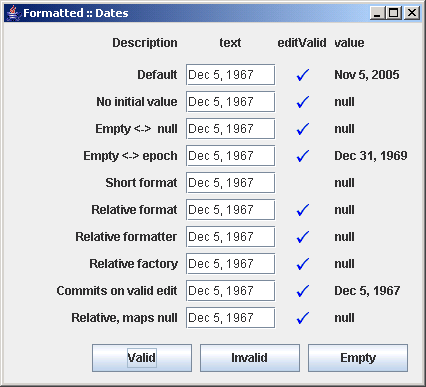
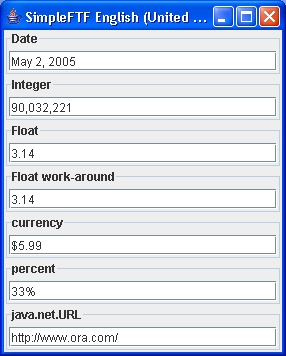
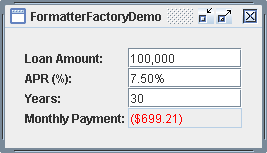
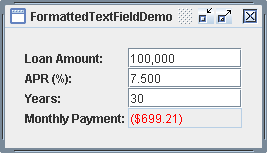
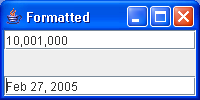
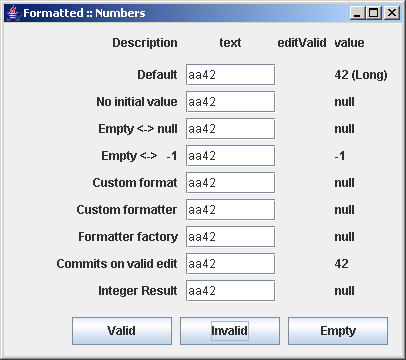
different configurations of JFormattedTextField: Number
/*
 * Copyright (c) 2003-2005 JGoodies Karsten Lentzsch. All Rights Reserved.
 *
 * Redistribution and use in source and binary forms, with or without
 * modification, are permitted provided that the following conditions are met:
 *
 *  o Redistributions of source code must retain the above copyright notice,
 *    this list of conditions and the following disclaimer.
 *
 *  o Redistributions in binary form must reproduce the above copyright notice,
 *    this list of conditions and the following disclaimer in the documentation
 *    and/or other materials provided with the distribution.
 *
 *  o Neither the name of JGoodies Karsten Lentzsch nor the names of
 *    its contributors may be used to endorse or promote products derived
 *    from this software without specific prior written permission.
 *
 * THIS SOFTWARE IS PROVIDED BY THE COPYRIGHT HOLDERS AND CONTRIBUTORS "AS IS"
 * AND ANY EXPRESS OR IMPLIED WARRANTIES, INCLUDING, BUT NOT LIMITED TO,
 * THE IMPLIED WARRANTIES OF MERCHANTABILITY AND FITNESS FOR A PARTICULAR
 * PURPOSE ARE DISCLAIMED. IN NO EVENT SHALL THE COPYRIGHT OWNER OR
 * CONTRIBUTORS BE LIABLE FOR ANY DIRECT, INDIRECT, INCIDENTAL, SPECIAL,
 * EXEMPLARY, OR CONSEQUENTIAL DAMAGES (INCLUDING, BUT NOT LIMITED TO,
 * PROCUREMENT OF SUBSTITUTE GOODS OR SERVICES; LOSS OF USE, DATA, OR PROFITS;
 * OR BUSINESS INTERRUPTION) HOWEVER CAUSED AND ON ANY THEORY OF LIABILITY,
 * WHETHER IN CONTRACT, STRICT LIABILITY, OR TORT (INCLUDING NEGLIGENCE
 * OR OTHERWISE) ARISING IN ANY WAY OUT OF THE USE OF THIS SOFTWARE,
 * EVEN IF ADVISED OF THE POSSIBILITY OF SUCH DAMAGE.
 */

package com.jgoodies.validation.tutorial.formatted;

import java.text.Format;
import java.text.NumberFormat;
import java.util.LinkedList;
import java.util.List;

import javax.swing.*;
import javax.swing.text.DefaultFormatter;
import javax.swing.text.DefaultFormatterFactory;
import javax.swing.text.NumberFormatter;

import com.jgoodies.forms.builder.DefaultFormBuilder;
import com.jgoodies.forms.layout.FormLayout;
import com.jgoodies.validation.formatter.EmptyNumberFormatter;
import com.jgoodies.validation.tutorial.formatted.format.DisplayFormat;
import com.jgoodies.validation.tutorial.formatted.formatter.CustomNumberFormatter;
import com.jgoodies.validation.tutorial.util.MyFocusTraversalPolicy;
import com.jgoodies.validation.tutorial.util.TutorialUtils;

/**
 * Demonstrates different configurations of <code>JFormattedTextField</code>
 * to display and edit numbers. Shows<ul>
 * <li>how to use a custom NumberFormat
 * <li>how to use a custom NumberFormatter
 * <li>how to use a custom FormatterFactory
 * <li>how to reset a number to <code>null</code>
 * <li>how to map the empty string to a special number
 * <li>how to commit values on valid texts
 * <li>how to set the class of the result
 * </ul><p>
 *
 * To look under the hood of this component, this class exposes
 * the bound properties <em>text</em>, <em>value</em> and <em>editValid</em>.
 *
 * @author  Karsten Lentzsch
 * @version $Revision: 1.9 $
 *
 * @see     JFormattedTextField
 * @see     JFormattedTextField.AbstractFormatter
 */

public final class NumberExample {

    public static void main(String[] args) {
        try {
            UIManager.setLookAndFeel("com.jgoodies.looks.plastic.PlasticXPLookAndFeel");
        } catch (Exception e) {
            // Likely Plastic is not in the classpath; ignore it.
        }
        JFrame frame = new JFrame();
        frame.setTitle("Formatted :: Numbers");
        frame.setDefaultCloseOperation(WindowConstants.EXIT_ON_CLOSE);
        JComponent panel = new NumberExample()
                .buildPanel();
        frame.getContentPane().add(panel);
        frame.pack();
        TutorialUtils.locateOnScreenCenter(frame);
        frame.setVisible(true);
    }

    /**
     * Builds and returns a panel with a header row and the sample rows.
     *
     * @return the example panel with a header and the sample rows
     */
    public JComponent buildPanel() {
        FormLayout layout = new FormLayout(
                "r:max(80dlu;pref), 4dlu, 45dlu, 1dlu, pref, 4dlu, pref, 0:grow");

        DefaultFormBuilder builder = new DefaultFormBuilder(layout);
        builder.setDefaultDialogBorder();
        builder.getPanel().setFocusTraversalPolicy(
                MyFocusTraversalPolicy.INSTANCE);

        Utils.appendTitleRow(builder, "Description");
        List fields = appendDemoRows(builder);
        Utils.appendButtonBar(builder, fields, "42", "aa42");
        return builder.getPanel();
    }


    /**
     * Appends the demo rows to the given builder and returns the List of
     * formatted text fields.
     *
     * @param builder  the builder used to add components to
     * @return the List of formatted text fields
     */
    private List appendDemoRows(DefaultFormBuilder builder) {
        // The Formatter is choosen by the initial value.
        JFormattedTextField defaultNumberField =
            new JFormattedTextField(new Long(42));

        // The Formatter is choosen by the given Format.
        JFormattedTextField noInitialValueField =
            new JFormattedTextField(NumberFormat.getIntegerInstance());

        // Uses a custom NumberFormat.
        NumberFormat customFormat = NumberFormat.getIntegerInstance();
        customFormat.setMinimumIntegerDigits(3);
        JFormattedTextField customFormatField =
            new JFormattedTextField(new NumberFormatter(customFormat));

        // Uses a custom NumberFormatter that prints natural language strings.
        JFormattedTextField customFormatterField =
            new JFormattedTextField(new CustomNumberFormatter());

        // Uses a custom FormatterFactory that used different formatters
        // for the display and while editing.
        DefaultFormatterFactory formatterFactory =
            new DefaultFormatterFactory(new NumberFormatter(),
                                        new CustomNumberFormatter());
        JFormattedTextField formatterFactoryField =
            new JFormattedTextField(formatterFactory);

        // Wraps a NumberFormatter to map empty strings to null and vice versa.
        JFormattedTextField numberOrNullField =
            new JFormattedTextField(new EmptyNumberFormatter());

        // Wraps a NumberFormatter to map empty strings to -1 and vice versa.
        Integer emptyValue = new Integer(-1);
        JFormattedTextField numberOrEmptyValueField =
            new JFormattedTextField(new EmptyNumberFormatter(emptyValue));
        numberOrEmptyValueField.setValue(emptyValue);

        // Commits values on valid edit texts.
        DefaultFormatter formatter = new NumberFormatter();
        formatter.setCommitsOnValidEdit(true);
        JFormattedTextField commitOnValidEditField =
            new JFormattedTextField(formatter);

        // Returns number values of type Integer
        NumberFormatter numberFormatter = new NumberFormatter();
        numberFormatter.setValueClass(Integer.class);
        JFormattedTextField integerField =
            new JFormattedTextField(numberFormatter);

        Format displayFormat = new DisplayFormat(NumberFormat.getIntegerInstance());
        Format typedDisplayFormat = new DisplayFormat(NumberFormat.getIntegerInstance(), true);
        List fields = new LinkedList();
        fields.add(Utils.appendRow(builder, "Default",               defaultNumberField,      typedDisplayFormat));
        fields.add(Utils.appendRow(builder, "No initial value",      noInitialValueField,     displayFormat));
        fields.add(Utils.appendRow(builder, "Empty <-> null",        numberOrNullField,       displayFormat));
        fields.add(Utils.appendRow(builder, "Empty <->   -1",        numberOrEmptyValueField, displayFormat));
        fields.add(Utils.appendRow(builder, "Custom format",         customFormatField,       displayFormat));
        fields.add(Utils.appendRow(builder, "Custom formatter",      customFormatterField,    displayFormat));
        fields.add(Utils.appendRow(builder, "Formatter factory",     formatterFactoryField,   displayFormat));
        fields.add(Utils.appendRow(builder, "Commits on valid edit", commitOnValidEditField,  displayFormat));
        fields.add(Utils.appendRow(builder, "Integer Result",        integerField,            typedDisplayFormat));

        return fields;
    }

}
 validation.zip( 654 k)
Related examples in the same category