Add Item to Most Recent Used Item List

Imports System
Imports System.Windows.Forms
Imports System.Collections.Generic
Imports System.ComponentModel

Public Class MainClass

   Shared Sub Main()
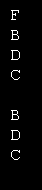
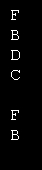
       Dim the_items As New MostRecentList(Of String)(4)
       the_items.Add("A")
       the_items.Add("B")
       the_items.Add("C")
       the_items.Add("D")
       the_items.Add("D")
       the_items.Add("B")
       the_items.Add("F")

       For i As Integer = 0 To the_items.Count - 1
            Console.WriteLine(the_items.Item(i))
       Next i

   End Sub

End Class


Public Class MostRecentList(Of ItemType)
    Public Sub New(ByVal max_items As Integer)
        MaxItems = max_items
    End Sub

    Private m_Items As New List(Of ItemType)
    <Description("The items."), _
     Category("Data")> _
    Public Property Item(ByVal index As Integer) As ItemType
        Get
            Return m_Items(index)
        End Get
        Set(ByVal value As ItemType)
            m_Items(index) = value
        End Set
    End Property

    Private m_MaxItems As Integer = 4
    <Description("The maximum number of items in the list."), _
     Category("Data")> _
    Public Property MaxItems() As Integer
        Get
            Return m_MaxItems
        End Get
        Set(ByVal value As Integer)
            m_MaxItems = value

            Do While m_Items.Count > m_MaxItems
                m_Items.RemoveAt(m_Items.Count - 1)
            Loop
        End Set
    End Property

    <Description("The current number of items."), _
     Category("Data")> _
    Public ReadOnly Property Count() As Integer
        Get
            Return m_Items.Count
        End Get
    End Property

    Public Sub Add(ByVal value As ItemType)
        If m_Items.Contains(value) Then m_Items.Remove(value)

        m_Items.Insert(0, value)

        If m_Items.Count > m_MaxItems Then m_Items.RemoveAt(m_Items.Count - 1)
    End Sub

    Public Sub Remove(ByVal value As ItemType)
        m_Items.Remove(value)
    End Sub

    Public Sub RemoveAt(ByVal index As Integer)
        m_Items.RemoveAt(index)
    End Sub
End Class
Related examples in the same category