Your own List Data structure
Imports System

Public Class MainClass
  Public Shared Sub Main()
      Dim list As List = New List()

      Dim aBoolean As Boolean = True
      Dim aCharacter As Char = "$"c
      Dim anInteger As Integer = 34
      Dim aString As String = "www.java2s.com"

      list.InsertAtFront(aBoolean)
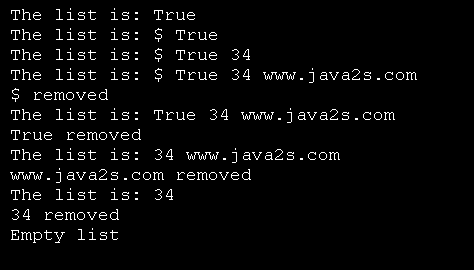
      Console.WriteLine(list)

      list.InsertAtFront(aCharacter)
      Console.WriteLine(list)

      list.InsertAtBack(anInteger)
      Console.WriteLine(list)

      list.InsertAtBack(aString)
      Console.WriteLine(list)

      Dim removedObject As Object

      Try
         removedObject = list.RemoveFromFront()
         Console.WriteLine(Convert.ToString(removedObject) & " removed")

         Console.WriteLine(list)

         removedObject = list.RemoveFromFront()
         Console.WriteLine(Convert.ToString(removedObject) & _
            " removed")

         Console.WriteLine(list)

         removedObject = list.RemoveFromBack()
         Console.WriteLine(Convert.ToString(removedObject) & _
            " removed")

         Console.WriteLine(list)

         removedObject = list.RemoveFromBack()
         Console.WriteLine(Convert.ToString(removedObject) & _
            " removed")

         Console.WriteLine(list)

      Catch emptyListException As EmptyListException
         Console.Error.WriteLine(vbCrLf & _
            Convert.ToString(emptyListException))
      End Try
  End Sub
End Class


Public Class List
   Private firstNode As ListNode
   Private lastNode As ListNode
   Private name As String

   Public Sub New(ByVal listName As String)
      name = listName
      firstNode = Nothing
      lastNode = Nothing
   End Sub

   Public Sub New()
      MyClass.New("list")
   End Sub

   Public Sub InsertAtFront(ByVal insertItem As Object)

      SyncLock (Me)
         If IsEmpty() Then
            lastNode = New ListNode(insertItem)
            firstNode = lastNode
         Else
            firstNode = New ListNode(insertItem, firstNode)
         End If
      End SyncLock

   End Sub

   Public Sub InsertAtBack(ByVal insertItem As Object)
      SyncLock (Me)
         If IsEmpty() Then
            lastNode = New ListNode(insertItem)
            firstNode = lastNode
         Else
            lastNode.NextNode = New ListNode(insertItem)
            lastNode = lastNode.NextNode
         End If
      End SyncLock
   End Sub

   Public Function RemoveFromFront() As Object
      SyncLock (Me)
         Dim removeItem As Object = Nothing

         If IsEmpty() Then
            Throw New EmptyListException(name)
         End If
         removeItem = firstNode.Data
         If firstNode Is lastNode Then
            firstNode = Nothing
            lastNode = Nothing
         Else
            firstNode = firstNode.NextNode
         End If

         Return removeItem
      End SyncLock

   End Function

   Public Function RemoveFromBack() As Object
      SyncLock (Me)
         Dim removeItem As Object = Nothing
         If IsEmpty() Then
            Throw New EmptyListException(name)
         End If

         removeItem = lastNode.Data

         If firstNode Is lastNode Then
            lastNode = Nothing
            firstNode = lastNode
         Else
            Dim current As ListNode = firstNode

            While (Not (current.NextNode Is lastNode))
               current = current.NextNode
            End While

            lastNode = current
            current.NextNode = Nothing
         End If

         Return removeItem
      End SyncLock
   End Function

   Public Function IsEmpty() As Boolean
      SyncLock (Me)
         If firstNode Is Nothing Then
            Return True
         Else
            Return False
         End If
      End SyncLock
   End Function

   Public Overrides Function ToString() As String
      Dim str As String = New String("")
      SyncLock (Me)
         If IsEmpty() Then
            Return "Empty " & name
         End If
         str = "The " & name & " is: "
         Dim current As ListNode = firstNode

         While Not current Is Nothing
            str += current.Data & " "
            current = current.NextNode
         End While

         Return str

      End SyncLock
   End Function

End Class


Public Class ListNode
   Private mData As Object
   Private mNextNode As ListNode

   Public Sub New(ByVal dataValue As Object)
      MyClass.New(dataValue, Nothing)
   End Sub

   Public Sub New(ByVal dataValue As Object, _
      ByVal nextNodeValue As Object)
      mData = dataValue
      mNextNode = nextNodeValue
   End Sub

   Public ReadOnly Property Data() As Object
      Get
         Return mData
      End Get
   End Property

   Public Property NextNode() As ListNode
      Get
         Return mNextNode
      End Get
      Set(ByVal value As ListNode)
         mNextNode = value
      End Set

   End Property

End Class


Public Class EmptyListException
   Inherits ApplicationException

   Public Sub New(ByVal name As String)
      MyBase.New("The " & name & " is empty")
   End Sub

End Class
Related examples in the same category