A Cancellable ProgressBar While Processing on a Background Thread : Thread « Windows Presentation Foundation « VB.Net

Home
VB.Net
1.2D
2.Application
3.Class
4.Data Structure
5.Data Types
6.Database ADO.net
7.Date Time
8.Development
9.Event
10.File Directory
11.Generics
12.GUI
13.Internationalization I18N
14.Language Basics
15.LINQ
16.Network Remote
17.Reflection
18.Security
19.Thread
20.Windows Presentation Foundation
21.Windows System
22.XML
23.XML LINQ
VB.Net » Windows Presentation Foundation » ThreadScreenshots 
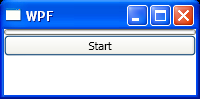
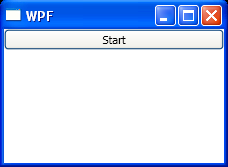
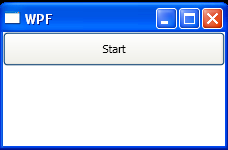
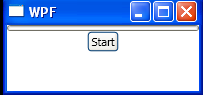
A Cancellable ProgressBar While Processing on a Background Thread
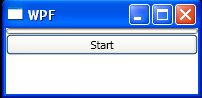
    
<Window x:Class="WpfApplication1.Window1"
    xmlns="http://schemas.microsoft.com/winfx/2006/xaml/presentation"
    xmlns:x="http://schemas.microsoft.com/winfx/2006/xaml"
    Title="WPF" Height="100" Width="200">
    <StackPanel>
        <ProgressBar Name="progressBar"/>
        <Button Name="button" Click="button_Click">
            Start
        </Button>
    </StackPanel>
</Window>
//File:Window.xaml.vb
Imports System.ComponentModel
Imports System.Threading
Imports System.Windows
Imports System.Windows.Input

Namespace WpfApplication1
  Public Partial Class Window1
    Inherits Window
    Private worker As New BackgroundWorker()

    Public Sub New()
      InitializeComponent()
      worker.WorkerReportsProgress = True
      worker.WorkerSupportsCancellation = True
      AddHandler worker.DoWork, New DoWorkEventHandler(AddressOf worker_DoWork)
      AddHandler worker.RunWorkerCompleted, New RunWorkerCompletedEventHandler(AddressOf worker_RunWorkerCompleted)
      AddHandler worker.ProgressChanged, AddressOf worker_ProgressChanged
    End Sub

    Private Sub button_Click(sender As Object, e As RoutedEventArgs)
      If Not worker.IsBusy Then
        Me.Cursor = Cursors.Wait
        worker.RunWorkerAsync()
        button.Content = "Cancel"
      Else
        worker.CancelAsync()
      End If
    End Sub

    Private Sub worker_RunWorkerCompleted(sender As Object, e As RunWorkerCompletedEventArgs)
      Me.Cursor = Cursors.Arrow
      If e.Cancelled Then
        MessageBox.Show("Operation was canceled")
      ElseIf e.[ErrorIsNot Nothing Then
        MessageBox.Show(e.[Error].Message)
      End If

      button.Content = "Start"
    End Sub

    Private Sub worker_DoWork(sender As Object, e As DoWorkEventArgs)
      For i As Integer = To 100
        If worker.CancellationPending Then
          e.Cancel = True
          Return
        End If
        Thread.Sleep(100)
        worker.ReportProgress(i)
      Next
    End Sub
    Private Sub worker_ProgressChanged(sender As Object, e As ProgressChangedEventArgs)
      progressBar.Value = e.ProgressPercentage
    End Sub
  End Class
End Namespace


Related examples in the same category
1.Create a multi threaded web browsing application.
2.Show a Continuous Animation During an Asynchronous ProcessShow a Continuous Animation During an Asynchronous Process
3.Load the Data for a Window Asynchronously After It Has RenderedLoad the Data for a Window Asynchronously After It Has Rendered
4.Check Whether You Are Running on the UI ThreadCheck Whether You Are Running on the UI Thread
5.Ensure That You Are Running on the UI ThreadEnsure That You Are Running on the UI Thread
6.Show a Continuous Progress Bar While Processing on a Background ThreadShow a Continuous Progress Bar While Processing on a Background Thread
7.Execute a Method Asynchronously Using the Dispatcher QueueExecute a Method Asynchronously Using the Dispatcher Queue
8.Thread Sleep in Button Click handlerThread Sleep in Button Click handler
9.Execute a Method Asynchronously Using a Background Worker ThreadExecute a Method Asynchronously Using a Background Worker Thread
10.Track the Progress of a Background Worker ThreadTrack the Progress of a Background Worker Thread
11.Support the Cancellation of a Background Worker ThreadSupport the Cancellation of a Background Worker Thread
12.Create a Background Worker Thread in XAMLCreate a Background Worker Thread in XAML
13.WPF ThreadingWPF Threading
14.BlockThread.xamlBlockThread.xaml
15.Keep the UI from becoming non-responsive in single threaded application which performs a long operation.Keep the UI from becoming non-responsive in single threaded application which performs a long operation.
java2s.com  | Contact Us | Privacy Policy
Copyright 2009 - 12 Demo Source and Support. All rights reserved.
All other trademarks are property of their respective owners.