Reference XML data as a database table
Imports System
Imports System.Xml
Imports System.Xml.Schema
Imports System.IO
Imports System.Data


Public Class MainClass

    Shared Sub Main()
        Dim MyDS As New DataSet()
        MyDS.ReadXmlSchema("book.xdr")
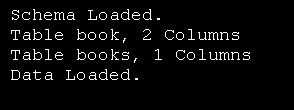
        Console.WriteLine("Schema Loaded.")

        Dim Table As DataTable
        For Each Table In MyDS.Tables
            Console.WriteLine("Table {0}, {1} Columns", _
                              Table.TableName, Table.Columns.Count)
        Next

        MyDS.ReadXml("book.xml", XmlReadMode.IgnoreSchema)
        Console.WriteLine("Data Loaded.")
        Console.WriteLine()
        Dim Book As DataRow
        For Each Book In MyDS.Tables("Book").Rows
            Console.WriteLine("{0} : {1} - ${2}", Book("Title"))
        Next
    End Sub

End Class


'book.xdr
'<?xml version = "1.0"?>

'<Schema xmlns = "urn:schemas-microsoft-com:xml-data">
'   <ElementType name = "title" content = "textOnly"
'      model = "closed" />

'   <ElementType name = "book" content = "eltOnly" model = "closed">
'      <element type = "title" minOccurs = "1" maxOccurs = "1" />
'   </ElementType>

'   <ElementType name = "books" content = "eltOnly" model = "closed">
'      <element type = "book" minOccurs = "0" maxOccurs = "*" />
'   </ElementType>
'</Schema>

'File: book.xml
'<?xml version = "1.0"?>

'<books xmlns = "x-schema:book.xdr">
'   <book>
'      <title>C# How to Program</title>
'   </book>

'   <book>
'      <title>Java How to Program, 4/e</title>
'   </book>

'   <book>
'      <title>Visual Basic .NET How to Program</title>
'   </book>

'   <book>
'      <title>Advanced Java 2 Platform How to Program</title>
'   </book>

'   <book>
'      <title>Python How to Program</title>
'   </book>
'</books>
Related examples in the same category