using System;
using System.Drawing;
using System.Windows.Forms;
using System.Data;
using System.Data.SqlClient;

public class ComboBoxes : Form
{
  ComboBox cmb;
  Button btnDisplay;
  Button btnInsert;
  Button btnSelect;
  Label lblEdit;
  TextBox txtDisplay;
  Boolean boolChange = false;
  Boolean boolProcessed = false;

  public ComboBoxes()
  {
    Size = new Size(300,400);
    this.Load += new EventHandler(this_Load);

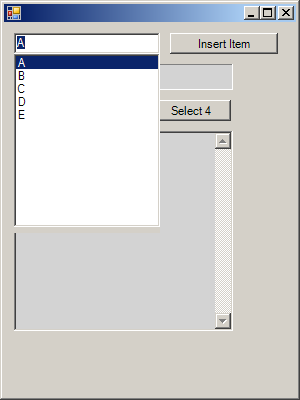
    cmb = new ComboBox();
    cmb.Parent = this;
    cmb.Location = new Point(10,10);
    cmb.Size = new Size(ClientSize.Width / 2, Height - 200);
    cmb.Anchor = AnchorStyles.Top | AnchorStyles.Left | AnchorStyles.Right | AnchorStyles.Bottom;
    cmb.DropDownStyle = ComboBoxStyle.DropDown;
    cmb.DropDownStyle = ComboBoxStyle.Simple;
    cmb.DropDownWidth = (int)(cmb.Width * 1.5);
    cmb.MaxDropDownItems = 12;
    cmb.MaxLength = 20;

    cmb.SelectionChangeCommitted += new EventHandler(cmb_SelectionChangeCommitted);
    cmb.Leave += new EventHandler(cmb_Leave);

    btnInsert = new Button();
    btnInsert.Parent = this;
    btnInsert.Text = "&Insert Item";
    btnInsert.Size = new Size((int)(Font.Height * .75) * btnInsert.Text.Length, cmb.Height);
    btnInsert.Location = new Point(cmb.Right + 10, cmb.Top);
    btnInsert.Click += new System.EventHandler(btnInsert_Click);

    lblEdit = new Label();
    lblEdit.Parent = this;
    lblEdit.BorderStyle = BorderStyle.Fixed3D;
    lblEdit.Location = new Point(cmb.Left, cmb.Bottom + 10);
    lblEdit.BackColor = Color.LightGray;
    lblEdit.Text = "";
    lblEdit.Size = new Size(cmb.DropDownWidth, Font.Height * 2);

    btnDisplay = new Button();
    btnDisplay.Parent = this;
    btnDisplay.Text = "&Display Items";
    btnDisplay.Size = new Size((int)(Font.Height * .75) * btnDisplay.Text.Length, cmb.Height);
    btnDisplay.Location = new Point(lblEdit.Left, lblEdit.Bottom + 10);
    btnDisplay.Click += new System.EventHandler(btnDisplay_Click);

    txtDisplay = new TextBox();
    txtDisplay.Parent = this;
    txtDisplay.Location = new Point(btnDisplay.Left, btnDisplay.Bottom + 10);
    txtDisplay.Multiline = true;
    txtDisplay.ReadOnly = true;
    txtDisplay.BackColor = Color.LightGray;
    txtDisplay.ScrollBars = ScrollBars.Vertical;
    txtDisplay.Text = "";
    txtDisplay.Size = new Size(cmb.DropDownWidth, 200);

    btnSelect = new Button();
    btnSelect.Parent = this;
    btnSelect.Text = "&Select 4";
    btnSelect.Size = new Size((int)(Font.Height * .75) * btnSelect.Text.Length, cmb.Height);
    btnSelect.Location = new Point(btnDisplay.Right + 10, btnDisplay.Top);
    btnSelect.Click += new System.EventHandler(btnSelect_Click);

      cmb.Items.Add("A");
      cmb.Items.Add("B");
      cmb.Items.Add("C");
      cmb.Items.Add("D");
      cmb.Items.Add("E");
    cmb.SelectedIndex = 0;
  }

  static void Main()
  {
    Application.Run(new ComboBoxes());
  }

  private void this_Load(object sender, EventArgs e)
  {
    cmb.TextChanged += new EventHandler(cmb_TextChanged);
    cmb.SelectedIndexChanged += new EventHandler(cmb_SelectedIndexChanged);
  }

  private void cmb_TextChanged(object sender, EventArgs e)
  {
    if (!boolProcessed)
      lblEdit.Text = cmb.Text;
    boolChange = true;
  }
  private void cmb_SelectedIndexChanged(object sender, EventArgs e)
  {
    if (boolChange)
    {
      boolChange = false;
      boolProcessed = false;
    }
  }

  private void cmb_SelectionChangeCommitted(object sender, EventArgs e)
  {
    if (boolChange)
      ProcessChange();
  }

  private void cmb_Leave(object sender, EventArgs e)
  {
    if (boolChange)
    {
      ProcessChange();
      boolChange = false;
    }
  }

  private void ProcessChange()
  {
    lblEdit.Text = "Edited: " + cmb.Text;
    boolProcessed = true;
  }

  private void btnDisplay_Click(object sender, EventArgs e)
  {
    string str = DateTime.Now.ToString() + "\r\n";
    foreach (object item in cmb.Items)
    {
      str += item.ToString() + "\r\n";
    }

    txtDisplay.Text = str;
  }

  private void btnSelect_Click(object sender, EventArgs e)
  {
    cmb.Select(1,2);
  }

  private void btnInsert_Click(object sender, EventArgs e)
  {
    if (cmb.FindStringExact(cmb.Text) != -1)
    {
      MessageBox.Show("'" + cmb.Text + "' already exists in the list.\r\n" +
          "Will not be added again.",
          "Already Exists!");
    }
    else if (cmb.Text == "")
    {
      MessageBox.Show("There is nothing to add.","Nothing There");
    }
    else
    {
      cmb.Items.Add(cmb.Text);
    }
  }
}