Draw string along a circle : Draw String « 2D « C# / CSharp Tutorial
- C# / CSharp Tutorial
- 2D
- Draw String
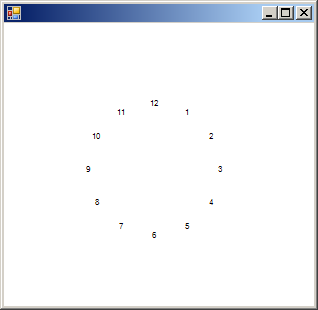
using System;
using System.Drawing;
using System.Collections;
using System.ComponentModel;
using System.Windows.Forms;
using System.Data;

public class DrawStringAlignACircle : System.Windows.Forms.Form
{
  private System.ComponentModel.Container components = null;

  public DrawStringAlignACircle()
  {
    InitializeComponent();
    BackColor = SystemColors.Window;
    ForeColor = SystemColors.WindowText;
  }

  protected override void OnPaint ( PaintEventArgs e )
  {
    Graphics g = e.Graphics;
    SetScale(g);
    DrawFace(g);
    base.OnPaint(e);
  }
  private void InitializeComponent()
  {
    this.AutoScaleBaseSize = new System.Drawing.Size(5, 13);
    this.ClientSize = new System.Drawing.Size(292, 266);

  }

  [STAThread]
  static void Main()
  {
    Application.Run(new DrawStringAlignACircle());
  }

  private void SetScale(Graphics g)
  {
    g.TranslateTransform(Width/2, Height/2);

    float inches = Math.Min(Width / g.DpiX, Height / g.DpiX);

    g.ScaleTransform(inches * g.DpiX / 2000, inches * g.DpiY / 2000);
  }

  private void DrawFace(Graphics g)
  {
    Brush brush = new SolidBrush(ForeColor);
    Font font = new Font("Arial", 40);

    float x, y;

    const int numHours = 12;
    const int deg = 360 / numHours;
    const int FaceRadius = 450;

    for (int i = 1; i <= numHours; i++)
    {
      x = GetCos(i*deg + 90) * FaceRadius;
      y = GetSin(i*deg + 90) * FaceRadius;

      StringFormat format = new StringFormat();
      format.Alignment = StringAlignment.Center;
      format.LineAlignment = StringAlignment.Center;

      g.DrawString( i.ToString(), font, brush, -x, -y,format);

    }
    brush.Dispose();
    font.Dispose();
  }

  private static float GetSin(float degAngle)
  {
    return (float) Math.Sin(Math.PI * degAngle / 180f);
  }

  private static float GetCos(float degAngle)
  {
    return (float) Math.Cos(Math.PI * degAngle / 180f);
  }

}