CaretListener Interface and CaretEvent Class : JTextComponent « Swing « Java Tutorial

Java Tutorial
1. Language
2. Data Type
3. Operators
4. Statement Control
5. Class Definition
6. Development
7. Reflection
8. Regular Expressions
9. Collections
10. Thread
11. File
12. Generics
13. I18N
14. Swing
15. Swing Event
16. 2D Graphics
17. SWT
18. SWT 2D Graphics
19. Network
20. Database
21. Hibernate
22. JPA
23. JSP
24. JSTL
25. Servlet
26. Web Services SOA
27. EJB3
28. Spring
29. PDF
30. Email
31. J2ME
32. J2EE Application
33. XML
34. Design Pattern
35. Log
36. Security
37. Apache Common
38. Ant
39. JUnit
Java
Java Source Code / Java Documentation
Java Open Source
Jar File Download
Java Articles
Java Products
Java by API
C# / C Sharp
C# / CSharp Tutorial
ASP.Net
ASP.NET Tutorial
JavaScript DHTML
JavaScript Tutorial
JavaScript Reference
HTML / CSS
HTML CSS Reference
C / ANSI-C
C Tutorial
C++
C++ Tutorial
Ruby
PHP
Python
SQL Server / T-SQL
SQL Server / T-SQL Tutorial
Oracle PL / SQL
Oracle PL/SQL Tutorial
PostgreSQL
SQL / MySQL
MySQL Tutorial
VB.Net
VB.Net Tutorial
Flash / Flex / ActionScript
VBA / Excel / Access / Word
Microsoft Office PowerPoint 2007 Tutorial
Microsoft Office Excel 2007 Tutorial
Microsoft Office Word 2007 Tutorial
Java Tutorial » Swing » JTextComponent 
14. 14. 7. CaretListener Interface and CaretEvent Class
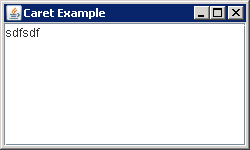
CaretListener Interface and CaretEvent Class
import java.awt.BorderLayout;

import javax.swing.JFrame;
import javax.swing.JScrollPane;
import javax.swing.JTextArea;
import javax.swing.event.CaretEvent;
import javax.swing.event.CaretListener;

public class CaretSample {
  public static void main(String args[]) {
    JFrame frame = new JFrame("Caret Example");
    frame.setDefaultCloseOperation(JFrame.EXIT_ON_CLOSE);

    JTextArea textArea = new JTextArea();
    JScrollPane scrollPane = new JScrollPane(textArea);
    frame.add(scrollPane, BorderLayout.CENTER);
    
    CaretListener listener = new CaretListener() {
      public void caretUpdate(CaretEvent caretEvent) {
        System.out.println("Dot: "+ caretEvent.getDot());
        System.out.println("Mark: "+caretEvent.getMark());
      }
    };

    textArea.addCaretListener(listener);

    frame.setSize(250150);
    frame.setVisible(true);
  }
}
14. 14. JTextComponent
14. 14. 1. JTextComponent: the parent class for all the components used as textual views.
14. 14. 2. Drawing in the Background of a ComponentDrawing in the Background of a Component
14. 14. 3. Loading and Saving ContentLoading and Saving Content
14. 14. 4. Accessing the System ClipboardAccessing the System Clipboard
14. 14. 5. Default Editor Kit: cutActionDefault Editor Kit: cutAction
14. 14. 6. Register Keyboard action: registerKeyboardActionRegister Keyboard action: registerKeyboardAction
14. 14. 7. CaretListener Interface and CaretEvent ClassCaretListener Interface and CaretEvent Class
14. 14. 8. Restricting Caret Movement: NavigationFilterRestricting Caret Movement: NavigationFilter
14. 14. 9. Remove Key action from Text componentRemove Key action from Text component
14. 14. 10. Listening to Text Components Events with an ActionListenerListening to Text Components Events with an ActionListener
14. 14. 11. Listening to JTextField Events with an KeyListenerListening to JTextField Events with an KeyListener
14. 14. 12. Share Document
14. 14. 13. Listening to Text Components Events with an InputVerifierListening to Text Components Events with an InputVerifier
14. 14. 14. TextAction Name Constants
14. 14. 15. Using Text Component ActionsUsing Text Component Actions
14. 14. 16. Listening to Text Components Events with a DocumentListenerListening to Text Components Events with a DocumentListener
14. 14. 17. Text Component PrintingText Component Printing
14. 14. 18. GIF Writer
14. 14. 19. Text component supports both cut, copy and paste (using the DefaultEditorKit's built-in actions) and drag and drop
14. 14. 20. Document and DocumentFilter
w__w___w.___j__a___v__a_2__s___._c__o___m | Contact Us
Copyright 2003 - 08 Demo Source and Support. All rights reserved.
All other trademarks are property of their respective owners.