VLOOKUP(lookup_value,table_array,col_index_num,range_lookup) looks in the first column of a table and moves across the row to return the value of a cell : VLOOKUP « Lookup Reference functions « Microsoft Office Excel 2007 Tutorial
| 19.15.VLOOKUP | ||||
| 19.15.1. | VLOOKUP(lookup_value,table_array,col_index_num,range_lookup) looks in the first column of a table and moves across the row to return the value of a cell | 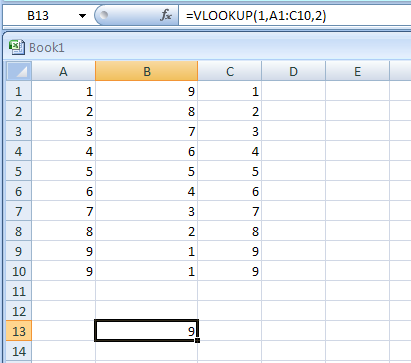 | ||
| 19.15.2. | =VLOOKUP(1,A1:C10,3,TRUE) | 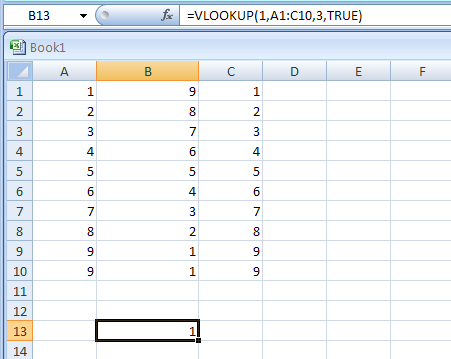 | ||
| 19.15.3. | =VLOOKUP(.7,A2:C10,3,FALSE) | 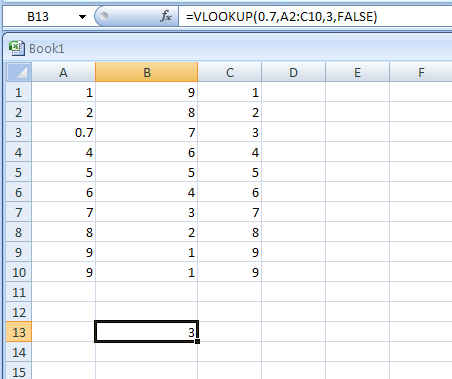 | ||
| 19.15.4. | =VLOOKUP(0.1,A2:C10,2,TRUE) | 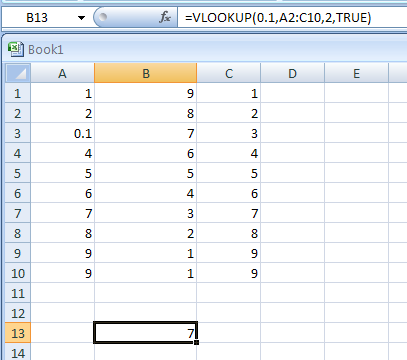 | ||