Imports System.Windows.Forms

public class GetTextPasswordField
   public Shared Sub Main
        Application.Run(New FrmButtonTest)
   End Sub
End class


Public Class FrmButtonTest
   Inherits System.Windows.Forms.Form

#Region " Windows Form Designer generated code "

   Public Sub New()
      MyBase.New()

      'This call is required by the Windows Form Designer.
      InitializeComponent()

      'Add any initialization after the InitializeComponent() call

   End Sub

   'Form overrides dispose to clean up the component list.
   Protected Overloads Overrides Sub Dispose(ByVal disposing As Boolean)
      If disposing Then
         If Not (components Is Nothing) Then
            components.Dispose()
         End If
      End If
      MyBase.Dispose(disposing)
   End Sub
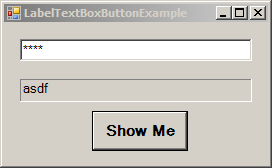
   Friend WithEvents lblOutput As System.Windows.Forms.Label
   Friend WithEvents txtInput As System.Windows.Forms.TextBox
   Friend WithEvents cmdShow As System.Windows.Forms.Button

   'Required by the Windows Form Designer
   Private components As System.ComponentModel.Container

   'NOTE: The following procedure is required by the Windows Form Designer
   'It can be modified using the Windows Form Designer.
   'Do not modify it using the code editor.
   <System.Diagnostics.DebuggerStepThrough()> Private Sub InitializeComponent()
      Me.cmdShow = New System.Windows.Forms.Button()
      Me.txtInput = New System.Windows.Forms.TextBox()
      Me.lblOutput = New System.Windows.Forms.Label()
      Me.SuspendLayout()
      '
      'cmdShow
      '
      Me.cmdShow.Font = New System.Drawing.Font("Microsoft Sans Serif", 11.25!, System.Drawing.FontStyle.Bold, System.Drawing.GraphicsUnit.Point, CType(0, Byte))
      Me.cmdShow.Location = New System.Drawing.Point(88, 88)
      Me.cmdShow.Name = "cmdShow"
      Me.cmdShow.Size = New System.Drawing.Size(96, 40)
      Me.cmdShow.TabIndex = 2
      Me.cmdShow.Text = "Show Me"
      '
      'txtInput
      '
      Me.txtInput.Font = New System.Drawing.Font("Microsoft Sans Serif", 9.75!, System.Drawing.FontStyle.Regular, System.Drawing.GraphicsUnit.Point, CType(0, Byte))
      Me.txtInput.Location = New System.Drawing.Point(16, 16)
      Me.txtInput.Name = "txtInput"
      Me.txtInput.PasswordChar = Microsoft.VisualBasic.ChrW(42)
      Me.txtInput.Size = New System.Drawing.Size(232, 22)
      Me.txtInput.TabIndex = 0
      Me.txtInput.Text = ""
      '
      'lblOutput
      '
      Me.lblOutput.BorderStyle = System.Windows.Forms.BorderStyle.Fixed3D
      Me.lblOutput.Font = New System.Drawing.Font("Microsoft Sans Serif", 9.75!, System.Drawing.FontStyle.Regular, System.Drawing.GraphicsUnit.Point, CType(0, Byte))
      Me.lblOutput.Location = New System.Drawing.Point(16, 56)
      Me.lblOutput.Name = "lblOutput"
      Me.lblOutput.Size = New System.Drawing.Size(232, 23)
      Me.lblOutput.TabIndex = 1
      '
      'FrmButtonTest
      '
      Me.AutoScaleBaseSize = New System.Drawing.Size(5, 13)
      Me.ClientSize = New System.Drawing.Size(264, 141)
      Me.Controls.AddRange(New System.Windows.Forms.Control() {Me.cmdShow, Me.lblOutput, Me.txtInput})
      Me.Name = "FrmButtonTest"
      Me.Text = "LabelTextBoxButtonExample"
      Me.ResumeLayout(False)

   End Sub

#End Region

   Private Sub cmdShow_Click(ByVal sender As System.Object, _
      ByVal e As System.EventArgs) Handles cmdShow.Click

      lblOutput.Text = txtInput.Text
   End Sub

End Class