Create MessageBox dynamically : MessageBox « GUI « VB.Net Tutorial
- VB.Net Tutorial
- GUI
- MessageBox
Imports System.Windows.Forms

public class MessageBoxCreateDy
   public Shared Sub Main
        Application.Run(New frmMessageBox)
   End Sub
End class

Public Class frmMessageBox
   Inherits System.Windows.Forms.Form

#Region " Windows Form Designer generated code "

   Public Sub New()
      MyBase.New()

      'This call is required by the Windows Form Designer.
      InitializeComponent()

      'Add any initialization after the InitializeComponent() call

   End Sub

   'Form overrides dispose to clean up the component list.
   Protected Overloads Overrides Sub Dispose(ByVal disposing As Boolean)
      If disposing Then
         If Not (components Is Nothing) Then
            components.Dispose()
         End If
      End If
      MyBase.Dispose(disposing)
   End Sub
   Friend WithEvents grpPromptandTitle As System.Windows.Forms.GroupBox
   Friend WithEvents GroupBox1 As System.Windows.Forms.GroupBox
   Friend WithEvents btnShow As System.Windows.Forms.Button
   Friend WithEvents Panel1 As System.Windows.Forms.Panel
   Friend WithEvents Splitter1 As System.Windows.Forms.Splitter
   Friend WithEvents Panel2 As System.Windows.Forms.Panel
   Friend WithEvents Label1 As System.Windows.Forms.Label
   Friend WithEvents txtText As System.Windows.Forms.TextBox
   Friend WithEvents txtCaption As System.Windows.Forms.TextBox
   Friend WithEvents Label2 As System.Windows.Forms.Label
   Friend WithEvents rdoOKOnly As System.Windows.Forms.RadioButton
   Friend WithEvents Label3 As System.Windows.Forms.Label
   Friend WithEvents rdoAbRetry As System.Windows.Forms.RadioButton
   Friend WithEvents rdoError As System.Windows.Forms.RadioButton
   Friend WithEvents rdoExclamation As System.Windows.Forms.RadioButton
   Friend WithEvents rdoRetryCancel As System.Windows.Forms.RadioButton
   Friend WithEvents rdoInformation As System.Windows.Forms.RadioButton
   Friend WithEvents rdoYesNo As System.Windows.Forms.RadioButton
   Friend WithEvents rdoYesNoCancel As System.Windows.Forms.RadioButton
   Friend WithEvents rdoOKCancel As System.Windows.Forms.RadioButton
   Friend WithEvents Label4 As System.Windows.Forms.Label
   Friend WithEvents rdoNoIcon As System.Windows.Forms.RadioButton
   Friend WithEvents rdoQuestion As System.Windows.Forms.RadioButton

   'Required by the Windows Form Designer
   Private components As System.ComponentModel.IContainer

   'NOTE: The following procedure is required by the Windows Form Designer
   'It can be modified using the Windows Form Designer.
   'Do not modify it using the code editor.
   <System.Diagnostics.DebuggerStepThrough()> Private Sub InitializeComponent()
      Me.grpPromptandTitle = New System.Windows.Forms.GroupBox()
      Me.GroupBox1 = New System.Windows.Forms.GroupBox()
      Me.btnShow = New System.Windows.Forms.Button()
      Me.Panel1 = New System.Windows.Forms.Panel()
      Me.Splitter1 = New System.Windows.Forms.Splitter()
      Me.Panel2 = New System.Windows.Forms.Panel()
      Me.Label1 = New System.Windows.Forms.Label()
      Me.txtText = New System.Windows.Forms.TextBox()
      Me.txtCaption = New System.Windows.Forms.TextBox()
      Me.Label2 = New System.Windows.Forms.Label()
      Me.rdoOKOnly = New System.Windows.Forms.RadioButton()
      Me.Label3 = New System.Windows.Forms.Label()
      Me.rdoAbRetry = New System.Windows.Forms.RadioButton()
      Me.rdoError = New System.Windows.Forms.RadioButton()
      Me.rdoExclamation = New System.Windows.Forms.RadioButton()
      Me.rdoRetryCancel = New System.Windows.Forms.RadioButton()
      Me.rdoInformation = New System.Windows.Forms.RadioButton()
      Me.rdoYesNo = New System.Windows.Forms.RadioButton()
      Me.rdoYesNoCancel = New System.Windows.Forms.RadioButton()
      Me.rdoOKCancel = New System.Windows.Forms.RadioButton()
      Me.Label4 = New System.Windows.Forms.Label()
      Me.rdoNoIcon = New System.Windows.Forms.RadioButton()
      Me.rdoQuestion = New System.Windows.Forms.RadioButton()
      Me.grpPromptandTitle.SuspendLayout()
      Me.GroupBox1.SuspendLayout()
      Me.Panel1.SuspendLayout()
      Me.Panel2.SuspendLayout()
      Me.SuspendLayout()
      '
      'grpPromptandTitle
      '
      Me.grpPromptandTitle.Controls.AddRange(New System.Windows.Forms.Control() {Me.txtCaption, Me.Label2, Me.txtText, Me.Label1})
      Me.grpPromptandTitle.Dock = System.Windows.Forms.DockStyle.Top
      Me.grpPromptandTitle.Name = "grpPromptandTitle"
      Me.grpPromptandTitle.Size = New System.Drawing.Size(456, 112)
      Me.grpPromptandTitle.TabIndex = 0
      Me.grpPromptandTitle.TabStop = False
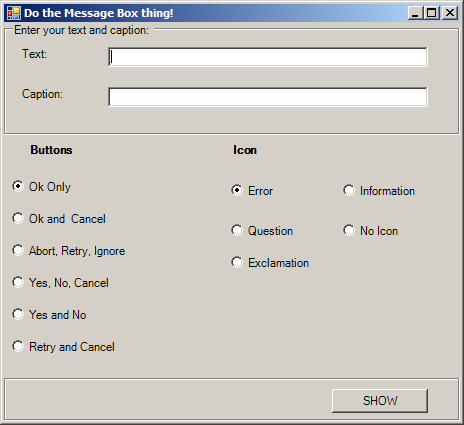
      Me.grpPromptandTitle.Text = "Enter your text and caption:"
      '
      'GroupBox1
      '
      Me.GroupBox1.Controls.AddRange(New System.Windows.Forms.Control() {Me.btnShow})
      Me.GroupBox1.Dock = System.Windows.Forms.DockStyle.Bottom
      Me.GroupBox1.Location = New System.Drawing.Point(0, 350)
      Me.GroupBox1.Name = "GroupBox1"
      Me.GroupBox1.Size = New System.Drawing.Size(456, 48)
      Me.GroupBox1.TabIndex = 3
      Me.GroupBox1.TabStop = False
      '
      'btnShow
      '
      Me.btnShow.Location = New System.Drawing.Point(328, 16)
      Me.btnShow.Name = "btnShow"
      Me.btnShow.Size = New System.Drawing.Size(96, 24)
      Me.btnShow.TabIndex = 0
      Me.btnShow.Text = "SHOW"
      '
      'Panel1
      '
      Me.Panel1.Controls.AddRange(New System.Windows.Forms.Control() {Me.Label3, Me.rdoRetryCancel, Me.rdoYesNo, Me.rdoYesNoCancel, Me.rdoAbRetry, Me.rdoOKCancel, Me.rdoOKOnly})
      Me.Panel1.Dock = System.Windows.Forms.DockStyle.Left
      Me.Panel1.Location = New System.Drawing.Point(0, 112)
      Me.Panel1.Name = "Panel1"
      Me.Panel1.Size = New System.Drawing.Size(200, 238)
      Me.Panel1.TabIndex = 1
      '
      'Splitter1
      '
      Me.Splitter1.Location = New System.Drawing.Point(200, 112)
      Me.Splitter1.Name = "Splitter1"
      Me.Splitter1.Size = New System.Drawing.Size(3, 238)
      Me.Splitter1.TabIndex = 3
      Me.Splitter1.TabStop = False
      '
      'Panel2
      '
      Me.Panel2.Controls.AddRange(New System.Windows.Forms.Control() {Me.Label4, Me.rdoExclamation, Me.rdoNoIcon, Me.rdoInformation, Me.rdoQuestion, Me.rdoError})
      Me.Panel2.Dock = System.Windows.Forms.DockStyle.Fill
      Me.Panel2.Location = New System.Drawing.Point(203, 112)
      Me.Panel2.Name = "Panel2"
      Me.Panel2.Size = New System.Drawing.Size(253, 238)
      Me.Panel2.TabIndex = 2
      '
      'Label1
      '
      Me.Label1.Location = New System.Drawing.Point(16, 24)
      Me.Label1.Name = "Label1"
      Me.Label1.Size = New System.Drawing.Size(64, 24)
      Me.Label1.TabIndex = 0
      Me.Label1.Text = "Text:"
      '
      'txtText
      '
      Me.txtText.Location = New System.Drawing.Point(104, 24)
      Me.txtText.Name = "txtText"
      Me.txtText.Size = New System.Drawing.Size(320, 20)
      Me.txtText.TabIndex = 0
      Me.txtText.Text = ""
      '
      'txtCaption
      '
      Me.txtCaption.Location = New System.Drawing.Point(104, 64)
      Me.txtCaption.Name = "txtCaption"
      Me.txtCaption.Size = New System.Drawing.Size(320, 20)
      Me.txtCaption.TabIndex = 1
      Me.txtCaption.Text = ""
      '
      'Label2
      '
      Me.Label2.Location = New System.Drawing.Point(16, 64)
      Me.Label2.Name = "Label2"
      Me.Label2.Size = New System.Drawing.Size(64, 24)
      Me.Label2.TabIndex = 0
      Me.Label2.Text = "Caption:"
      '
      'rdoOKOnly
      '
      Me.rdoOKOnly.Checked = True
      Me.rdoOKOnly.Location = New System.Drawing.Point(8, 40)
      Me.rdoOKOnly.Name = "rdoOKOnly"
      Me.rdoOKOnly.Size = New System.Drawing.Size(160, 24)
      Me.rdoOKOnly.TabIndex = 2
      Me.rdoOKOnly.TabStop = True
      Me.rdoOKOnly.Text = "Ok Only"
      '
      'Label3
      '
      Me.Label3.Font = New System.Drawing.Font("Microsoft Sans Serif", 8.25!, System.Drawing.FontStyle.Bold, System.Drawing.GraphicsUnit.Point, CType(0, Byte))
      Me.Label3.Location = New System.Drawing.Point(24, 8)
      Me.Label3.Name = "Label3"
      Me.Label3.Size = New System.Drawing.Size(104, 24)
      Me.Label3.TabIndex = 0
      Me.Label3.Text = "Buttons"
      '
      'rdoAbRetry
      '
      Me.rdoAbRetry.Location = New System.Drawing.Point(8, 104)
      Me.rdoAbRetry.Name = "rdoAbRetry"
      Me.rdoAbRetry.Size = New System.Drawing.Size(160, 24)
      Me.rdoAbRetry.TabIndex = 4
      Me.rdoAbRetry.Text = "Abort, Retry, Ignore"
      '
      'rdoError
      '
      Me.rdoError.Checked = True
      Me.rdoError.Location = New System.Drawing.Point(24, 40)
      Me.rdoError.Name = "rdoError"
      Me.rdoError.Size = New System.Drawing.Size(88, 32)
      Me.rdoError.TabIndex = 1
      Me.rdoError.TabStop = True
      Me.rdoError.Text = "Error"
      '
      'rdoExclamation
      '
      Me.rdoExclamation.Location = New System.Drawing.Point(24, 112)
      Me.rdoExclamation.Name = "rdoExclamation"
      Me.rdoExclamation.Size = New System.Drawing.Size(88, 32)
      Me.rdoExclamation.TabIndex = 3
      Me.rdoExclamation.Text = "Exclamation"
      '
      'rdoRetryCancel
      '
      Me.rdoRetryCancel.Location = New System.Drawing.Point(8, 200)
      Me.rdoRetryCancel.Name = "rdoRetryCancel"
      Me.rdoRetryCancel.Size = New System.Drawing.Size(160, 24)
      Me.rdoRetryCancel.TabIndex = 0
      Me.rdoRetryCancel.Text = "Retry and Cancel"
      '
      'rdoInformation
      '
      Me.rdoInformation.Location = New System.Drawing.Point(136, 40)
      Me.rdoInformation.Name = "rdoInformation"
      Me.rdoInformation.Size = New System.Drawing.Size(88, 32)
      Me.rdoInformation.TabIndex = 4
      Me.rdoInformation.Text = "Information"
      '
      'rdoYesNo
      '
      Me.rdoYesNo.Location = New System.Drawing.Point(8, 168)
      Me.rdoYesNo.Name = "rdoYesNo"
      Me.rdoYesNo.Size = New System.Drawing.Size(160, 24)
      Me.rdoYesNo.TabIndex = 6
      Me.rdoYesNo.Text = "Yes and No"
      '
      'rdoYesNoCancel
      '
      Me.rdoYesNoCancel.Location = New System.Drawing.Point(8, 136)
      Me.rdoYesNoCancel.Name = "rdoYesNoCancel"
      Me.rdoYesNoCancel.Size = New System.Drawing.Size(160, 24)
      Me.rdoYesNoCancel.TabIndex = 5
      Me.rdoYesNoCancel.Text = "Yes, No, Cancel"
      '
      'rdoOKCancel
      '
      Me.rdoOKCancel.Location = New System.Drawing.Point(8, 72)
      Me.rdoOKCancel.Name = "rdoOKCancel"
      Me.rdoOKCancel.Size = New System.Drawing.Size(160, 24)
      Me.rdoOKCancel.TabIndex = 3
      Me.rdoOKCancel.Text = "Ok and  Cancel"
      '
      'Label4
      '
      Me.Label4.Font = New System.Drawing.Font("Microsoft Sans Serif", 8.25!, System.Drawing.FontStyle.Bold, System.Drawing.GraphicsUnit.Point, CType(0, Byte))
      Me.Label4.Location = New System.Drawing.Point(24, 8)
      Me.Label4.Name = "Label4"
      Me.Label4.Size = New System.Drawing.Size(80, 24)
      Me.Label4.TabIndex = 0
      Me.Label4.Text = "Icon"
      '
      'rdoNoIcon
      '
      Me.rdoNoIcon.Location = New System.Drawing.Point(136, 80)
      Me.rdoNoIcon.Name = "rdoNoIcon"
      Me.rdoNoIcon.Size = New System.Drawing.Size(88, 32)
      Me.rdoNoIcon.TabIndex = 5
      Me.rdoNoIcon.Text = "No Icon"
      '
      'rdoQuestion
      '
      Me.rdoQuestion.Location = New System.Drawing.Point(24, 80)
      Me.rdoQuestion.Name = "rdoQuestion"
      Me.rdoQuestion.Size = New System.Drawing.Size(88, 32)
      Me.rdoQuestion.TabIndex = 2
      Me.rdoQuestion.Text = "Question"
      '
      'frmMessageBox
      '
      Me.AutoScaleBaseSize = New System.Drawing.Size(5, 13)
      Me.ClientSize = New System.Drawing.Size(456, 398)
      Me.Controls.AddRange(New System.Windows.Forms.Control() {Me.Panel2, Me.Splitter1, Me.Panel1, Me.GroupBox1, Me.grpPromptandTitle})
      Me.Name = "frmMessageBox"
      Me.Text = "Do the Message Box thing!"
      Me.grpPromptandTitle.ResumeLayout(False)
      Me.GroupBox1.ResumeLayout(False)
      Me.Panel1.ResumeLayout(False)
      Me.Panel2.ResumeLayout(False)
      Me.ResumeLayout(False)

   End Sub

#End Region


   Private Sub btnShow_Click(ByVal sender As Object, ByVal e As System.EventArgs) Handles btnShow.Click
      Dim buttonchoice As MessageBoxButtons
      Dim iconchoice As MessageBoxIcon
      Dim answer As DialogResult

      If rdoOKOnly.Checked = True Then
         buttonchoice = MessageBoxButtons.OK
      ElseIf rdoOKCancel.Checked = True Then
         buttonchoice = MessageBoxButtons.OKCancel
      ElseIf rdoAbRetry.Checked = True Then
         buttonchoice = MessageBoxButtons.AbortRetryIgnore
      ElseIf rdoYesNoCancel.Checked = True Then
         buttonchoice = MessageBoxButtons.YesNoCancel
      ElseIf rdoYesNo.Checked = True Then
         buttonchoice = MessageBoxButtons.YesNo
      ElseIf rdoRetryCancel.Checked = True Then
         buttonchoice = MessageBoxButtons.RetryCancel
      Else
         MessageBox.Show("Unexpected error in button selection!")
      End If

      If rdoError.Checked = True Then
         iconchoice = MessageBoxIcon.Error
      ElseIf rdoQuestion.Checked = True Then
         iconchoice = MessageBoxIcon.Question
      ElseIf rdoExclamation.Checked = True Then
         iconchoice = MessageBoxIcon.Exclamation
      ElseIf rdoInformation.Checked = True Then
         iconchoice = MessageBoxIcon.Information
      ElseIf rdoNoIcon.Checked = True Then
         iconchoice = MessageBoxIcon.None
      Else
         MessageBox.Show("Unexpected error in icon selection!")
      End If

      answer = MessageBox.Show(txtText.Text, txtCaption.Text, _
         buttonchoice, iconchoice)

      Dim evaluate As String
      If answer = DialogResult.OK Then
         evaluate = "You clicked OK!"
      ElseIf answer = DialogResult.Cancel Then
         evaluate = "You clicked Cancel!"
      ElseIf answer = DialogResult.Abort Then
         evaluate = "You clicked Abort!"
      ElseIf answer = DialogResult.Retry Then
         evaluate = "You clicked Retry!"
      ElseIf answer = DialogResult.Ignore Then
         evaluate = "You clicked Ignore!"
      ElseIf answer = DialogResult.Yes Then
         evaluate = "You clicked Yes!"
      ElseIf answer = DialogResult.No Then
         evaluate = "You clicked No!"
      Else
         evaluate = "Nothing was clicked!"
      End If

      MessageBox.Show(evaluate, "Message Box Evaluation", _
         MessageBoxButtons.OK, MessageBoxIcon.Information)
   End Sub
End Class