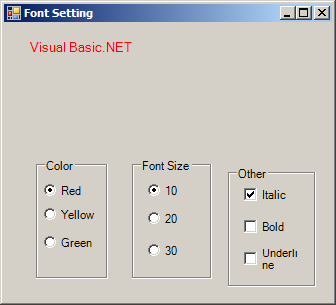
Imports System.Drawing
Imports System.Drawing.Drawing2D
Imports System.Windows.Forms

public class UseCheckBoxRadioButtonSetFont
   public Shared Sub Main
        Application.Run(New Form1)
   End Sub
End class

Public Class Form1
    Inherits System.Windows.Forms.Form
    Private LabelStyle As FontStyle

    Public Sub New()
        MyBase.New()

        InitializeComponent()

    End Sub

    Protected Overloads Overrides Sub Dispose(ByVal disposing As Boolean)
        If disposing Then
            If Not (components Is Nothing) Then
                components.Dispose()
            End If
        End If
        MyBase.Dispose(disposing)
    End Sub

    Private components As System.ComponentModel.IContainer

    Friend WithEvents Label1 As System.Windows.Forms.Label
    Friend WithEvents GroupBox1 As System.Windows.Forms.GroupBox
    Friend WithEvents RadioButton1 As System.Windows.Forms.RadioButton
    Friend WithEvents RadioButton2 As System.Windows.Forms.RadioButton
    Friend WithEvents RadioButton3 As System.Windows.Forms.RadioButton
    Friend WithEvents GroupBox2 As System.Windows.Forms.GroupBox
    Friend WithEvents RadioButton4 As System.Windows.Forms.RadioButton
    Friend WithEvents RadioButton5 As System.Windows.Forms.RadioButton
    Friend WithEvents RadioButton6 As System.Windows.Forms.RadioButton
    Friend WithEvents GroupBox3 As System.Windows.Forms.GroupBox
    Friend WithEvents CheckBox1 As System.Windows.Forms.CheckBox
    Friend WithEvents CheckBox2 As System.Windows.Forms.CheckBox
    Friend WithEvents CheckBox3 As System.Windows.Forms.CheckBox
    <System.Diagnostics.DebuggerStepThrough()> Private Sub InitializeComponent()
        Me.Label1 = New System.Windows.Forms.Label
        Me.GroupBox1 = New System.Windows.Forms.GroupBox
        Me.RadioButton1 = New System.Windows.Forms.RadioButton
        Me.RadioButton2 = New System.Windows.Forms.RadioButton
        Me.RadioButton3 = New System.Windows.Forms.RadioButton
        Me.GroupBox2 = New System.Windows.Forms.GroupBox
        Me.RadioButton4 = New System.Windows.Forms.RadioButton
        Me.RadioButton5 = New System.Windows.Forms.RadioButton
        Me.RadioButton6 = New System.Windows.Forms.RadioButton
        Me.GroupBox3 = New System.Windows.Forms.GroupBox
        Me.CheckBox1 = New System.Windows.Forms.CheckBox
        Me.CheckBox2 = New System.Windows.Forms.CheckBox
        Me.CheckBox3 = New System.Windows.Forms.CheckBox
        Me.GroupBox1.SuspendLayout()
        Me.GroupBox2.SuspendLayout()
        Me.GroupBox3.SuspendLayout()
        Me.SuspendLayout()
        '
        'Label1
        '
        Me.Label1.Font = New System.Drawing.Font("Microsoft Sans Serif", 14.25!, System.Drawing.FontStyle.Regular, System.Drawing.GraphicsUnit.Point, CType(0, Byte))
        Me.Label1.Location = New System.Drawing.Point(24, 16)
        Me.Label1.Name = "Label1"
        Me.Label1.Size = New System.Drawing.Size(288, 88)
        Me.Label1.TabIndex = 0
        Me.Label1.Text = "Visual Basic.NET"
        '
        'GroupBox1
        '
        Me.GroupBox1.Controls.Add(Me.RadioButton3)
        Me.GroupBox1.Controls.Add(Me.RadioButton2)
        Me.GroupBox1.Controls.Add(Me.RadioButton1)
        Me.GroupBox1.Location = New System.Drawing.Point(32, 136)
        Me.GroupBox1.Name = "GroupBox1"
        Me.GroupBox1.Size = New System.Drawing.Size(72, 120)
        Me.GroupBox1.TabIndex = 1
        Me.GroupBox1.TabStop = False
        Me.GroupBox1.Text = "Color"
        '
        'RadioButton1
        '
        Me.RadioButton1.Location = New System.Drawing.Point(8, 24)
        Me.RadioButton1.Name = "RadioButton1"
        Me.RadioButton1.Size = New System.Drawing.Size(56, 16)
        Me.RadioButton1.TabIndex = 0
        Me.RadioButton1.Text = "Red"
        '
        'RadioButton2
        '
        Me.RadioButton2.Location = New System.Drawing.Point(8, 48)
        Me.RadioButton2.Name = "RadioButton2"
        Me.RadioButton2.Size = New System.Drawing.Size(56, 16)
        Me.RadioButton2.TabIndex = 1
        Me.RadioButton2.Text = "Yellow"
        '
        'RadioButton3
        '
        Me.RadioButton3.Location = New System.Drawing.Point(8, 72)
        Me.RadioButton3.Name = "RadioButton3"
        Me.RadioButton3.Size = New System.Drawing.Size(56, 24)
        Me.RadioButton3.TabIndex = 2
        Me.RadioButton3.Text = "Green"
        '
        'GroupBox2
        '
        Me.GroupBox2.Controls.Add(Me.RadioButton6)
        Me.GroupBox2.Controls.Add(Me.RadioButton5)
        Me.GroupBox2.Controls.Add(Me.RadioButton4)
        Me.GroupBox2.Location = New System.Drawing.Point(128, 136)
        Me.GroupBox2.Name = "GroupBox2"
        Me.GroupBox2.Size = New System.Drawing.Size(80, 120)
        Me.GroupBox2.TabIndex = 2
        Me.GroupBox2.TabStop = False
        Me.GroupBox2.Text = "Font Size"
        '
        'RadioButton4
        '
        Me.RadioButton4.Location = New System.Drawing.Point(16, 24)
        Me.RadioButton4.Name = "RadioButton4"
        Me.RadioButton4.Size = New System.Drawing.Size(48, 16)
        Me.RadioButton4.TabIndex = 0
        Me.RadioButton4.Text = "10"
        '
        'RadioButton5
        '
        Me.RadioButton5.Location = New System.Drawing.Point(16, 48)
        Me.RadioButton5.Name = "RadioButton5"
        Me.RadioButton5.Size = New System.Drawing.Size(56, 24)
        Me.RadioButton5.TabIndex = 1
        Me.RadioButton5.Text = "20"
        '
        'RadioButton6
        '
        Me.RadioButton6.Location = New System.Drawing.Point(16, 80)
        Me.RadioButton6.Name = "RadioButton6"
        Me.RadioButton6.Size = New System.Drawing.Size(56, 24)
        Me.RadioButton6.TabIndex = 2
        Me.RadioButton6.Text = "30"
        '
        'GroupBox3
        '
        Me.GroupBox3.Controls.Add(Me.CheckBox3)
        Me.GroupBox3.Controls.Add(Me.CheckBox2)
        Me.GroupBox3.Controls.Add(Me.CheckBox1)
        Me.GroupBox3.Location = New System.Drawing.Point(224, 144)
        Me.GroupBox3.Name = "GroupBox3"
        Me.GroupBox3.Size = New System.Drawing.Size(88, 120)
        Me.GroupBox3.TabIndex = 3
        Me.GroupBox3.TabStop = False
        Me.GroupBox3.Text = "Other"
        '
        'CheckBox1
        '
        Me.CheckBox1.Location = New System.Drawing.Point(16, 16)
        Me.CheckBox1.Name = "CheckBox1"
        Me.CheckBox1.Size = New System.Drawing.Size(64, 24)
        Me.CheckBox1.TabIndex = 0
        Me.CheckBox1.Text = "Italic"
        '
        'CheckBox2
        '
        Me.CheckBox2.Location = New System.Drawing.Point(16, 48)
        Me.CheckBox2.Name = "CheckBox2"
        Me.CheckBox2.Size = New System.Drawing.Size(48, 24)
        Me.CheckBox2.TabIndex = 1
        Me.CheckBox2.Text = "Bold"
        '
        'CheckBox3
        '
        Me.CheckBox3.Location = New System.Drawing.Point(16, 80)
        Me.CheckBox3.Name = "CheckBox3"
        Me.CheckBox3.Size = New System.Drawing.Size(64, 24)
        Me.CheckBox3.TabIndex = 2
        Me.CheckBox3.Text = "Underline"
        '
        'Form1
        '
        Me.AutoScaleBaseSize = New System.Drawing.Size(5, 13)
        Me.ClientSize = New System.Drawing.Size(328, 278)
        Me.Controls.Add(Me.GroupBox3)
        Me.Controls.Add(Me.GroupBox2)
        Me.Controls.Add(Me.GroupBox1)
        Me.Controls.Add(Me.Label1)
        Me.Name = "Form1"
        Me.Text = "Font Setting"
        Me.GroupBox1.ResumeLayout(False)
        Me.GroupBox2.ResumeLayout(False)
        Me.GroupBox3.ResumeLayout(False)
        Me.ResumeLayout(False)

    End Sub

    Private Sub RadioButton1_CheckedChanged(ByVal sender As System.Object, ByVal e As System.EventArgs) Handles RadioButton1.CheckedChanged
        Label1.ForeColor = Color.Red
    End Sub

    Private Sub RadioButton2_CheckedChanged(ByVal sender As System.Object, ByVal e As System.EventArgs) Handles RadioButton2.CheckedChanged
        Label1.ForeColor = Color.Yellow
    End Sub

    Private Sub RadioButton3_CheckedChanged(ByVal sender As System.Object, ByVal e As System.EventArgs) Handles RadioButton3.CheckedChanged
        Label1.ForeColor = Color.Green
    End Sub

    Private Sub RadioButton4_CheckedChanged(ByVal sender As System.Object, ByVal e As System.EventArgs) Handles RadioButton4.CheckedChanged
        Label1.Font = New Font(Label1.Font.FontFamily, 10)
    End Sub

    Private Sub RadioButton5_CheckedChanged(ByVal sender As System.Object, ByVal e As System.EventArgs) Handles RadioButton5.CheckedChanged
        Label1.Font = New Font(Label1.Font.FontFamily, 20)
    End Sub

    Private Sub RadioButton6_CheckedChanged(ByVal sender As System.Object, ByVal e As System.EventArgs) Handles RadioButton6.CheckedChanged
        Label1.Font = New Font(Label1.Font.FontFamily, 30)
    End Sub

    Private Sub CheckBox1_CheckedChanged(ByVal sender As System.Object, ByVal e As System.EventArgs) Handles CheckBox1.CheckedChanged
        LabelStyle = LabelStyle Xor FontStyle.Italic
        Label1.Font = New Font(Label1.Font, LabelStyle)
    End Sub

    Private Sub CheckBox2_CheckedChanged(ByVal sender As System.Object, ByVal e As System.EventArgs) Handles CheckBox2.CheckedChanged
        LabelStyle = LabelStyle Xor FontStyle.Bold
        Label1.Font = New Font(Label1.Font, LabelStyle)
    End Sub

    Private Sub CheckBox3_CheckedChanged(ByVal sender As System.Object, ByVal e As System.EventArgs) Handles CheckBox3.CheckedChanged
        LabelStyle = LabelStyle Xor FontStyle.Underline
        Label1.Font = New Font(Label1.Font, LabelStyle)
    End Sub
End Class