Imports System
Imports System.Drawing
Imports System.Collections
Imports System.ComponentModel
Imports System.Windows.Forms
Imports System.Data
Imports System.Drawing.Drawing2D

public class DrawCoordinate
   public Shared Sub Main
        Application.Run(New Form1)
   End Sub
End class

Public Class Form1
    Inherits System.Windows.Forms.Form
    Private startPoint As New Point(50, 217)
    Private endPoint As New Point(50, 217)

    Public Sub New()
        MyBase.New()
        InitializeComponent()
    End Sub

    Private components As System.ComponentModel.IContainer

    Friend WithEvents Button1 As System.Windows.Forms.Button
    Friend WithEvents CheckBox1 As System.Windows.Forms.CheckBox
    <System.Diagnostics.DebuggerStepThrough()> Private Sub InitializeComponent()
        Me.Button1 = New System.Windows.Forms.Button
        Me.CheckBox1 = New System.Windows.Forms.CheckBox
        Me.SuspendLayout()
        '
        'Button1
        '
        Me.Button1.BackColor = System.Drawing.SystemColors.Desktop
        Me.Button1.Location = New System.Drawing.Point(352, 16)
        Me.Button1.Name = "Button1"
        Me.Button1.Size = New System.Drawing.Size(96, 24)
        Me.Button1.TabIndex = 0
        Me.Button1.Text = "Clear All"
        '
        'CheckBox1
        '
        Me.CheckBox1.Location = New System.Drawing.Point(352, 56)
        Me.CheckBox1.Name = "CheckBox1"
        Me.CheckBox1.TabIndex = 1
        Me.CheckBox1.Text = "Rectangle"
        '
        'Form1
        '
        Me.AutoScaleBaseSize = New System.Drawing.Size(5, 13)
        Me.BackColor = System.Drawing.SystemColors.ActiveCaptionText
        Me.ClientSize = New System.Drawing.Size(480, 317)
        Me.Controls.Add(Me.CheckBox1)
        Me.Controls.Add(Me.Button1)
        Me.Text = ""
        Me.ResumeLayout(False)

    End Sub

    Private Sub Button1_Click(ByVal sender As System.Object, ByVal e As System.EventArgs) Handles Button1.Click
        startPoint.X = 50
        startPoint.Y = 217
        endPoint.X = 50
        endPoint.Y = 217
        Me.Invalidate(Me.ClientRectangle)
    End Sub
    Protected Overrides Sub OnMouseDown(ByVal e As MouseEventArgs)
        If e.Button = MouseButtons.Left Then
            Dim g1 As Graphics = Me.CreateGraphics()
            Dim linePen As New Pen(Color.Green, 1)
            Dim ellipsePen As New Pen(Color.Red, 1)
            startPoint = endPoint
            endPoint = New Point(e.X, e.Y)
            g1.DrawLine(linePen, startPoint, endPoint)
            If checkBox1.Checked Then
                g1.DrawRectangle(ellipsePen, e.X - 2, e.Y - 2, 4, 4)
            Else
                g1.DrawEllipse(ellipsePen, e.X - 2, e.Y - 2, 4, 4)
            End If
            linePen.Dispose()
            ellipsePen.Dispose()
            g1.Dispose()
        End If
    End Sub

    Protected Overrides Sub OnPaint(ByVal e As PaintEventArgs)
        Dim g As Graphics = e.Graphics
        Dim vertFont As New Font("Verdana", 10, FontStyle.Bold)
        Dim horzFont As New Font("Verdana", 10, FontStyle.Bold)
        Dim vertBrush As New SolidBrush(Color.Black)
        Dim horzBrush As New SolidBrush(Color.Blue)
        Dim blackPen As New Pen(Color.Black, 2)
        Dim bluePen As New Pen(Color.Blue, 2)
        ' Drawing a vertical and a horizontal line
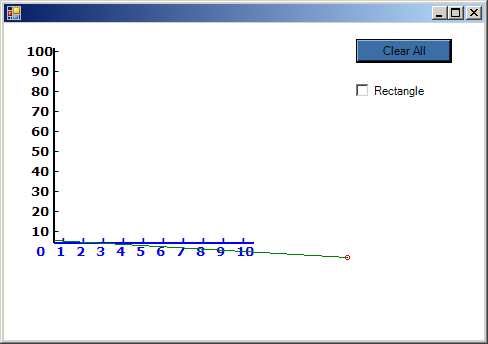
        g.DrawLine(blackPen, 50, 220, 50, 25)
        g.DrawLine(bluePen, 50, 220, 250, 220)
        'X axis drawing
        g.DrawString("0", horzFont, horzBrush, 30, 220)
        g.DrawString("1", horzFont, horzBrush, 50, 220)
        g.DrawString("2", horzFont, horzBrush, 70, 220)
        g.DrawString("3", horzFont, horzBrush, 90, 220)
        g.DrawString("4", horzFont, horzBrush, 110, 220)
        g.DrawString("5", horzFont, horzBrush, 130, 220)
        g.DrawString("6", horzFont, horzBrush, 150, 220)
        g.DrawString("7", horzFont, horzBrush, 170, 220)
        g.DrawString("8", horzFont, horzBrush, 190, 220)
        g.DrawString("9", horzFont, horzBrush, 210, 220)
        g.DrawString("10", horzFont, horzBrush, 230, 220)
        ' Drawing vertical strings
        Dim vertStrFormat As New StringFormat
        vertStrFormat.FormatFlags = StringFormatFlags.DirectionVertical

        g.DrawString("-", horzFont, horzBrush, 50, 212, vertStrFormat)
        g.DrawString("-", horzFont, horzBrush, 70, 212, vertStrFormat)
        g.DrawString("-", horzFont, horzBrush, 90, 212, vertStrFormat)
        g.DrawString("-", horzFont, horzBrush, 110, 212, vertStrFormat)
        g.DrawString("-", horzFont, horzBrush, 130, 212, vertStrFormat)
        g.DrawString("-", horzFont, horzBrush, 150, 212, vertStrFormat)
        g.DrawString("-", horzFont, horzBrush, 170, 212, vertStrFormat)
        g.DrawString("-", horzFont, horzBrush, 190, 212, vertStrFormat)
        g.DrawString("-", horzFont, horzBrush, 210, 212, vertStrFormat)
        g.DrawString("-", horzFont, horzBrush, 230, 212, vertStrFormat)
        'Y axis drawing
        g.DrawString("100-", vertFont, vertBrush, 20, 20)
        g.DrawString("90 -", vertFont, vertBrush, 25, 40)
        g.DrawString("80 -", vertFont, vertBrush, 25, 60)
        g.DrawString("70 -", vertFont, vertBrush, 25, 80)
        g.DrawString("60 -", vertFont, vertBrush, 25, 100)
        g.DrawString("50 -", vertFont, vertBrush, 25, 120)
        g.DrawString("40 -", vertFont, vertBrush, 25, 140)
        g.DrawString("30 -", vertFont, vertBrush, 25, 160)
        g.DrawString("20 -", vertFont, vertBrush, 25, 180)
        g.DrawString("10 -", vertFont, vertBrush, 25, 200)
        ' Dispose
        vertFont.Dispose()
        horzFont.Dispose()
        vertBrush.Dispose()
        horzBrush.Dispose()
        blackPen.Dispose()
        bluePen.Dispose()
    End Sub

End Class