Java Tutorial - Java char
In Java, char stores characters. Java uses Unicode to represent characters. Unicode can represent all of the characters found in all human languages.
Java char is a 16-bit type.
The range of a char is 0 to 65,536.
There are no negative chars.
Char Literals
Characters in Java are indices into the Unicode character set.
character is represented inside a pair of single quotes.
For example, 'a', 'z', and '@'.
Here is a program that demonstrates char variables:
public class Main {
  public static void main(String args[]) {
    char ch1, ch2;
/* www .  j a  v  a2 s. co  m*/
    ch1 = 88; // code for X

    ch2 = 'Y';
    System.out.print("ch1 and ch2: ");
    System.out.println(ch1 + " " + ch2);//ch1 and ch2: X Y
  }
}
The code above generates the following result.

ch1 is assigned the value 88,
which is the ASCII (and Unicode) value that corresponds to the letter X.
Example
char type value can be used as an integer type and
you can perform arithmetic operations.
public class Main {
  public static void main(String args[]) {
    char ch1;//  ww w. j  av a2 s .  c o m
    ch1 = 'X';
    System.out.println("ch1 contains " + ch1);//ch1 contains X

    ch1 = (char)(ch1 + 1); // increment ch1
    System.out.println("ch1 is now " + ch1);//ch1 is now Y
  }
}
The code above generates the following result.

Example 2
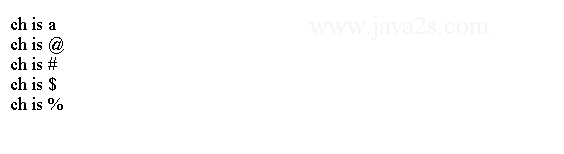
The following code shows that we can assign non-letter character to Java char type.
public class Main {
  public static void main(String[] argv) {
    char ch = 'a';
// w ww  . jav a  2 s  . com
    System.out.println("ch is " + ch);//ch is a
    ch = '@';
    System.out.println("ch is " + ch);//ch is @
    ch = '#';
    System.out.println("ch is " + ch);//ch is #
    ch = '$';
    System.out.println("ch is " + ch);//ch is $
    ch = '%';
    System.out.println("ch is " + ch);//ch is %
  }
}
The code above generates the following result.
Example 3
The following code stores unicode value into a char variable.
The unicode literal uses \uxxxx format.
public class Main {
  public static void main(String[] args) {
    int x = 75;
    char y = (char) x;
    char half = '\u00AB';
    System.out.println("y is " + y + " and half is " + half);
  }
}
The code above generates the following result.

Java char value escape
The escape sequences are used to enter impossible-to-enter-directly characters.
Syntax to escape char value:
'\'' is for the single-quote character.
'\n' is for the newline character.
For octal notation, use the backslash followed by the three-digit number.
For example, '\141' is the letter 'a'.
For hexadecimal, you enter a backslash-u (\u), then exactly four hexadecimal digits.
For example, '\u0061' is the ISO-Latin-1
'a' because the top byte is zero.
'\ua432' is a Japanese Katakana character.
public class Main {
  public static void main(String[] argv) {
    char ch = '\'';
    System.out.println("ch is " + ch);//ch is '

  }
}
Character is a simple wrapper around a char.
The code above generates the following result.

Escape value list
The following table shows the character escape sequences.
| Escape Sequence | Description |
|---|---|
| \ddd | Octal character (ddd) |
| \uxxxx | Hexadecimal Unicode character (xxxx) |
| \' | Single quote |
| \" | Double quote |
| \\ | Backslash |
| \r | Carriage return |
| \n | New line |
| \f | Form feed |
| \t | Tab |
| \b | Backspace |