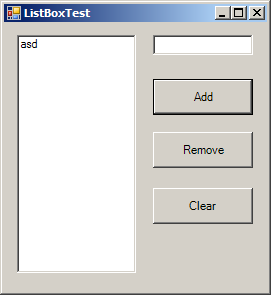
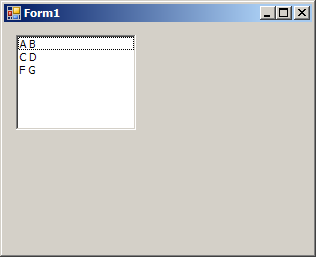
Set TopIndex to auto scroll ListBox
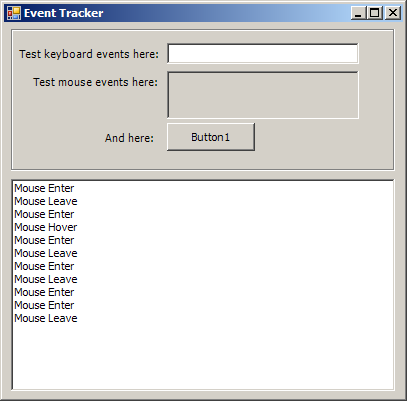
using System;
using System.Collections.Generic;
using System.ComponentModel;
using System.Data;
using System.Drawing;
using System.Text;
using System.Windows.Forms;

public class Form1 : Form
{
    private System.Windows.Forms.GroupBox GroupBox1;
    private System.Windows.Forms.Label Label4;
    private System.Windows.Forms.Label Label1;
    private System.Windows.Forms.PictureBox pic;
    private System.Windows.Forms.TextBox txt;
    private System.Windows.Forms.Button cmd;
    private System.Windows.Forms.Label Label2;
    private System.Windows.Forms.Label Label3;
    private System.Windows.Forms.ListBox eventLogList;

    public Form1() {
        InitializeComponent();
    }
    private void Log(String data)
    {
        eventLogList.Items.Add(data);
        int itemsPerPage = (int)(eventLogList.Height / eventLogList.ItemHeight);
        eventLogList.TopIndex = eventLogList.Items.Count - itemsPerPage;
    }

    private void txt_KeyDown(object sender, System.Windows.Forms.KeyEventArgs e)
    {
        Log("Key Down: " + e.KeyCode.ToString() + e.KeyValue.ToString());
    }

    private void txt_KeyPress(object sender, System.Windows.Forms.KeyPressEventArgs e)
    {
        Log("Key Press: " + e.KeyChar.ToString());
    }

    private void txt_KeyUp(object sender, System.Windows.Forms.KeyEventArgs e)
    {
        Log("Key Up: " + e.KeyCode.ToString() + e.KeyValue.ToString() + " Text is: " + txt.Text);
    }

    private void txt_TextChanged(object sender, System.EventArgs e)
    {
        Log("Changed: " + " Text is: " + txt.Text);
    }

    private void pic_MouseEnter(object sender, System.EventArgs e)
    {
        Log("Mouse Enter");
    }

    private void pic_MouseHover(object sender, System.EventArgs e)
    {
        Log("Mouse Hover");
    }

    private void pic_MouseDown(object sender, System.Windows.Forms.MouseEventArgs e)
    {
        Log("Mouse Down: X=" + e.X.ToString() + " Y=" + e.Y.ToString() + " Button=" + e.Button.ToString());
    }

    private void pic_MouseUp(object sender, System.Windows.Forms.MouseEventArgs e)
    {
        Log("Mouse Up: X=" + e.X.ToString() + " Y=" + e.Y.ToString() + " Button=" + e.Button.ToString());
    }

    private void pic_Click(object sender, System.EventArgs e)
    {
        Log("Click");
    }

    private void pic_DoubleClick(object sender, System.EventArgs e)
    {
        Log("Double Click");
    }

    private void pic_MouseLeave(object sender, System.EventArgs e)
    {
        Log("Mouse Leave");
    }

    private void InitializeComponent()
    {
        this.GroupBox1 = new System.Windows.Forms.GroupBox();
        this.Label4 = new System.Windows.Forms.Label();
        this.Label1 = new System.Windows.Forms.Label();
        this.pic = new System.Windows.Forms.PictureBox();
        this.txt = new System.Windows.Forms.TextBox();
        this.cmd = new System.Windows.Forms.Button();
        this.Label2 = new System.Windows.Forms.Label();
        this.Label3 = new System.Windows.Forms.Label();
        this.eventLogList = new System.Windows.Forms.ListBox();
        this.GroupBox1.SuspendLayout();
        ((System.ComponentModel.ISupportInitialize)(this.pic)).BeginInit();
        this.SuspendLayout();
        //
        // GroupBox1
        //
        this.GroupBox1.Anchor = ((System.Windows.Forms.AnchorStyles)(((System.Windows.Forms.AnchorStyles.Top | System.Windows.Forms.AnchorStyles.Left)
                    | System.Windows.Forms.AnchorStyles.Right)));
        this.GroupBox1.Controls.Add(this.Label4);
        this.GroupBox1.Controls.Add(this.Label1);
        this.GroupBox1.Controls.Add(this.pic);
        this.GroupBox1.Controls.Add(this.txt);
        this.GroupBox1.Controls.Add(this.cmd);
        this.GroupBox1.Controls.Add(this.Label2);
        this.GroupBox1.FlatStyle = System.Windows.Forms.FlatStyle.System;
        this.GroupBox1.Location = new System.Drawing.Point(7, 0);
        this.GroupBox1.Name = "GroupBox1";
        this.GroupBox1.Size = new System.Drawing.Size(384, 148);
        this.GroupBox1.TabIndex = 12;
        this.GroupBox1.TabStop = false;
        //
        // Label4
        //
        this.Label4.Location = new System.Drawing.Point(92, 108);
        this.Label4.Name = "Label4";
        this.Label4.Size = new System.Drawing.Size(56, 16);
        this.Label4.TabIndex = 5;
        this.Label4.Text = "And here:";
        //
        // Label1
        //
        this.Label1.Location = new System.Drawing.Point(6, 24);
        this.Label1.Name = "Label1";
        this.Label1.Size = new System.Drawing.Size(144, 16);
        this.Label1.TabIndex = 2;
        this.Label1.Text = "Test keyboard events here:";
        //
        // pic
        //
        this.pic.BorderStyle = System.Windows.Forms.BorderStyle.Fixed3D;
        this.pic.Location = new System.Drawing.Point(156, 48);
        this.pic.Name = "pic";
        this.pic.Size = new System.Drawing.Size(192, 48);
        this.pic.TabIndex = 3;
        this.pic.TabStop = false;
        this.pic.DoubleClick += new System.EventHandler(this.pic_DoubleClick);
        this.pic.Click += new System.EventHandler(this.pic_Click);
        this.pic.MouseHover += new System.EventHandler(this.pic_MouseHover);
        this.pic.MouseUp += new System.Windows.Forms.MouseEventHandler(this.pic_MouseUp);
        this.pic.MouseEnter += new System.EventHandler(this.pic_MouseEnter);
        this.pic.MouseDown += new System.Windows.Forms.MouseEventHandler(this.pic_MouseDown);
        //
        // txt
        //
        this.txt.Location = new System.Drawing.Point(156, 20);
        this.txt.Name = "txt";
        this.txt.Size = new System.Drawing.Size(192, 21);
        this.txt.TabIndex = 1;
        this.txt.KeyUp += new System.Windows.Forms.KeyEventHandler(this.txt_KeyUp);
        this.txt.KeyPress += new System.Windows.Forms.KeyPressEventHandler(this.txt_KeyPress);
        this.txt.TextChanged += new System.EventHandler(this.txt_TextChanged);
        this.txt.KeyDown += new System.Windows.Forms.KeyEventHandler(this.txt_KeyDown);
        //
        // cmd
        //
        this.cmd.FlatStyle = System.Windows.Forms.FlatStyle.System;
        this.cmd.Location = new System.Drawing.Point(156, 100);
        this.cmd.Name = "cmd";
        this.cmd.Size = new System.Drawing.Size(88, 28);
        this.cmd.TabIndex = 4;
        this.cmd.Text = "Button1";
        this.cmd.MouseLeave += new System.EventHandler(this.pic_MouseLeave);
        this.cmd.Click += new System.EventHandler(this.pic_Click);
        this.cmd.MouseEnter += new System.EventHandler(this.pic_MouseEnter);
        this.cmd.MouseHover += new System.EventHandler(this.pic_MouseHover);
        this.cmd.MouseUp += new System.Windows.Forms.MouseEventHandler(this.pic_MouseUp);
        this.cmd.MouseDown += new System.Windows.Forms.MouseEventHandler(this.pic_MouseDown);
        //
        // Label2
        //
        this.Label2.Location = new System.Drawing.Point(20, 52);
        this.Label2.Name = "Label2";
        this.Label2.Size = new System.Drawing.Size(128, 16);
        this.Label2.TabIndex = 2;
        this.Label2.Text = "Test mouse events here:";
        //
        // Label3
        //
        this.Label3.Location = new System.Drawing.Point(23, 100);
        this.Label3.Name = "Label3";
        this.Label3.Size = new System.Drawing.Size(64, 24);
        this.Label3.TabIndex = 11;
        this.Label3.Text = "Label3";
        //
        // eventLogList
        //
        this.eventLogList.Anchor = ((System.Windows.Forms.AnchorStyles)((((System.Windows.Forms.AnchorStyles.Top | System.Windows.Forms.AnchorStyles.Bottom)
                    | System.Windows.Forms.AnchorStyles.Left)
                    | System.Windows.Forms.AnchorStyles.Right)));
        this.eventLogList.FormattingEnabled = true;
        this.eventLogList.IntegralHeight = false;
        this.eventLogList.Location = new System.Drawing.Point(7, 156);
        this.eventLogList.Name = "eventLogList";
        this.eventLogList.Size = new System.Drawing.Size(384, 212);
        this.eventLogList.TabIndex = 10;
        //
        // Form1
        //
        this.AutoScaleDimensions = new System.Drawing.SizeF(6F, 13F);
        this.AutoScaleMode = System.Windows.Forms.AutoScaleMode.Font;
        this.ClientSize = new System.Drawing.Size(399, 374);
        this.Controls.Add(this.GroupBox1);
        this.Controls.Add(this.Label3);
        this.Controls.Add(this.eventLogList);
        this.Font = new System.Drawing.Font("Tahoma", 8.25F, System.Drawing.FontStyle.Regular, System.Drawing.GraphicsUnit.Point, ((byte)(0)));
        this.Name = "Form1";
        this.Text = "Event Tracker";
        this.GroupBox1.ResumeLayout(false);
        this.GroupBox1.PerformLayout();
        ((System.ComponentModel.ISupportInitialize)(this.pic)).EndInit();
        this.ResumeLayout(false);

    }

    [STAThread]
    static void Main()
    {
        Application.EnableVisualStyles();
        Application.Run(new Form1());
    }

}
Related examples in the same category