Buffered Animation Demo

import java.awt.Color;
import java.awt.Dimension;
import java.awt.Graphics;
import java.awt.Image;
import java.awt.Insets;
import java.awt.image.BufferedImage;
import java.util.Timer;
import java.util.TimerTask;

import javax.swing.JFrame;

public class BufferedAnimate extends JFrame {

  private static int DELAY = 100;

  Image buffer;

  Dimension oldSize;

  Insets insets;

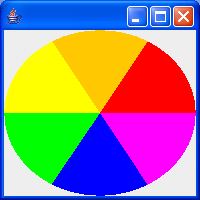
  Color colors[] = { Color.RED, Color.ORANGE, Color.YELLOW, Color.GREEN,
      Color.BLUE, Color.MAGENTA };

  public void paint(Graphics g) {
    if ((oldSize == null) || (oldSize != getSize())) {
      oldSize = getSize();
      buffer = new BufferedImage(getWidth(), getHeight(),
          BufferedImage.TYPE_INT_RGB);
    }
    if (insets == null) {
      insets = getInsets();
    }
    // Calculate each time in case of resize
    int x = insets.left;
    int y = insets.top;
    int width = getWidth() - insets.left - insets.right;
    int height = getHeight() - insets.top - insets.bottom;
    int start = 0;
    int steps = colors.length;
    int stepSize = 360 / steps;
    synchronized (colors) {
      Graphics bufferG = buffer.getGraphics();
      bufferG.setColor(Color.WHITE);
      bufferG.fillRect(x, y, width, height);
      for (int i = 0; i < steps; i++) {
        bufferG.setColor(colors[i]);
        bufferG.fillArc(x, y, width, height, start, stepSize);
        start += stepSize;
      }
    }
    g.drawImage(buffer, 0, 0, this);
  }

  public void go() {
    TimerTask task = new TimerTask() {
      public void run() {
        Color c = colors[0];
        synchronized (colors) {
          System.arraycopy(colors, 1, colors, 0, colors.length - 1);
          colors[colors.length - 1] = c;
        }
        repaint();
      }
    };
    Timer timer = new Timer();
    timer.schedule(task, 0, DELAY);
  }

  public static void main(String args[]) {
    BufferedAnimate f = new BufferedAnimate();
    f.setSize(200, 200);
    f.setTitle("Buffered");
    f.show();
    f.go();
  }
}
Related examples in the same category