Swing Mouse Motion Event Demo
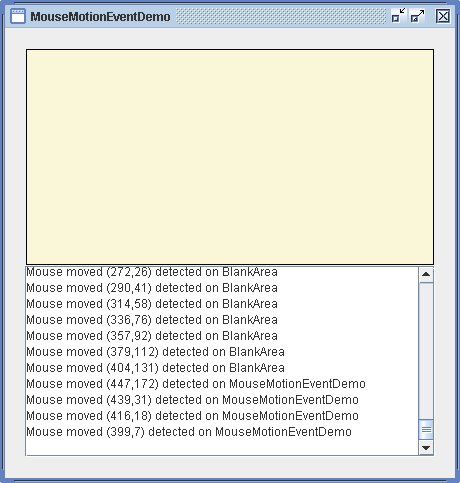
/* From http://java.sun.com/docs/books/tutorial/index.html */
/*
 * Copyright (c) 2006 Sun Microsystems, Inc. All Rights Reserved.
 *
 * Redistribution and use in source and binary forms, with or without
 * modification, are permitted provided that the following conditions are met:
 *
 * -Redistribution of source code must retain the above copyright notice, this
 *  list of conditions and the following disclaimer.
 *
 * -Redistribution in binary form must reproduce the above copyright notice,
 *  this list of conditions and the following disclaimer in the documentation
 *  and/or other materials provided with the distribution.
 *
 * Neither the name of Sun Microsystems, Inc. or the names of contributors may
 * be used to endorse or promote products derived from this software without
 * specific prior written permission.
 *
 * This software is provided "AS IS," without a warranty of any kind. ALL
 * EXPRESS OR IMPLIED CONDITIONS, REPRESENTATIONS AND WARRANTIES, INCLUDING
 * ANY IMPLIED WARRANTY OF MERCHANTABILITY, FITNESS FOR A PARTICULAR PURPOSE
 * OR NON-INFRINGEMENT, ARE HEREBY EXCLUDED. SUN MIDROSYSTEMS, INC. ("SUN")
 * AND ITS LICENSORS SHALL NOT BE LIABLE FOR ANY DAMAGES SUFFERED BY LICENSEE
 * AS A RESULT OF USING, MODIFYING OR DISTRIBUTING THIS SOFTWARE OR ITS
 * DERIVATIVES. IN NO EVENT WILL SUN OR ITS LICENSORS BE LIABLE FOR ANY LOST
 * REVENUE, PROFIT OR DATA, OR FOR DIRECT, INDIRECT, SPECIAL, CONSEQUENTIAL,
 * INCIDENTAL OR PUNITIVE DAMAGES, HOWEVER CAUSED AND REGARDLESS OF THE THEORY
 * OF LIABILITY, ARISING OUT OF THE USE OF OR INABILITY TO USE THIS SOFTWARE,
 * EVEN IF SUN HAS BEEN ADVISED OF THE POSSIBILITY OF SUCH DAMAGES.
 *
 * You acknowledge that this software is not designed, licensed or intended
 * for use in the design, construction, operation or maintenance of any
 * nuclear facility.
 */
/*
 * SwingMouseMotionEventDemo.java is a 1.2/1.3/1.4 example that requires the
 * following file: BlankArea.java
 */

import java.awt.Color;
import java.awt.Dimension;
import java.awt.GridBagConstraints;
import java.awt.GridBagLayout;
import java.awt.Insets;
import java.awt.event.MouseEvent;
import java.awt.event.MouseMotionListener;

import javax.swing.BorderFactory;
import javax.swing.JComponent;
import javax.swing.JFrame;
import javax.swing.JLabel;
import javax.swing.JPanel;
import javax.swing.JScrollPane;
import javax.swing.JTextArea;

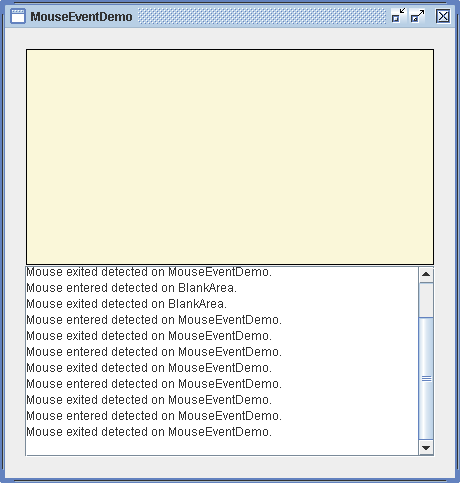
public class SwingMouseMotionEventDemo extends JPanel implements MouseMotionListener {
  BlankArea blankArea;

  JTextArea textArea;

  static final String newline = "\n";

  public SwingMouseMotionEventDemo() {
    super(new GridBagLayout());
    GridBagLayout gridbag = (GridBagLayout) getLayout();
    GridBagConstraints c = new GridBagConstraints();

    c.fill = GridBagConstraints.BOTH;
    c.gridwidth = GridBagConstraints.REMAINDER;
    c.weightx = 1.0;
    c.weighty = 1.0;

    c.insets = new Insets(1, 1, 1, 1);
    blankArea = new BlankArea(new Color(0.98f, 0.97f, 0.85f));
    gridbag.setConstraints(blankArea, c);
    add(blankArea);

    c.insets = new Insets(0, 0, 0, 0);
    textArea = new JTextArea();
    textArea.setEditable(false);
    JScrollPane scrollPane = new JScrollPane(textArea,
        JScrollPane.VERTICAL_SCROLLBAR_ALWAYS,
        JScrollPane.HORIZONTAL_SCROLLBAR_AS_NEEDED);
    scrollPane.setPreferredSize(new Dimension(200, 75));
    gridbag.setConstraints(scrollPane, c);
    add(scrollPane);

    //Register for mouse events on blankArea and panel.
    blankArea.addMouseMotionListener(this);
    addMouseMotionListener(this);

    setPreferredSize(new Dimension(450, 450));
    setBorder(BorderFactory.createEmptyBorder(20, 20, 20, 20));
  }

  public void mouseMoved(MouseEvent e) {
    saySomething("Mouse moved", e);
  }

  public void mouseDragged(MouseEvent e) {
    saySomething("Mouse dragged", e);
  }

  void saySomething(String eventDescription, MouseEvent e) {
    textArea.append(eventDescription + " (" + e.getX() + "," + e.getY()
        + ")" + " detected on " + e.getComponent().getClass().getName()
        + newline);
    textArea.setCaretPosition(textArea.getDocument().getLength());
  }

  /**
   * Create the GUI and show it. For thread safety, this method should be
   * invoked from the event-dispatching thread.
   */
  private static void createAndShowGUI() {
    //Make sure we have nice window decorations.
    JFrame.setDefaultLookAndFeelDecorated(true);

    //Create and set up the window.
    JFrame frame = new JFrame("SwingMouseMotionEventDemo");
    frame.setDefaultCloseOperation(JFrame.EXIT_ON_CLOSE);

    //Create and set up the content pane.
    JComponent newContentPane = new SwingMouseMotionEventDemo();
    newContentPane.setOpaque(true); //content panes must be opaque
    frame.setContentPane(newContentPane);

    //Display the window.
    frame.pack();
    frame.setVisible(true);
  }

  public static void main(String[] args) {
    //Schedule a job for the event-dispatching thread:
    //creating and showing this application's GUI.
    javax.swing.SwingUtilities.invokeLater(new Runnable() {
      public void run() {
        createAndShowGUI();
      }
    });
  }
}

class BlankArea extends JLabel {
  Dimension minSize = new Dimension(100, 100);

  public BlankArea(Color color) {
    setBackground(color);
    setOpaque(true);
    setBorder(BorderFactory.createLineBorder(Color.black));
  }

  public Dimension getMinimumSize() {
    return minSize;
  }

  public Dimension getPreferredSize() {
    return minSize;
  }
}
Related examples in the same category