ImageViewer
/*******************************************************************************
 * All Right Reserved. Copyright (c) 1998, 2004 Jackwind Li Guojie
 *
 * Created on 2004-5-2 14:57:37 by JACK $Id$
 *
 ******************************************************************************/
import org.eclipse.swt.graphics.Point;
import org.eclipse.swt.graphics.Rectangle;
import org.eclipse.swt.layout.GridData;
import org.eclipse.swt.layout.GridLayout;
import org.eclipse.swt.widgets.Button;
import org.eclipse.swt.widgets.Combo;
import org.eclipse.swt.widgets.Dialog;
import org.eclipse.swt.widgets.Event;
import org.eclipse.swt.widgets.Label;
import org.eclipse.swt.SWT;
import org.eclipse.swt.events.PaintEvent;
import org.eclipse.swt.events.PaintListener;
import org.eclipse.swt.graphics.GC;
import org.eclipse.swt.graphics.Image;
import org.eclipse.swt.graphics.Point;
import org.eclipse.swt.graphics.Rectangle;
import org.eclipse.swt.layout.GridData;
import org.eclipse.swt.layout.GridLayout;
import org.eclipse.swt.printing.PrintDialog;
import org.eclipse.swt.printing.Printer;
import org.eclipse.swt.printing.PrinterData;
import org.eclipse.swt.widgets.Canvas;
import org.eclipse.swt.widgets.Display;
import org.eclipse.swt.widgets.Event;
import org.eclipse.swt.widgets.FileDialog;
import org.eclipse.swt.widgets.Listener;
import org.eclipse.swt.widgets.Shell;
import org.eclipse.swt.widgets.ToolBar;
import org.eclipse.swt.widgets.ToolItem;

public class SWTImageViewer {
  Display display = new Display();
  Shell shell = new Shell(display);

  Canvas canvas;

  Image image;
  String fileName;
  public SWTImageViewer() {
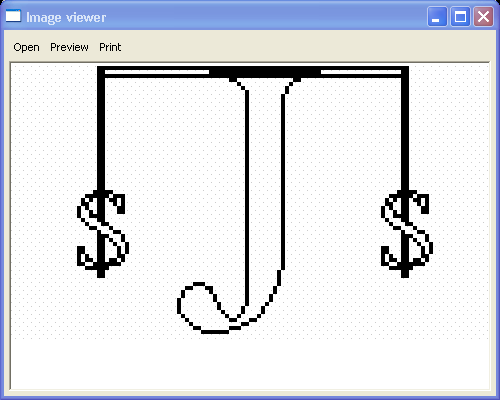
    shell.setText("Image viewer");
    shell.setLayout(new GridLayout(1, true));

    ToolBar toolBar = new ToolBar(shell, SWT.FLAT);
    ToolItem itemOpen = new ToolItem(toolBar, SWT.PUSH);
    itemOpen.setText("Open");
    itemOpen.addListener(SWT.Selection, new Listener() {
      public void handleEvent(Event event) {
        FileDialog dialog = new FileDialog(shell, SWT.OPEN);
        String file = dialog.open();
        if (file != null) {
          if (image != null)
            image.dispose();
          image = null;
          try {
            image = new Image(display, file);
          } catch (RuntimeException e) {
            // e.printStackTrace();
          }

          if (image != null) {
            fileName = file;
          } else {
            System.err.println(
              "Failed to load image from file: " + file);
          }
          canvas.redraw();
        }
      }
    });

    ToolItem itemPrintPreview = new ToolItem(toolBar, SWT.PUSH);

    itemPrintPreview.setText("Preview");
    itemPrintPreview.addListener(SWT.Selection, new Listener() {
      public void handleEvent(Event event) {
        ImagePrintPreviewDialog dialog =
          new ImagePrintPreviewDialog(ImageViewer.this);
        dialog.open();
      }
    });

    ToolItem itemPrint = new ToolItem(toolBar, SWT.PUSH);
    itemPrint.setText("Print");
    itemPrint.addListener(SWT.Selection, new Listener() {
      public void handleEvent(Event event) {
        print();
      }
    });

    canvas = new Canvas(shell, SWT.BORDER);
    canvas.setBackground(display.getSystemColor(SWT.COLOR_WHITE));
    canvas.setLayoutData(new GridData(GridData.FILL_BOTH));

    canvas.addPaintListener(new PaintListener() {
      public void paintControl(PaintEvent e) {
        if (image == null) {
          e.gc.drawString("No image", 0, 0);
        } else {
          e.gc.drawImage(image, 0, 0);
        }
      }
    });

    image = new Image(display, "java2s.gif");
    fileName = "scene.jpg";

    shell.setSize(500, 400);
    shell.open();

    //textUser.forceFocus();

    // Set up the event loop.
    while (!shell.isDisposed()) {
      if (!display.readAndDispatch()) {
        // If no more entries in event queue
        display.sleep();
      }
    }

    display.dispose();
  }

  /**
   * Lets the user to select a printer and prints the image on it.
   *
   */
  void print() {
    PrintDialog dialog = new PrintDialog(shell);
    // Prompts the printer dialog to let the user select a printer.
    PrinterData printerData = dialog.open();

    if (printerData == null) // the user cancels the dialog
      return;
    // Loads the printer.
    Printer printer = new Printer(printerData);
    print(printer, null);
  }

  /**
   * Prints the image current displayed to the specified printer.
   *
   * @param printer
   */
  void print(final Printer printer, PrintMargin printMargin) {
    if (image == null) // If no image is loaded, do not print.
      return;

    final Point printerDPI = printer.getDPI();
    final Point displayDPI = display.getDPI();
    System.out.println(displayDPI + " " + printerDPI);

    final PrintMargin margin = (printMargin == null ?  PrintMargin.getPrintMargin(printer, 1.0) : printMargin);

    Thread printThread = new Thread() {
      public void run() {
        if (!printer.startJob(fileName)) {
          System.err.println("Failed to start print job!");
          printer.dispose();
          return;
        }

        GC gc = new GC(printer);

        if (!printer.startPage()) {
          System.err.println("Failed to start a new page!");
          gc.dispose();
          return;
        } else {
          int imageWidth = image.getBounds().width;
          int imageHeight = image.getBounds().height;

          // Handles DPI conversion.
          double dpiScaleFactorX = printerDPI.x * 1.0 / displayDPI.x;
          double dpiScaleFactorY = printerDPI.y * 1.0 / displayDPI.y;

          // If the image is too large to draw on a page, reduces its
          // width and height proportionally.
          double imageSizeFactor =
            Math.min(
              1,
              (margin.right - margin.left)
                * 1.0
                / (dpiScaleFactorX * imageWidth));
          imageSizeFactor =
            Math.min(
              imageSizeFactor,
              (margin.bottom - margin.top)
                * 1.0
                / (dpiScaleFactorY * imageHeight));

          // Draws the image to the printer.
          gc.drawImage(
            image,
            0,
            0,
            imageWidth,
            imageHeight,
            margin.left,
            margin.top,
            (int) (dpiScaleFactorX * imageSizeFactor * imageWidth),
            (int) (dpiScaleFactorY
              * imageSizeFactor
              * imageHeight));
          gc.dispose();
        }

        printer.endPage();
        printer.endJob();

        printer.dispose();
        System.out.println("Printing job done!");
      }
    };
    printThread.start();
  }

  public static void main(String[] args) {
    new SWTImageViewer();
  }
}

class ImagePrintPreviewDialog extends Dialog {
  ImageViewer viewer;
  Shell shell;
  Canvas canvas;
  Printer printer;
  PrintMargin margin;
  Combo combo;

  public ImagePrintPreviewDialog(ImageViewer viewer) {
    super(viewer.shell);
    this.viewer = viewer;
  }

  public void open() {
    shell =
      new Shell(
        viewer.shell,
        SWT.DIALOG_TRIM | SWT.APPLICATION_MODAL | SWT.RESIZE);
    shell.setText("Print preview");
    shell.setLayout(new GridLayout(4, false));

    final Button buttonSelectPrinter = new Button(shell, SWT.PUSH);
    buttonSelectPrinter.setText("Select a printer");
    buttonSelectPrinter.addListener(SWT.Selection, new Listener() {
      public void handleEvent(Event event) {
        PrintDialog dialog = new PrintDialog(shell);
        // Prompts the printer dialog to let the user select a printer.
        PrinterData printerData = dialog.open();

        if (printerData == null) // the user cancels the dialog
          return;
        // Loads the printer.
        final Printer printer = new Printer(printerData);
        setPrinter(
          printer,
          Double.parseDouble(
            combo.getItem(combo.getSelectionIndex())));
      }
    });

    new Label(shell, SWT.NULL).setText("Margin in inches: ");
    combo = new Combo(shell, SWT.READ_ONLY);
    combo.add("0.5");
    combo.add("1.0");
    combo.add("1.5");
    combo.add("2.0");
    combo.add("2.5");
    combo.add("3.0");
    combo.select(1);
    combo.addListener(SWT.Selection, new Listener() {
      public void handleEvent(Event event) {
        double value =
          Double.parseDouble(
            combo.getItem(combo.getSelectionIndex()));
        setPrinter(printer, value);
      }
    });

    final Button buttonPrint = new Button(shell, SWT.PUSH);
    buttonPrint.setText("Print");
    buttonPrint.addListener(SWT.Selection, new Listener() {
      public void handleEvent(Event event) {
        if (printer == null)
          viewer.print();
        else
          viewer.print(printer, margin);
        shell.dispose();
      }
    });

    canvas = new Canvas(shell, SWT.BORDER);
    GridData gridData = new GridData(GridData.FILL_BOTH);
    gridData.horizontalSpan = 4;
    canvas.setLayoutData(gridData);
    canvas.addPaintListener(new PaintListener() {
      public void paintControl(PaintEvent e) {
        int canvasBorder = 20;

        if (printer == null || printer.isDisposed())
          return;
        Rectangle rectangle = printer.getBounds();
        Point canvasSize = canvas.getSize();

        double viewScaleFactor =
          (canvasSize.x - canvasBorder * 2) * 1.0 / rectangle.width;
        viewScaleFactor =
          Math.min(
            viewScaleFactor,
            (canvasSize.y - canvasBorder * 2)
              * 1.0
              / rectangle.height);

        int offsetX =
          (canvasSize.x - (int) (viewScaleFactor * rectangle.width))
            / 2;
        int offsetY =
          (canvasSize.y - (int) (viewScaleFactor * rectangle.height))
            / 2;

        e.gc.setBackground(
          shell.getDisplay().getSystemColor(SWT.COLOR_WHITE));
        // draws the page layout
        e.gc.fillRectangle(
          offsetX,
          offsetY,
          (int) (viewScaleFactor * rectangle.width),
          (int) (viewScaleFactor * rectangle.height));

        // draws the margin.
        e.gc.setLineStyle(SWT.LINE_DASH);
        e.gc.setForeground(
          shell.getDisplay().getSystemColor(SWT.COLOR_BLACK));

        int marginOffsetX =
          offsetX + (int) (viewScaleFactor * margin.left);
        int marginOffsetY =
          offsetY + (int) (viewScaleFactor * margin.top);
        e.gc.drawRectangle(
          marginOffsetX,
          marginOffsetY,
          (int) (viewScaleFactor * (margin.right - margin.left)),
          (int) (viewScaleFactor * (margin.bottom - margin.top)));

        if (viewer.image != null) {
          int imageWidth = viewer.image.getBounds().width;
          int imageHeight = viewer.image.getBounds().height;

          double dpiScaleFactorX =
            printer.getDPI().x
              * 1.0
              / shell.getDisplay().getDPI().x;
          double dpiScaleFactorY =
            printer.getDPI().y
              * 1.0
              / shell.getDisplay().getDPI().y;

          double imageSizeFactor =
            Math.min(
              1,
              (margin.right - margin.left)
                * 1.0
                / (dpiScaleFactorX * imageWidth));
          imageSizeFactor =
            Math.min(
              imageSizeFactor,
              (margin.bottom - margin.top)
                * 1.0
                / (dpiScaleFactorY * imageHeight));

          e.gc.drawImage(
            viewer.image,
            0,
            0,
            imageWidth,
            imageHeight,
            marginOffsetX,
            marginOffsetY,
            (int) (dpiScaleFactorX
              * imageSizeFactor
              * imageWidth
              * viewScaleFactor),
            (int) (dpiScaleFactorY
              * imageSizeFactor
              * imageHeight
              * viewScaleFactor));

        }

      }
    });

    shell.setSize(400, 400);
    shell.open();
    setPrinter(null, 1.0);

    // Set up the event loop.
    while (!shell.isDisposed()) {
      if (!shell.getDisplay().readAndDispatch()) {
        // If no more entries in event queue
        shell.getDisplay().sleep();
      }
    }
  }

  /**
   * Sets target printer.
   *
   * @param printer
   */
  void setPrinter(Printer printer, double marginSize) {
    if (printer == null) {
      printer = new Printer(Printer.getDefaultPrinterData());
    }
    this.printer = printer;
    margin = PrintMargin.getPrintMargin(printer, marginSize);
    canvas.redraw();
  }
}

/**
 * Contains margin information (in pixels) for a print job.
 *
 */
class PrintMargin {
  // Margin to the left side, in pixels
  public int left;
  //  Margins to the right side, in pixels
  public int right;
  //  Margins to the top side, in pixels
  public int top;
  //  Margins to the bottom side, in pixels
  public int bottom;

  private PrintMargin(int left, int right, int top, int bottom) {
    this.left = left;
    this.right = right;
    this.top = top;
    this.bottom = bottom;
  }

  /**
   * Returns a PrintMargin object containing the true border margins for the
   * specified printer with the given margin in inches.
   * Note: all four sides share the same margin width.
   * @param printer
   * @param margin
   * @return
   */
  static PrintMargin getPrintMargin(Printer printer, double margin) {
    return getPrintMargin(printer, margin, margin, margin, margin);
  }

  /**
   * Returns a PrintMargin object containing the true border margins for the
   * specified printer with the given margin width (in inches) for each side.
   */
  static PrintMargin getPrintMargin(
    Printer printer,
    double marginLeft,
    double marginRight,
    double marginTop,
    double marginBottom) {
    Rectangle clientArea = printer.getClientArea();
    Rectangle trim = printer.computeTrim(0, 0, 0, 0);

    //System.out.println(printer.getBounds() + " - " + clientArea + "" +
    // trim);
    Point dpi = printer.getDPI();

    int leftMargin = (int) (marginLeft * dpi.x) - trim.x;
    int rightMargin =
      clientArea.width
        + trim.width
        - (int) (marginRight * dpi.x)
        - trim.x;
    int topMargin = (int) (marginTop * dpi.y) - trim.y;
    int bottomMargin =
      clientArea.height
        + trim.height
        - (int) (marginBottom * dpi.y)
        - trim.y;

    return new PrintMargin(
      leftMargin,
      rightMargin,
      topMargin,
      bottomMargin);
  }

  public String toString() {
    return "Margin { "
      + left
      + ", "
      + right
      + "; "
      + top
      + ", "
      + bottom
      + " }";
  }
}
Related examples in the same category