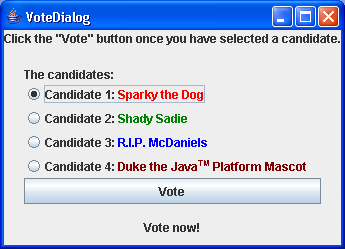
Vote Dialog
/* From http://java.sun.com/docs/books/tutorial/index.html */

/*
 * Copyright (c) 2006 Sun Microsystems, Inc. All Rights Reserved.
 *
 * Redistribution and use in source and binary forms, with or without
 * modification, are permitted provided that the following conditions are met:
 *
 * -Redistribution of source code must retain the above copyright notice, this
 *  list of conditions and the following disclaimer.
 *
 * -Redistribution in binary form must reproduce the above copyright notice,
 *  this list of conditions and the following disclaimer in the documentation
 *  and/or other materials provided with the distribution.
 *
 * Neither the name of Sun Microsystems, Inc. or the names of contributors may
 * be used to endorse or promote products derived from this software without
 * specific prior written permission.
 *
 * This software is provided "AS IS," without a warranty of any kind. ALL
 * EXPRESS OR IMPLIED CONDITIONS, REPRESENTATIONS AND WARRANTIES, INCLUDING
 * ANY IMPLIED WARRANTY OF MERCHANTABILITY, FITNESS FOR A PARTICULAR PURPOSE
 * OR NON-INFRINGEMENT, ARE HEREBY EXCLUDED. SUN MIDROSYSTEMS, INC. ("SUN")
 * AND ITS LICENSORS SHALL NOT BE LIABLE FOR ANY DAMAGES SUFFERED BY LICENSEE
 * AS A RESULT OF USING, MODIFYING OR DISTRIBUTING THIS SOFTWARE OR ITS
 * DERIVATIVES. IN NO EVENT WILL SUN OR ITS LICENSORS BE LIABLE FOR ANY LOST
 * REVENUE, PROFIT OR DATA, OR FOR DIRECT, INDIRECT, SPECIAL, CONSEQUENTIAL,
 * INCIDENTAL OR PUNITIVE DAMAGES, HOWEVER CAUSED AND REGARDLESS OF THE THEORY
 * OF LIABILITY, ARISING OUT OF THE USE OF OR INABILITY TO USE THIS SOFTWARE,
 * EVEN IF SUN HAS BEEN ADVISED OF THE POSSIBILITY OF SUCH DAMAGES.
 *
 * You acknowledge that this software is not designed, licensed or intended
 * for use in the design, construction, operation or maintenance of any
 * nuclear facility.
 */

import java.awt.BorderLayout;
import java.awt.Container;
import java.awt.GridLayout;
import java.awt.event.ActionEvent;
import java.awt.event.ActionListener;

import javax.swing.BorderFactory;
import javax.swing.BoxLayout;
import javax.swing.ButtonGroup;
import javax.swing.JButton;
import javax.swing.JFrame;
import javax.swing.JLabel;
import javax.swing.JOptionPane;
import javax.swing.JPanel;
import javax.swing.JRadioButton;

public class VoteDialog extends JPanel {
  JLabel label;

  JFrame frame;

  String simpleDialogDesc = "The candidates";

  public VoteDialog(JFrame frame) {
    this.frame = frame;
    JLabel title;

    // Create the components.
    JPanel choicePanel = createSimpleDialogBox();

    System.out.println("passed createSimpleDialogBox");

    title = new JLabel("Click the \"Vote\" button"
        + " once you have selected a candidate.", JLabel.CENTER);

    label = new JLabel("Vote now!", JLabel.CENTER);
    label.setBorder(BorderFactory.createEmptyBorder(10, 10, 10, 10));
    choicePanel.setBorder(BorderFactory.createEmptyBorder(20, 20, 5, 20));

    // Set the layout.
    setLayout(new BorderLayout());
    add(title, BorderLayout.NORTH);
    add(label, BorderLayout.SOUTH);
    add(choicePanel, BorderLayout.CENTER);
  }

  void setLabel(String newText) {
    label.setText(newText);
  }

  private JPanel createSimpleDialogBox() {
    final int numButtons = 4;
    JRadioButton[] radioButtons = new JRadioButton[numButtons];

    final ButtonGroup group = new ButtonGroup();

    JButton voteButton = null;

    final String defaultMessageCommand = "default";
    final String yesNoCommand = "yesno";
    final String yeahNahCommand = "yeahnah";
    final String yncCommand = "ync";

    radioButtons[0] = new JRadioButton(
        "<html>Candidate 1: <font color=red>Sparky the Dog</font></html>");
    radioButtons[0].setActionCommand(defaultMessageCommand);

    radioButtons[1] = new JRadioButton(
        "<html>Candidate 2: <font color=green>Shady Sadie</font></html>");
    radioButtons[1].setActionCommand(yesNoCommand);

    radioButtons[2] = new JRadioButton(
        "<html>Candidate 3: <font color=blue>R.I.P. McDaniels</font></html>");
    radioButtons[2].setActionCommand(yeahNahCommand);

    radioButtons[3] = new JRadioButton(
        "<html>Candidate 4: <font color=maroon>Duke the Java<font size=-2><sup>TM</sup></font size> Platform Mascot</font></html>");
    radioButtons[3].setActionCommand(yncCommand);

    for (int i = 0; i < numButtons; i++) {
      group.add(radioButtons[i]);
    }
    // Select the first button by default.
    radioButtons[0].setSelected(true);

    voteButton = new JButton("Vote");

    voteButton.addActionListener(new ActionListener() {
      public void actionPerformed(ActionEvent e) {
        String command = group.getSelection().getActionCommand();

        // ok dialog
        if (command == defaultMessageCommand) {
          JOptionPane.showMessageDialog(frame,
              "This candidate is a dog. Invalid vote.");

          // yes/no dialog
        } else if (command == yesNoCommand) {
          int n = JOptionPane
              .showConfirmDialog(
                  frame,
                  "This candidate is a convicted felon. \nDo you still want to vote for her?",
                  "A Follow-up Question",
                  JOptionPane.YES_NO_OPTION);
          if (n == JOptionPane.YES_OPTION) {
            setLabel("OK. Keep an eye on your wallet.");
          } else if (n == JOptionPane.NO_OPTION) {
            setLabel("Whew! Good choice.");
          } else {
            setLabel("It is your civic duty to cast your vote.");
          }

          // yes/no (with customized wording)
        } else if (command == yeahNahCommand) {
          Object[] options = { "Yes, please", "No, thanks" };
          int n = JOptionPane
              .showOptionDialog(
                  frame,
                  "This candidate is deceased. \nDo you still want to vote for him?",
                  "A Follow-up Question",
                  JOptionPane.YES_NO_OPTION,
                  JOptionPane.QUESTION_MESSAGE, null,
                  options, options[0]);
          if (n == JOptionPane.YES_OPTION) {
            setLabel("I hope you don't expect much from your candidate.");
          } else if (n == JOptionPane.NO_OPTION) {
            setLabel("Whew! Good choice.");
          } else {
            setLabel("It is your civic duty to cast your vote.");
          }

          // yes/no/cancel (with customized wording)
        } else if (command == yncCommand) {
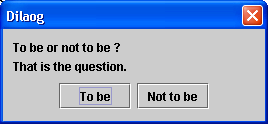
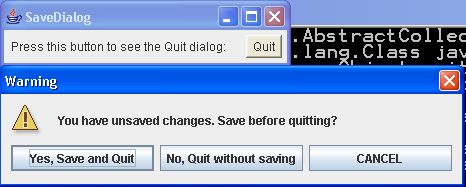
          Object[] options = { "Yes!", "No, I'll pass",
              "Well, if I must" };
          int n = JOptionPane.showOptionDialog(frame,
              "Duke is a cartoon mascot. \nDo you  "
                  + "still want to cast your vote?",
              "A Follow-up Question",
              JOptionPane.YES_NO_CANCEL_OPTION,
              JOptionPane.QUESTION_MESSAGE, null, options,
              options[2]);
          if (n == JOptionPane.YES_OPTION) {
            setLabel("Excellent choice.");
          } else if (n == JOptionPane.NO_OPTION) {
            setLabel("Whatever you say. It's your vote.");
          } else if (n == JOptionPane.CANCEL_OPTION) {
            setLabel("Well, I'm certainly not going to make you vote.");
          } else {
            setLabel("It is your civic duty to cast your vote.");
          }
        }
        return;
      }
    });
    System.out.println("calling createPane");
    return createPane(simpleDialogDesc + ":", radioButtons, voteButton);
  }

  private JPanel createPane(String description, JRadioButton[] radioButtons,
      JButton showButton) {
    int numChoices = radioButtons.length;
    JPanel box = new JPanel();
    JLabel label = new JLabel(description);

    box.setLayout(new BoxLayout(box, BoxLayout.Y_AXIS));
    box.add(label);

    for (int i = 0; i < numChoices; i++) {
      box.add(radioButtons[i]);
    }

    JPanel pane = new JPanel();
    pane.setLayout(new BorderLayout());
    pane.add(box, BorderLayout.NORTH);
    pane.add(showButton, BorderLayout.SOUTH);
    System.out.println("returning pane");
    return pane;
  }

  public static void main(String[] args) {
    JFrame frame = new JFrame("VoteDialog");

    Container contentPane = frame.getContentPane();
    contentPane.setLayout(new GridLayout(1, 1));
    contentPane.add(new VoteDialog(frame));

    // Exit when the window is closed.
    frame.setDefaultCloseOperation(JFrame.EXIT_ON_CLOSE);

    frame.pack();
    frame.setVisible(true);
  }
}
Related examples in the same category