using System;
using System.Drawing;
using System.Windows.Forms;

public class FormMoveDemo : Form
{
    private bool dragging;

    private Point pointClicked;

    public FormMoveDemo()
    {
        InitializeComponent();
    }

    private void lblDrag_MouseDown(object sender, MouseEventArgs e)
    {
        if (e.Button == MouseButtons.Left)
        {
            dragging = true;
            pointClicked = new Point(e.X, e.Y);
        }
        else
        {
            dragging = false;
        }
    }

    private void lblDrag_MouseMove(object sender, MouseEventArgs e)
    {
        if (dragging){
            Point pointMoveTo;
            pointMoveTo = this.PointToScreen(new Point(e.X, e.Y));

            pointMoveTo.Offset(-pointClicked.X, -pointClicked.Y);

            this.Location = pointMoveTo;
        }
    }

    private void lblDrag_MouseUp(object sender, MouseEventArgs e)
    {
        dragging = false;
    }

    private void cmdClose_Click(object sender, EventArgs e)
    {
        this.Close();
    }

    [STAThread]
    public static void Main(string[] args)
    {
        Application.Run(new FormMoveDemo());
    }
    private System.Windows.Forms.Button cmdClose= new System.Windows.Forms.Button();
    private System.Windows.Forms.Label lblDrag = new System.Windows.Forms.Label();

    private System.ComponentModel.IContainer components = null;

    private void InitializeComponent()
    {
        this.SuspendLayout();
        //
        // cmdClose
        //
        this.cmdClose.Location = new System.Drawing.Point(102, 215);
        this.cmdClose.Name = "cmdClose";
        this.cmdClose.Size = new System.Drawing.Size(76, 20);
        this.cmdClose.TabIndex = 5;
        this.cmdClose.Text = "Close";
        this.cmdClose.Click += new System.EventHandler(this.cmdClose_Click);
        //
        // lblDrag
        //
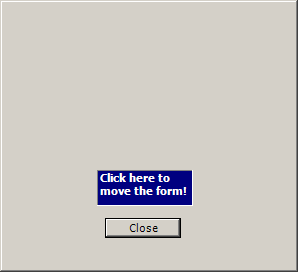
        this.lblDrag.BackColor = System.Drawing.Color.Navy;
        this.lblDrag.BorderStyle = System.Windows.Forms.BorderStyle.Fixed3D;
        this.lblDrag.Font = new System.Drawing.Font("Tahoma", 8.25F, System.Drawing.FontStyle.Bold, System.Drawing.GraphicsUnit.Point, ((byte)(0)));
        this.lblDrag.ForeColor = System.Drawing.Color.White;
        this.lblDrag.Location = new System.Drawing.Point(94, 167);
        this.lblDrag.Name = "lblDrag";
        this.lblDrag.Size = new System.Drawing.Size(96, 36);
        this.lblDrag.TabIndex = 4;
        this.lblDrag.Text = "Click here to move the form!";
        this.lblDrag.MouseUp += new System.Windows.Forms.MouseEventHandler(this.lblDrag_MouseUp);
        this.lblDrag.MouseMove += new System.Windows.Forms.MouseEventHandler(this.lblDrag_MouseMove);
        this.lblDrag.MouseDown += new System.Windows.Forms.MouseEventHandler(this.lblDrag_MouseDown);
        //
        // FormMoveDemo
        //
        this.AutoScaleDimensions = new System.Drawing.SizeF(6F, 13F);
        this.AutoScaleMode = System.Windows.Forms.AutoScaleMode.Font;
        this.ClientSize = new System.Drawing.Size(292, 266);
        this.ControlBox = false;
        this.Controls.Add(this.cmdClose);
        this.Controls.Add(this.lblDrag);
        this.Font = new System.Drawing.Font("Tahoma", 8.25F, System.Drawing.FontStyle.Regular, System.Drawing.GraphicsUnit.Point, ((byte)(0)));
        this.FormBorderStyle = System.Windows.Forms.FormBorderStyle.FixedDialog;
        this.MaximizeBox = false;
        this.MinimizeBox = false;
        this.ResumeLayout(false);
    }

}