Text Widgets : Entry « Tkinker « Python Tutorial

Home
Python Tutorial
1.Introduction
2.Data Type
3.Statement
4.Operator
5.String
6.Tuple
7.List
8.Dictionary
9.Collections
10.Function
11.Class
12.File
13.Buildin Function
14.Buildin Module
15.Database
16.Regular Expressions
17.Thread
18.Tkinker
19.wxPython
20.XML
21.Network
22.CGI Web
23.Windows
Python Tutorial » Tkinker » Entry 
18.11.4.Text Widgets
Text Widgets
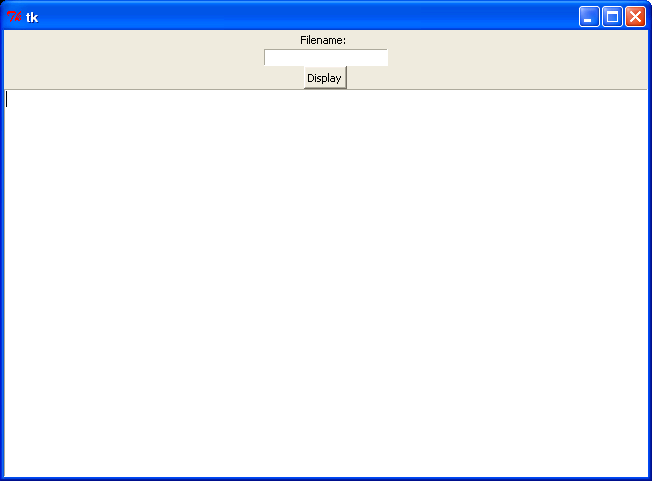
from Tkinter import *

class FileDisplay :

    def loadfile(self:
        myFile=file(self.filename.get())
        myText= myFile.read()
        myFile.close()

        self.text_widget.insert(0.0,myText)

    def __init__(self:
        self.root = Tk()
        Label(self.root, text="Filename: ").pack()
        self.filename = Entry(self.root)
        self.filename.pack()
        Button(self.root, text="Display", command=self.loadfile).pack()
        self.text_widget = Text(self.root)
        self.text_widget.pack(expand=1, fill=BOTH)

        self.root.mainloop()

fd = FileDisplay()
18.11.Entry
18.11.1.Read data from EntryRead data from Entry
18.11.2.Create a story based on user inputCreate a story based on user input
18.11.3.Working with Entry Fields and Grid LayoutsWorking with Entry Fields and Grid Layouts
18.11.4.Text WidgetsText Widgets
java2s.com  | Contact Us | Privacy Policy
Copyright 2009 - 12 Demo Source and Support. All rights reserved.
All other trademarks are property of their respective owners.