Path Gradient
/*
Professional Windows GUI Programming Using C#
by Jay Glynn, Csaba Torok, Richard Conway, Wahid Choudhury,
   Zach Greenvoss, Shripad Kulkarni, Neil Whitlow

Publisher: Peer Information
ISBN: 1861007663
*/
using System;
using System.Drawing;
using System.Collections;
using System.ComponentModel;
using System.Windows.Forms;
using System.Data;

using System.Drawing.Drawing2D;  // PathGradientBrush

namespace PathGradient
{
    /// <summary>
    /// Summary description for PathGradient.
    /// </summary>
    public class PathGradient : System.Windows.Forms.Form
    {
        /// <summary>
        /// Required designer variable.
        /// </summary>
        private System.ComponentModel.Container components = null;

        public PathGradient()
        {
            //
            // Required for Windows Form Designer support
            //
            InitializeComponent();

            this.Text = "PathGradient - CenterPoint";

            //
            // TODO: Add any constructor code after InitializeComponent call
            //
        }

        /// <summary>
        /// Clean up any resources being used.
        /// </summary>
        protected override void Dispose( bool disposing )
        {
            if( disposing )
            {
                if (components != null)
                {
                    components.Dispose();
                }
            }
            base.Dispose( disposing );
        }

        #region Windows Form Designer generated code
        /// <summary>
        /// Required method for Designer support - do not modify
        /// the contents of this method with the code editor.
        /// </summary>
        private void InitializeComponent()
        {
            //
            // PathGradient
            //
            this.AutoScaleBaseSize = new System.Drawing.Size(5, 13);
            this.ClientSize = new System.Drawing.Size(256, 213);
            this.Name = "PathGradient";
            this.Text = "PathGradient";

        }
        #endregion

        /// <summary>
        /// The main entry point for the application.
        /// </summary>
        [STAThread]
        static void Main()
        {
            Application.Run(new PathGradient());
        }
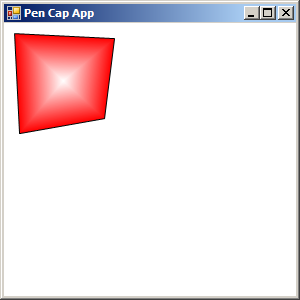
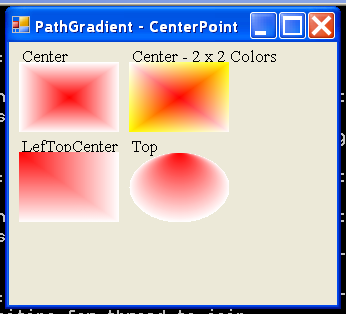
        protected override void OnPaint(PaintEventArgs e)
        {
            Graphics g = e.Graphics;
            Font f = new Font(new FontFamily("Times New Roman"), 10);
            Brush fb = new SolidBrush(Color.Black);
            GraphicsPath gp;
            PathGradientBrush pGB;  // namespace System.Drawing.Drawing2D;
            Rectangle rec;
            Color cR = Color.Red, cW = Color.White, cY = Color.Yellow;
            int w = 100, h = 70;

            // Left upper rectangle:
            g.DrawString("Center", f, fb, 10, 5);
            gp = new GraphicsPath();
            rec = new Rectangle(10, 20, w, h);
            gp.AddRectangle(rec);
            pGB = new PathGradientBrush(gp);
            pGB.CenterPoint = new Point(10 + w/2, 20 + h/2);
            pGB.CenterColor = cR;
            pGB.SurroundColors = new Color[1]{cW};
            g.FillRectangle(pGB, rec);

            // Right upper rectangle:
            g.DrawString("Center - 2 x 2 Colors", f, fb, w + 20, 5);
            gp = new GraphicsPath();
            rec = new Rectangle(20 + w, 20, w, h);
            gp.AddRectangle(rec);
            pGB = new PathGradientBrush(gp);
            pGB.CenterPoint = new Point(w + 20 + w/2, 20 + h/2);
            pGB.CenterColor = cR;
            pGB.SurroundColors = new Color[4]{cW, cY, cW, cY};
            g.FillRectangle(pGB, rec);

            // Left down rectangle:
            g.DrawString("LefTopCenter", f, fb, 10, h + 25);
            gp = new GraphicsPath();
            rec = new Rectangle(10, h + 40, w, h);
            gp.AddRectangle(rec);
            pGB = new PathGradientBrush(gp);
            pGB.CenterPoint = new Point(10, h + 40);
            pGB.CenterColor = cR;
            pGB.SurroundColors = new Color[1]{cW};
            g.FillRectangle(pGB, rec);

            // Ellipse
            g.DrawString("Top", f, fb, w + 20, h + 25);
            gp = new GraphicsPath();
            rec = new Rectangle(w + 20, h + 40, w, h);
            gp.AddEllipse(rec);
            pGB = new PathGradientBrush(gp);
            pGB.CenterPoint = new Point(w + 20 + w/2, h + 40);
            pGB.CenterColor = cR;
            pGB.SurroundColors = new Color[1]{cW};
            g.FillRectangle(pGB, rec);

            g.Dispose();
            fb.Dispose();
        }
    }
}
Related examples in the same category