Image Buffering
import java.awt.BorderLayout;
import java.awt.Canvas;
import java.awt.Color;
import java.awt.Container;
import java.awt.Graphics;
import java.awt.Graphics2D;
import java.awt.GridLayout;
import java.awt.Image;
import java.awt.MediaTracker;
import java.awt.Toolkit;
import java.awt.event.ActionEvent;
import java.awt.event.ActionListener;
import java.awt.event.WindowAdapter;
import java.awt.event.WindowEvent;
import java.awt.image.BufferedImage;

import javax.swing.ButtonGroup;
import javax.swing.JButton;
import javax.swing.JFrame;
import javax.swing.JPanel;
import javax.swing.JRadioButton;
import javax.swing.border.TitledBorder;

public class SimpleBufferedImageDemo extends JFrame {
  DisplayCanvas canvas;

  JRadioButton buffButton, nonBuffButton;

  JButton displayButton, clearButton;

  public SimpleBufferedImageDemo() {
    super();
    Container container = getContentPane();

    canvas = new DisplayCanvas();
    container.add(canvas);

    JPanel panel = new JPanel();
    panel.setLayout(new GridLayout(2, 2));
    panel.setBorder(new TitledBorder(
        "Select an Option and Display Image..."));

    buffButton = new JRadioButton("Buffered");
    buffButton.addActionListener(new ButtonListener());
    nonBuffButton = new JRadioButton("Non-Buffered", true);
    nonBuffButton.addActionListener(new ButtonListener());
    ButtonGroup group = new ButtonGroup();
    group.add(buffButton);
    group.add(nonBuffButton);

    displayButton = new JButton("Display");
    displayButton.addActionListener(new ButtonListener());
    clearButton = new JButton("Clear");
    clearButton.addActionListener(new ButtonListener());

    panel.add(nonBuffButton);
    panel.add(buffButton);
    panel.add(displayButton);
    panel.add(clearButton);

    container.add(BorderLayout.SOUTH, panel);

    addWindowListener(new WindowEventHandler());
    pack();
    setVisible(true);
  }

  class WindowEventHandler extends WindowAdapter {
    public void windowClosing(WindowEvent e) {
      System.exit(0);
    }
  }

  public static void main(String arg[]) {
    new SimpleBufferedImageDemo();
  }

  class ButtonListener implements ActionListener {
    public void actionPerformed(ActionEvent e) {
      Object obj = e.getSource();

      if (obj instanceof JRadioButton) {
        JRadioButton button = (JRadioButton) obj;
        if (button.equals(buffButton)) {
          canvas.buffered = true;
        } else if (button.equals(nonBuffButton)) {
          canvas.buffered = false;
        }
      }

      if (obj instanceof JButton) {
        JButton button = (JButton) obj;
        if (button.equals(displayButton)) {
          canvas.display = true;
          canvas.repaint();
        } else if (button.equals(clearButton)) {
          canvas.clear = true;
          canvas.repaint();
        }
      }
    }
  }
}

class DisplayCanvas extends Canvas {
  boolean display = false;

  boolean clear = false;

  boolean buffered = false;

  Image displayImage;
  DisplayCanvas() {
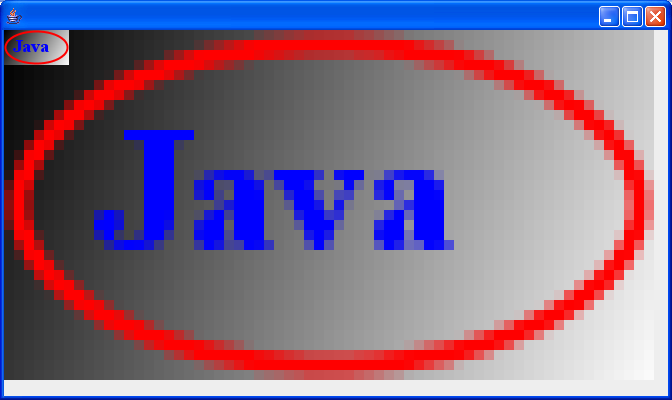
    displayImage = Toolkit.getDefaultToolkit().getImage("largeJava2sLogo.jpg");

    MediaTracker mt = new MediaTracker(this);
    mt.addImage(displayImage, 1);
    try {
      mt.waitForAll();
    } catch (Exception e) {
      System.out.println("Exception while loading.");
    }

    if (displayImage.getWidth(this) == -1) {
      System.out.println("No *.jpg file");
      System.exit(0);
    }
    setBackground(Color.white);
    setSize(400, 225);
  }

  public void paint(Graphics g) {
    Graphics2D g2D = (Graphics2D) g;

    if (display) {
      if (buffered) {
        BufferedImage bi = (BufferedImage) createImage(getWidth(),
            getHeight());

        // Draw into the memory buffer.
        for (int i = 0; i < getWidth(); i = i
            + displayImage.getWidth(this)) {
          for (int j = 0; j < getHeight(); j = j
              + displayImage.getHeight(this)) {
            bi.createGraphics().drawImage(displayImage, i, j, this);
          }
        }
        // Draw the buffered Image on to the screen
        g2D.drawImage(bi, 0, 0, this);
      }
      // This block of code draws the texture directly onto the screen.
      else if (!buffered) {
        for (int i = 0; i < getWidth(); i = i
            + displayImage.getWidth(this)) {
          for (int j = 0; j < getHeight(); j = j
              + displayImage.getHeight(this)) {
            g2D.drawImage(displayImage, i, j, this);
          }
        }
      }
      display = false;
    }else if (clear) {
      g2D.setColor(Color.white);
      g2D.clearRect(0, 0, getWidth(), getHeight());
      clear = false;
    }
  }
}
Related examples in the same category