Mutable Image Example
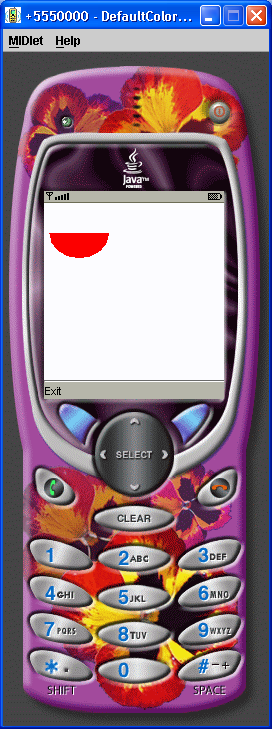
//jad file (please verify the jar size)
/*
MIDlet-Name: MutableImageExample
MIDlet-Version: 1.0
MIDlet-Vendor: MyCompany
MIDlet-Jar-URL: MutableImageExample.jar
MIDlet-1: MutableImageExample, , MutableImageExample
MicroEdition-Configuration: CLDC-1.0
MicroEdition-Profile: MIDP-1.0
MIDlet-JAR-SIZE: 100

*/
import javax.microedition.lcdui.Canvas;
import javax.microedition.lcdui.Command;
import javax.microedition.lcdui.CommandListener;
import javax.microedition.lcdui.Display;
import javax.microedition.lcdui.Displayable;
import javax.microedition.lcdui.Graphics;
import javax.microedition.lcdui.Image;
import javax.microedition.midlet.MIDlet;

public class MutableImageExample extends MIDlet {
  private Display display;

  private MyCanvas canvas;

  public MutableImageExample() {
    display = Display.getDisplay(this);
    canvas = new MyCanvas(this);
  }

  protected void startApp() {
    display.setCurrent(canvas);
  }

  protected void pauseApp() {
  }

  protected void destroyApp(boolean unconditional) {
  }

  public void exitMIDlet() {
    destroyApp(true);
    notifyDestroyed();
  }

  public Display getDisplay() {
    return display;
  }
}

class MyCanvas extends Canvas implements CommandListener {
  private Command exit;

  private MutableImageExample mutableImageExample;

  private Image image = Image.createImage(70, 70);

  public MyCanvas(MutableImageExample mutableImageExample) {
    this.mutableImageExample = mutableImageExample;
    exit = new Command("Exit", Command.EXIT, 1);
    addCommand(exit);
    setCommandListener(this);
    Graphics graphics = image.getGraphics();
    graphics.setColor(255, 0, 0);
    graphics.fillArc(10, 10, 60, 50, 180, 180);
  }

  protected void paint(Graphics graphics) {
     graphics.setColor(255, 255, 255);
     graphics.fillRect(0, 0, getWidth(), getHeight());
     graphics.drawImage(image, 30, 30, Graphics.VCENTER | Graphics.HCENTER);
  }

  public void commandAction(Command command, Displayable display) {
    if (command == exit) {
      mutableImageExample.exitMIDlet();
    }
  }
}
Related examples in the same category