GraphPaperLayout
/* From http://java.sun.com/docs/books/tutorial/index.html */
/*
* Copyright (c) 2006 Sun Microsystems, Inc. All Rights Reserved.
*
* Redistribution and use in source and binary forms, with or without
* modification, are permitted provided that the following conditions are met:
*
* -Redistribution of source code must retain the above copyright notice, this
* list of conditions and the following disclaimer.
*
* -Redistribution in binary form must reproduce the above copyright notice,
* this list of conditions and the following disclaimer in the documentation
* and/or other materials provided with the distribution.
*
* Neither the name of Sun Microsystems, Inc. or the names of contributors may
* be used to endorse or promote products derived from this software without
* specific prior written permission.
*
* This software is provided "AS IS," without a warranty of any kind. ALL
* EXPRESS OR IMPLIED CONDITIONS, REPRESENTATIONS AND WARRANTIES, INCLUDING
* ANY IMPLIED WARRANTY OF MERCHANTABILITY, FITNESS FOR A PARTICULAR PURPOSE
* OR NON-INFRINGEMENT, ARE HEREBY EXCLUDED. SUN MIDROSYSTEMS, INC. ("SUN")
* AND ITS LICENSORS SHALL NOT BE LIABLE FOR ANY DAMAGES SUFFERED BY LICENSEE
* AS A RESULT OF USING, MODIFYING OR DISTRIBUTING THIS SOFTWARE OR ITS
* DERIVATIVES. IN NO EVENT WILL SUN OR ITS LICENSORS BE LIABLE FOR ANY LOST
* REVENUE, PROFIT OR DATA, OR FOR DIRECT, INDIRECT, SPECIAL, CONSEQUENTIAL,
* INCIDENTAL OR PUNITIVE DAMAGES, HOWEVER CAUSED AND REGARDLESS OF THE THEORY
* OF LIABILITY, ARISING OUT OF THE USE OF OR INABILITY TO USE THIS SOFTWARE,
* EVEN IF SUN HAS BEEN ADVISED OF THE POSSIBILITY OF SUCH DAMAGES.
*
* You acknowledge that this software is not designed, licensed or intended
* for use in the design, construction, operation or maintenance of any
* nuclear facility.
*/
import java.awt.BorderLayout;
import java.awt.Component;
import java.awt.Container;
import java.awt.Dimension;
import java.awt.Insets;
import java.awt.LayoutManager;
import java.awt.LayoutManager2;
import java.awt.Rectangle;
import java.awt.event.WindowAdapter;
import java.awt.event.WindowEvent;
import java.util.Hashtable;
import javax.swing.JButton;
import javax.swing.JFrame;
import javax.swing.JPanel;
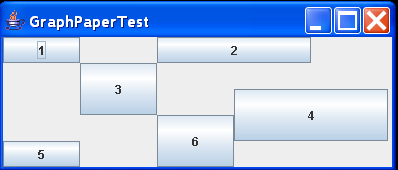
public class GraphPaperTest extends JPanel {
public GraphPaperTest() {
setLayout(new GraphPaperLayout(new Dimension(5, 5)));
// Add a 1x1 Rect at (0,0)
add(new JButton("1"), new Rectangle(0, 0, 1, 1));
// Add a 2x1 Rect at (2,0)
add(new JButton("2"), new Rectangle(2, 0, 2, 1));
// Add a 1x2 Rect at (1,1)
add(new JButton("3"), new Rectangle(1, 1, 1, 2));
// Add a 2x2 Rect at (3,2)
add(new JButton("4"), new Rectangle(3, 2, 2, 2));
// Add a 1x1 Rect at (0,4)
add(new JButton("5"), new Rectangle(0, 4, 1, 1));
// Add a 1x2 Rect at (2,3)
add(new JButton("6"), new Rectangle(2, 3, 1, 2));
}
public static void main(String[] args) {
JFrame f = new JFrame("GraphPaperTest");
f.addWindowListener(new WindowAdapter() {
public void windowClosing(WindowEvent e) {
System.exit(0);
}
});
f.getContentPane().add(new GraphPaperTest(), BorderLayout.CENTER);
f.pack();
f.setVisible(true);
}
}
/**
* The <code>GraphPaperLayout</code> class is a layout manager that lays out a
* container's components in a rectangular grid, similar to GridLayout. Unlike
* GridLayout, however, components can take up multiple rows and/or columns. The
* layout manager acts as a sheet of graph paper. When a component is added to
* the layout manager, the location and relative size of the component are
* simply supplied by the constraints as a Rectangle.
* <p>
* <code><pre>
*
* import java.awt.*;
* import java.applet.Applet;
*
* public class ButtonGrid extends Applet {
* public void init() {
* setLayout(new GraphPaperLayout(new Dimension(5, 5)));
* // Add a 1x1 Rect at (0,0)
* add(new Button("1"), new Rectangle(0, 0, 1, 1));
* // Add a 2x1 Rect at (2,0)
* add(new Button("2"), new Rectangle(2, 0, 2, 1));
* // Add a 1x2 Rect at (1,1)
* add(new Button("3"), new Rectangle(1, 1, 1, 2));
* // Add a 2x2 Rect at (3,2)
* add(new Button("4"), new Rectangle(3, 2, 2, 2));
* // Add a 1x1 Rect at (0,4)
* add(new Button("5"), new Rectangle(0, 4, 1, 1));
* // Add a 1x2 Rect at (2,3)
* add(new Button("6"), new Rectangle(2, 3, 1, 2));
* }
* }
* </pre></code>
*
* @author Michael Martak
*/
class GraphPaperLayout implements LayoutManager2 {
int hgap; //horizontal gap
int vgap; //vertical gap
Dimension gridSize; //grid size in logical units (n x m)
Hashtable compTable; //constraints (Rectangles)
/**
* Creates a graph paper layout with a default of a 1 x 1 graph, with no
* vertical or horizontal padding.
*/
public GraphPaperLayout() {
this(new Dimension(1, 1));
}
/**
* Creates a graph paper layout with the given grid size, with no vertical
* or horizontal padding.
*/
public GraphPaperLayout(Dimension gridSize) {
this(gridSize, 0, 0);
}
/**
* Creates a graph paper layout with the given grid size and padding.
*
* @param gridSize
* size of the graph paper in logical units (n x m)
* @param hgap
* horizontal padding
* @param vgap
* vertical padding
*/
public GraphPaperLayout(Dimension gridSize, int hgap, int vgap) {
if ((gridSize.width <= 0) || (gridSize.height <= 0)) {
throw new IllegalArgumentException(
"dimensions must be greater than zero");
}
this.gridSize = new Dimension(gridSize);
this.hgap = hgap;
this.vgap = vgap;
compTable = new Hashtable();
}
/**
* @return the size of the graph paper in logical units (n x m)
*/
public Dimension getGridSize() {
return new Dimension(gridSize);
}
/**
* Set the size of the graph paper in logical units (n x m)
*/
public void setGridSize(Dimension d) {
setGridSize(d.width, d.height);
}
/**
* Set the size of the graph paper in logical units (n x m)
*/
public void setGridSize(int width, int height) {
gridSize = new Dimension(width, height);
}
public void setConstraints(Component comp, Rectangle constraints) {
compTable.put(comp, new Rectangle(constraints));
}
/**
* Adds the specified component with the specified name to the layout. This
* does nothing in GraphPaperLayout, since constraints are required.
*/
public void addLayoutComponent(String name, Component comp) {
}
/**
* Removes the specified component from the layout.
*
* @param comp
* the component to be removed
*/
public void removeLayoutComponent(Component comp) {
compTable.remove(comp);
}
/**
* Calculates the preferred size dimensions for the specified panel given
* the components in the specified parent container.
*
* @param parent
* the component to be laid out
*
* @see #minimumLayoutSize
*/
public Dimension preferredLayoutSize(Container parent) {
return getLayoutSize(parent, true);
}
/**
* Calculates the minimum size dimensions for the specified panel given the
* components in the specified parent container.
*
* @param parent
* the component to be laid out
* @see #preferredLayoutSize
*/
public Dimension minimumLayoutSize(Container parent) {
return getLayoutSize(parent, false);
}
/**
* Algorithm for calculating layout size (minimum or preferred).
* <p>
* The width of a graph paper layout is the largest cell width (calculated
* in <code>getLargestCellSize()</code> times the number of columns, plus
* the horizontal padding times the number of columns plus one, plus the
* left and right insets of the target container.
* <p>
* The height of a graph paper layout is the largest cell height (calculated
* in <code>getLargestCellSize()</code> times the number of rows, plus the
* vertical padding times the number of rows plus one, plus the top and
* bottom insets of the target container.
*
* @param parent
* the container in which to do the layout.
* @param isPreferred
* true for calculating preferred size, false for calculating
* minimum size.
* @return the dimensions to lay out the subcomponents of the specified
* container.
* @see java.awt.GraphPaperLayout#getLargestCellSize
*/
protected Dimension getLayoutSize(Container parent, boolean isPreferred) {
Dimension largestSize = getLargestCellSize(parent, isPreferred);
Insets insets = parent.getInsets();
largestSize.width = (largestSize.width * gridSize.width)
+ (hgap * (gridSize.width + 1)) + insets.left + insets.right;
largestSize.height = (largestSize.height * gridSize.height)
+ (vgap * (gridSize.height + 1)) + insets.top + insets.bottom;
return largestSize;
}
/**
* Algorithm for calculating the largest minimum or preferred cell size.
* <p>
* Largest cell size is calculated by getting the applicable size of each
* component and keeping the maximum value, dividing the component's width
* by the number of columns it is specified to occupy and dividing the
* component's height by the number of rows it is specified to occupy.
*
* @param parent
* the container in which to do the layout.
* @param isPreferred
* true for calculating preferred size, false for calculating
* minimum size.
* @return the largest cell size required.
*/
protected Dimension getLargestCellSize(Container parent, boolean isPreferred) {
int ncomponents = parent.getComponentCount();
Dimension maxCellSize = new Dimension(0, 0);
for (int i = 0; i < ncomponents; i++) {
Component c = parent.getComponent(i);
Rectangle rect = (Rectangle) compTable.get(c);
if (c != null && rect != null) {
Dimension componentSize;
if (isPreferred) {
componentSize = c.getPreferredSize();
} else {
componentSize = c.getMinimumSize();
}
// Note: rect dimensions are already asserted to be > 0 when the
// component is added with constraints
maxCellSize.width = Math.max(maxCellSize.width,
componentSize.width / rect.width);
maxCellSize.height = Math.max(maxCellSize.height,
componentSize.height / rect.height);
}
}
return maxCellSize;
}
/**
* Lays out the container in the specified container.
*
* @param parent
* the component which needs to be laid out
*/
public void layoutContainer(Container parent) {
synchronized (parent.getTreeLock()) {
Insets insets = parent.getInsets();
int ncomponents = parent.getComponentCount();
if (ncomponents == 0) {
return;
}
// Total parent dimensions
Dimension size = parent.getSize();
int totalW = size.width - (insets.left + insets.right);
int totalH = size.height - (insets.top + insets.bottom);
// Cell dimensions, including padding
int totalCellW = totalW / gridSize.width;
int totalCellH = totalH / gridSize.height;
// Cell dimensions, without padding
int cellW = (totalW - ((gridSize.width + 1) * hgap))
/ gridSize.width;
int cellH = (totalH - ((gridSize.height + 1) * vgap))
/ gridSize.height;
for (int i = 0; i < ncomponents; i++) {
Component c = parent.getComponent(i);
Rectangle rect = (Rectangle) compTable.get(c);
if (rect != null) {
int x = insets.left + (totalCellW * rect.x) + hgap;
int y = insets.top + (totalCellH * rect.y) + vgap;
int w = (cellW * rect.width) - hgap;
int h = (cellH * rect.height) - vgap;
c.setBounds(x, y, w, h);
}
}
}
}
// LayoutManager2 /////////////////////////////////////////////////////////
/**
* Adds the specified component to the layout, using the specified
* constraint object.
*
* @param comp
* the component to be added
* @param constraints
* where/how the component is added to the layout.
*/
public void addLayoutComponent(Component comp, Object constraints) {
if (constraints instanceof Rectangle) {
Rectangle rect = (Rectangle) constraints;
if (rect.width <= 0 || rect.height <= 0) {
throw new IllegalArgumentException(
"cannot add to layout: rectangle must have positive width and height");
}
if (rect.x < 0 || rect.y < 0) {
throw new IllegalArgumentException(
"cannot add to layout: rectangle x and y must be >= 0");
}
setConstraints(comp, rect);
} else if (constraints != null) {
throw new IllegalArgumentException(
"cannot add to layout: constraint must be a Rectangle");
}
}
/**
* Returns the maximum size of this component.
*
* @see java.awt.Component#getMinimumSize()
* @see java.awt.Component#getPreferredSize()
* @see LayoutManager
*/
public Dimension maximumLayoutSize(Container target) {
return new Dimension(Integer.MAX_VALUE, Integer.MAX_VALUE);
}
/**
* Returns the alignment along the x axis. This specifies how the component
* would like to be aligned relative to other components. The value should
* be a number between 0 and 1 where 0 represents alignment along the
* origin, 1 is aligned the furthest away from the origin, 0.5 is centered,
* etc.
*/
public float getLayoutAlignmentX(Container target) {
return 0.5f;
}
/**
* Returns the alignment along the y axis. This specifies how the component
* would like to be aligned relative to other components. The value should
* be a number between 0 and 1 where 0 represents alignment along the
* origin, 1 is aligned the furthest away from the origin, 0.5 is centered,
* etc.
*/
public float getLayoutAlignmentY(Container target) {
return 0.5f;
}
/**
* Invalidates the layout, indicating that if the layout manager has cached
* information it should be discarded.
*/
public void invalidateLayout(Container target) {
// Do nothing
}
}
Related examples in the same category