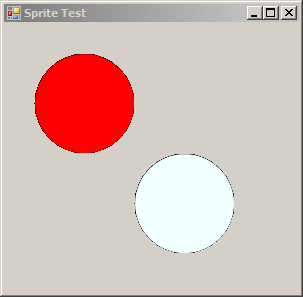
using System;
using System.Drawing;
using System.Drawing.Imaging;
using System.Drawing.Drawing2D;
using System.Windows.Forms;

public class SpriteTest : Form
{
    public SpriteTest()
    {
        this.SuspendLayout();

        this.AutoScaleDimensions = new System.Drawing.SizeF(6F, 13F);
        this.AutoScaleMode = System.Windows.Forms.AutoScaleMode.Font;
        this.ClientSize = new System.Drawing.Size(295, 270);
        this.Text = "Sprite Test";
        this.Load += new System.EventHandler(this.SpriteTest_Load);
        this.ResumeLayout(false);
    }

    private bool isDraggingA = false;
    private bool isDraggingB = false;

    private EllipseShape ellipseA, ellipseB;

    private void SpriteTest_Load(object sender, EventArgs e)
    {
        ellipseA = new EllipseShape();
        ellipseA.Width = ellipseA.Height = 100;
        ellipseA.Top = ellipseA.Left = 30;
        ellipseA.BackColor = Color.Red;
        this.Controls.Add(ellipseA);

        ellipseB = new EllipseShape();
        ellipseB.Width = ellipseB.Height = 100;
        ellipseB.Top = ellipseB.Left = 130;
        ellipseB.BackColor = Color.Azure;
        this.Controls.Add(ellipseB);

        ellipseA.MouseDown += new MouseEventHandler(Ellipse_MouseDown);
        ellipseA.MouseUp += new MouseEventHandler(Ellipse_MouseUp);
        ellipseA.MouseMove += new MouseEventHandler(Ellipse_MouseMove);

        ellipseB.MouseDown += new MouseEventHandler(Ellipse_MouseDown);
        ellipseB.MouseUp += new MouseEventHandler(Ellipse_MouseUp);
        ellipseB.MouseMove += new MouseEventHandler(Ellipse_MouseMove);
    }

    private void Ellipse_MouseDown(object sender, MouseEventArgs e)
    {
        Control control = (Control)sender;

        if (e.Button == MouseButtons.Left)
        {
            control.Tag = new Point(e.X, e.Y);
            if (control == ellipseA)
            {
                isDraggingA = true;
            }
            else
            {
                isDraggingB = true;
            }
        }
    }

    private void Ellipse_MouseUp(object sender, MouseEventArgs e)
    {
        isDraggingA = false;
        isDraggingB = false;
    }

    private void Ellipse_MouseMove(object sender, MouseEventArgs e)
    {
        Control control = (Control)sender;

        if ((isDraggingA && control == ellipseA) || (isDraggingB && control == ellipseB))
        {
            Point point = (Point)control.Tag;

            control.Left = e.X + control.Left - point.X;
            control.Top = e.Y + control.Top - point.Y;
        }
    }
    [STAThread]
    static void Main()
    {
        Application.EnableVisualStyles();
        Application.SetCompatibleTextRenderingDefault(false);
        Application.Run(new SpriteTest());
    }

}
class EllipseShape : Control
{
    public EllipseShape(){}

    private GraphicsPath path = null;

    private void RefreshPath()
    {
        path = new GraphicsPath();
        path.AddEllipse(this.ClientRectangle);
        this.Region = new Region(path);
    }

    protected override void OnPaint(PaintEventArgs e)
    {
        base.OnPaint(e);
        if (path != null)
        {
            e.Graphics.SmoothingMode = SmoothingMode.AntiAlias;
            e.Graphics.FillPath(new SolidBrush(this.BackColor), path);
            e.Graphics.DrawPath(new Pen(this.ForeColor, 1), path);
        }
    }

    protected override void OnResize(System.EventArgs e)
    {
        base.OnResize(e);
        RefreshPath();
        this.Invalidate();
    }
}