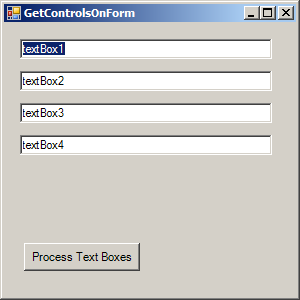
using System;
using System.Windows.Forms;

public class GetControlOnFormDemo {
    [STAThread]
    public static void Main(string[] args)
    {
        Application.Run(new GetControlsOnForm());
    }
}

public partial class GetControlsOnForm : Form
{
    public GetControlsOnForm()
    {
        InitializeComponent();
    }

    private void cmdProcessAll_Click(object sender, System.EventArgs e)
    {
        ProcessControls(this);
    }

    private void ProcessControls(Control ctrl)
    {
        // Ignore the control unless it's a textbox.
        if (ctrl.GetType() == typeof(TextBox))
        {
            ctrl.Text = "";
        }

        foreach (Control ctrlChild in ctrl.Controls)
        {
            ProcessControls(ctrlChild);
        }
    }

}
partial class GetControlsOnForm
{
    private System.Windows.Forms.TextBox textBox1;
    private System.Windows.Forms.TextBox textBox2;
    private System.Windows.Forms.TextBox textBox3;
    private System.Windows.Forms.TextBox textBox4;
    private System.Windows.Forms.Button cmdProcessAll;

    private System.ComponentModel.IContainer components = null;

    protected override void Dispose(bool disposing)
    {
        if (disposing && (components != null))
        {
            components.Dispose();
        }
        base.Dispose(disposing);
    }

    private void InitializeComponent()
    {
        this.textBox1 = new System.Windows.Forms.TextBox();
        this.textBox2 = new System.Windows.Forms.TextBox();
        this.textBox3 = new System.Windows.Forms.TextBox();
        this.textBox4 = new System.Windows.Forms.TextBox();
        this.cmdProcessAll = new System.Windows.Forms.Button();
        this.SuspendLayout();

        this.textBox1.Location = new System.Drawing.Point(16, 16);
        this.textBox1.Name = "textBox1";
        this.textBox1.Size = new System.Drawing.Size(252, 20);
        this.textBox1.TabIndex = 0;
        this.textBox1.Text = "textBox1";

        this.textBox2.Location = new System.Drawing.Point(16, 48);
        this.textBox2.Name = "textBox2";
        this.textBox2.Size = new System.Drawing.Size(252, 20);
        this.textBox2.TabIndex = 1;
        this.textBox2.Text = "textBox2";

        this.textBox3.Location = new System.Drawing.Point(16, 80);
        this.textBox3.Name = "textBox3";
        this.textBox3.Size = new System.Drawing.Size(252, 20);
        this.textBox3.TabIndex = 2;
        this.textBox3.Text = "textBox3";

        this.textBox4.Location = new System.Drawing.Point(16, 112);
        this.textBox4.Name = "textBox4";
        this.textBox4.Size = new System.Drawing.Size(252, 20);
        this.textBox4.TabIndex = 3;
        this.textBox4.Text = "textBox4";

        this.cmdProcessAll.Location = new System.Drawing.Point(20, 220);
        this.cmdProcessAll.Name = "cmdProcessAll";
        this.cmdProcessAll.Size = new System.Drawing.Size(116, 28);
        this.cmdProcessAll.TabIndex = 4;
        this.cmdProcessAll.Text = "Process Text Boxes";
        this.cmdProcessAll.Click += new System.EventHandler(this.cmdProcessAll_Click);

        this.components = new System.ComponentModel.Container();
        this.Controls.AddRange(new System.Windows.Forms.Control[] { this.cmdProcessAll,
                                  this.textBox4,
                                  this.textBox3,
                                  this.textBox2,
                                  this.textBox1});
        this.AutoScaleMode = System.Windows.Forms.AutoScaleMode.Font;
        this.Text = "GetControlsOnForm";
    }
}