Create an Digital ID : Security « Security « Microsoft Office Word 2007 Tutorial

Microsoft Office Word 2007 Tutorial
1. Introduction
2. Editing
3. Style Formatting
4. Shape Picture WordArt SmartArt Clip Art
5. Documentation
6. Table
7. Chart
8. Controls ActiveX Macro
9. Mail Merge
10. Security
11. Collaboration
Java
Java Tutorial
Java Source Code / Java Documentation
Java Open Source
Jar File Download
Java Articles
Java Products
Java by API
C# / C Sharp
C# / CSharp Tutorial
ASP.Net
JavaScript DHTML
JavaScript Tutorial
JavaScript Reference
HTML / CSS
HTML CSS Reference
C / ANSI-C
C Tutorial
C++
C++ Tutorial
PHP
Python
SQL Server / T-SQL
Oracle PL / SQL
Oracle PL/SQL Tutorial
PostgreSQL
SQL / MySQL
MySQL Tutorial
VB.Net
VB.Net Tutorial
Microsoft Office PowerPoint 2007 Tutorial
Microsoft Office Excel 2007 Tutorial
Microsoft Office Word 2007 Tutorial » Security » Security 
10. 4. 2. Create an Digital ID
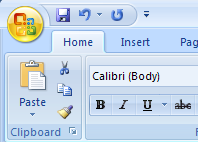
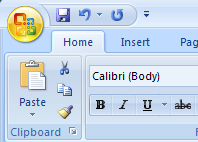
Click the Office button. 
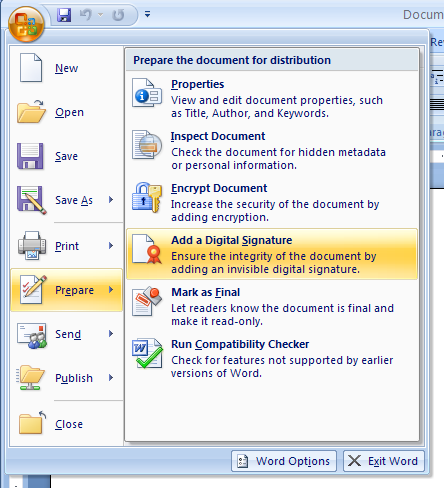
          Then point to Prepare. 
          Then click Add a Digital Signature.
Then click Add a Digital Signature.
Then click Signature Services from the Office Marketplace
Then click Signature Services from the Office Marketplace
Or click OK to create your own.
Or click OK to create your own.
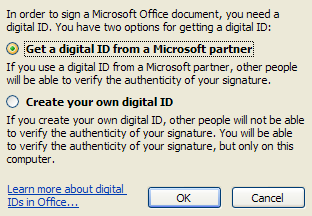
Then click the option to get an ID from a Microsoft Partner or create your own, and then click OK.
Then click the option to get an ID from a Microsoft Partner or create your own, and then click OK.
10. 4. Security
10. 4. 1. Inspect a DocumentInspect a Document
10. 4. 2. Create an Digital IDCreate an Digital ID
10. 4. 3. View the Trust CenterView the Trust Center
10. 4. 4. Modify Trusted Publishers and LocationsModify Trusted Publishers and Locations
10. 4. 5. Set Add-in Security OptionsSet Add-in Security Options
10. 4. 6. Change ActiveX Security SettingsChange ActiveX Security Settings
10. 4. 7. Change Macro Security SettingsChange Macro Security Settings
10. 4. 8. Modify Message Bar Security OptionsModify Message Bar Security Options
10. 4. 9. Set Privacy OptionsSet Privacy Options
10. 4. 10. Set Parental Controls for Online ResearchSet Parental Controls for Online Research
10. 4. 11. Enable Safe ModeEnable Safe Mode
10. 4. 12. Start User-Initiated Safe ModeStart User-Initiated Safe Mode
10. 4. 13. View Disabled ItemsView Disabled Items
w__ww.__j___a_v__a__2_s___.com | Contact Us
Copyright 2003 - 08 Demo Source and Support. All rights reserved.
All other trademarks are property of their respective owners.