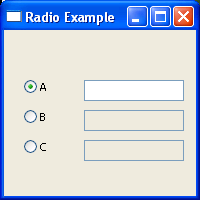
import wx

class RadioButtonFrame(wx.Frame):
    def __init__(self):
        wx.Frame.__init__(self,None,-1,'Radio Example',size=(200, 200))
        panel = wx.Panel(self, -1)
        radio1 = wx.RadioButton(panel, -1, "A", pos=(20, 50), style=wx.RB_GROUP)
        radio2 = wx.RadioButton(panel, -1, "B", pos=(20, 80))
        radio3 = wx.RadioButton(panel, -1, "C", pos=(20, 110))
        text1 = wx.TextCtrl(panel, -1, "", pos=(80, 50))
        text2 = wx.TextCtrl(panel, -1, "", pos=(80, 80))
        text3 = wx.TextCtrl(panel, -1, "", pos=(80, 110))
        self.texts = {"A": text1, "B": text2, "C": text3}
        for eachText in [text2, text3]:
            eachText.Enable(False)
        for eachRadio in [radio1, radio2, radio3]:
            self.Bind(wx.EVT_RADIOBUTTON, self.OnRadio, eachRadio)
        self.selectedText = text1

    def OnRadio(self, event):
        if self.selectedText:
            self.selectedText.Enable(False)
        radioSelected = event.GetEventObject()
        text = self.texts[radioSelected.GetLabel()]
        text.Enable(True)
        self.selectedText = text

app = wx.PySimpleApp()
RadioButtonFrame().Show()
app.MainLoop()
| 19.32.RadioButton |
| 19.32.1. | RadioButton and text control | |